Barium Announcer
The Barium has been discontinued and is no longer sold for new projects. This documentation remains available to support existing installations. For new projects or replacements, contact the Iongrade sales team.
The Barium is an audio message announcer (audio player) designed to play audio files in MP3 format triggered by events. It stores the audio files internally and plays them upon commands received over the communication network, allowing any system to send audio messages to users.
It is especially useful in situations where you need to guide or warn the user about a situation, such as in self-service kiosks and in access control systems or alarm monitoring centers. Through the Barium, security systems can send guidance or warning messages to users.
The Barium has an open communication protocol that allows easy integration with any system, either over HTTP or MQTT.
Overview
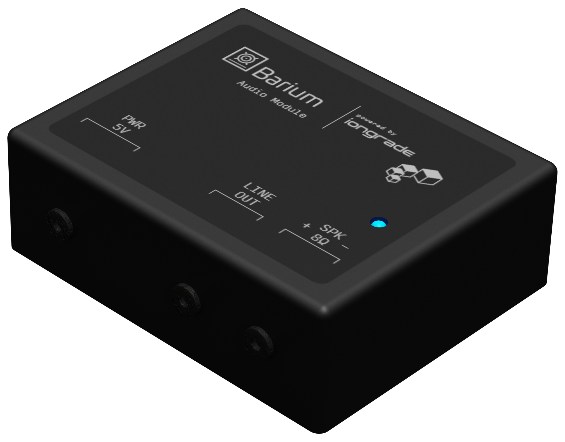
The Barium connects to the communication network through a WiFi connection and stays available to receive commands sent over the network. It plays MP3 files encoded at any bit rate, stored in its internal memory. The firmware can be updated remotely over the TCP/IP network.
How It Works
The Barium stores the MP3 audio files in its internal memory (Fsys file system) and plays them when it receives a trigger command. The files can be uploaded, replaced, or removed at any time over WiFi, and the playback volume is configurable.
There are three ways to trigger the playback of an audio file:
| Trigger method | Description |
|---|---|
| Webservice (HTTP POST) | The Barium has an embedded web server that receives POST commands (/cgi-bin/playfilemp3 to play and /cgi-bin/stopplay to stop). This is the simplest form of integration. |
| MQTT (OpenBarium) | The Barium can receive commands from a control system through an MQTT broker, using the open OpenBarium protocol. |
| Input Cmd (dry contact) | A physical command input allows playing an audio file through the signal of a dry contact (a button or a relay contact). |
The HTTP and MQTT communication methods can be used simultaneously. The details of the OpenBarium MQTT protocol are covered in separate documentation.
Audio Outputs
The Barium must be connected to a speaker or to an audio amplifier. For this, the device offers two output options:
| Output | Description |
|---|---|
| 8 Ω speaker terminals | Amplified output for direct connection of an 8 Ohm speaker. |
| P2 line-out connector | Female P2 connector to connect an external powered speaker (audio amplifier). |
Applications
The Barium announcer is used whenever a system needs to play pre-recorded messages to users:
- Self-service kiosks — guiding the user on how to proceed in each situation
- Access control notices — guidance or warning messages triggered by an event
- Alarm monitoring centers — audio messages associated with incidents
Technical Specifications
| Specification | Value |
|---|---|
| Type | Audio message announcer (MP3 audio player) |
| Version | v1.13 (firmware 1.0.8) |
| Power supply | 5 VDC / 250 mA (dual-voltage 110/220 VAC power supply included) |
| Network communication | WiFi |
| Audio format | MP3 at any bit rate |
| Storage | Internal memory (Fsys file system); limit of 80,000 bytes per file |
| Audio output | 8 Ω speaker terminals (amplified) and P2 line-out connector |
| Volume | Configurable (0 to 100) |
| Triggering | HTTP POST webservice, MQTT (OpenBarium protocol), and physical Input Cmd input (dry contact) |
| Server protocol | MQTT OpenBarium (Accelero or custom broker) and embedded HTTP web server |
| Firmware | Remote update over TCP/IP network |
Next Steps
- Installation Manual — power supply, audio output, Input Cmd input, status LED, and configuration mode