Carbon SLT Gateway
Carbon is a communication gateway for SLT systems (Tag Reading System), designed for access control projects that provide automatic vehicle identification through the reading of vehicle tags.
Tags are usually installed on the vehicles and detected by the antennas of a third-party identification system (SemParar/Veloe/etc.). The Carbon gateway connects over TCP/IP to that SLT server, receives from it the identification of the detected vehicles (tag and lane) and forwards that information to an Iongrade access controller, which commands the vehicle barrier gate of the corresponding lane.
The hardware was designed to operate safely and reliably in the most varied environmental conditions, with electronic circuits specially designed to protect the components against electrical discharges. Built to work with IoT communication protocols, it allows easy integration with a wide range of systems.
The Carbon gateway has no antenna or reading range of its own. The vehicle tags are detected by the third-party SLT server (SemParar/Veloe/etc.), which operates the RFID antennas. Carbon only receives the "tag X passed through lane Y" information from the SLT server and forwards it to the Iongrade access controller.
Overview
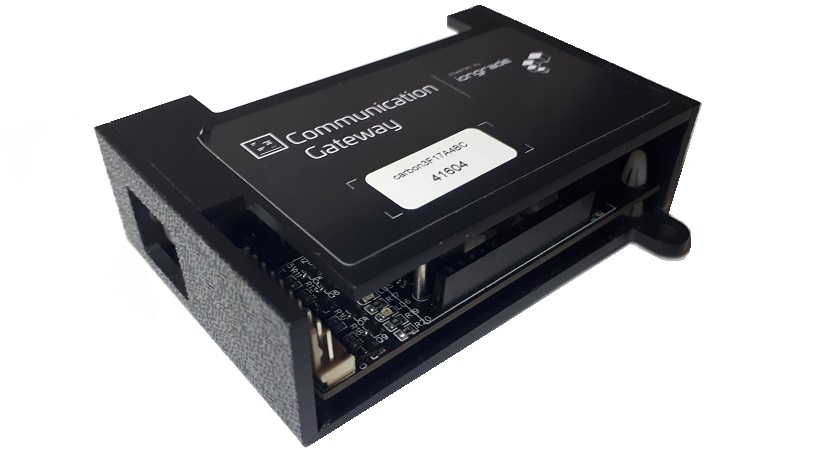
Carbon can connect to the communication network using wireless technology (WiFi) or through a UTP Ethernet 10/100-Base-T cable connection (RJ45). It has a high-precision internal clock and can be configured to access an external NTP server. It also provides an embedded HTTP server, through which all configuration is done using a web browser. It is powered by 12 VDC.
Optionally, Carbon can report to an MQTT broker (Accelero Cloud or a custom broker). The parameters of this integration are documented separately.
System Architecture
The vehicle identification solution involves three elements working together: the SLT server (third-party), the Carbon gateway and the Iongrade access controller. The flow is as follows:
Vehicle (tag) ── RFID antennas ── SLT server (SemParar/Veloe/etc.)
                                        │  TCP/IP (Carbon is the client)
                                        ▼
                                   Carbon Gateway
                                        │  Wiegand/Abatrack/RS232 serial  ── or ──  UDP socket (network)
                                        ▼
                              Access controller ── lane vehicle barrier gate
- The tag installed on the vehicle is detected by the SLT server's RFID antennas.
- The SLT server (SemParar/Veloe/etc.) identifies the vehicle and reports the tag and lane.
- The Carbon gateway — which opens a TCP/IP connection as a client of the SLT server — receives that information.
- Carbon routes the identification to the access controller that handles that lane, either by cable (Wiegand/Abatrack/RS232 serial) or over the network (UDP socket: IP, port and channel of the lane's controller).
- The access controller processes the tag and commands the vehicle barrier gate of the corresponding lane.
The tags received from the SLT server and sent to the controllers are handled as if they had been read locally by the access controllers.
Support for Multiple Lanes
Carbon supports up to 16 vehicle lanes. For each lane you can individually configure the responsible Iongrade access controller (Aurum/Neon/Indium/Titanium) — providing the IP, the port and the channel of that lane's controller when forwarding is done over the network (UDP).
Applications
The Carbon SLT gateway is used to provide the access control system with the automatic vehicle identification service:
- Vehicle barrier gate control per lane, based on the identification from the SLT server
- Vehicle identification integrated with Iongrade access control systems
- Integration with toll systems and third-party tag reading systems (SemParar/Veloe/etc.)
Technical Specifications
| Specification | Value |
|---|---|
| Type | Communication gateway for SLT systems (vehicle tag reading) |
| Version | v2.1 (firmware 2.0.3) |
| Power supply | 12 VDC ±5% |
| Consumption | 120 mA |
| Communication with the SLT server | TCP/IP (Carbon as the client) over Ethernet (RJ45) or WiFi |
| Network communication | Ethernet 10/100-Base-T (RJ45); WiFi |
| Supported lanes | Up to 16 lanes |
| Outputs to the controller | Wiegand, Abatrack, RS232 serial (UART) or UDP socket (network) |
| Status relay | Signals the active TCP connection with the SLT server |
| Display | Optional LCD (date/time and communication status) |
| Configuration server | Embedded HTTP, accessible through a web browser |
| Clock/calendar | High-precision internal clock, with optional synchronization through an external NTP server |
Next Steps
- Installation Manual — power supply, Ethernet connections, Wiegand/Abatrack, RS232 serial, status relay, display and buttons