Operation Manual
This manual describes how the Communication Gateway works in the Accelero system: its purpose, the integration flow, and how to monitor the equipment.
Concept
The Gateway is the component responsible for the communication between Accelero and the integrated external devices or systems. It acts as an intermediary between:
- The Accelero server (in the cloud, over MQTT)
- The external device or system on the local network (facial reader, CCTV, LPR, etc.)
The Gateway is used exclusively in scenarios where there is an integration with third-party systems.
Purpose
Through the Gateway, Accelero can:
- Send commands and records to the external devices
- Receive status information from the devices
- Monitor the connectivity of the integration
Integration Flow
The basic operating flow, in the case of a facial reader, works as follows:
- The operator creates a person with a photo and a category in Accelero.
- Accelero checks whether the person has access to the facial reader.
- Accelero sends the data and the photo to the Gateway.
- The Gateway forwards the record to the facial readers.
- The device performs the requested action.
- The status can be returned to Accelero.
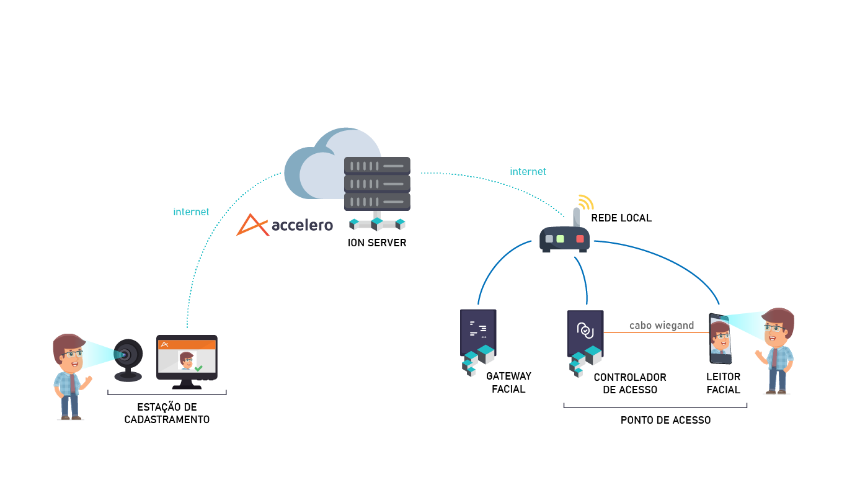
The behavior from step 4 onward depends on the device's operation mode (see the Overview):
- Enrollment management — the Gateway keeps the records synchronized on the device, which decides access locally.
- Online validation — on every access attempt, the device queries the Gateway, which answers by applying all Accelero access control rules.
Gateway Applications
The use of the Gateway is always tied to an integration module. Some examples:
- Third-party facial readers (Control iD, Dahua/Intelbras, Hikvision, Beward)
- CCTV systems (e.g., Digieye)
- LPR (license plate recognition) and other homologated devices
Each integration may have its own configuration parameters, defined according to the contracted licensing.
Gateway Monitoring
Accelero lets you monitor the Gateway's connection status.
Connection status notification
The system provides the "Gateway – connection status change" notification, configured in:
Settings > Operators > Notifications
When enabled, the system generates an alert if:
- The Gateway loses communication
- The connection is restored
Enable the status notification in critical installations to be warned immediately if the integration goes down. See also the FAQ for diagnosing communication failures.
Network Configuration
The Gateway's network configuration (static IP, default gateway, and DNS) is done locally, using an HDMI monitor and a USB keyboard, as described in the Installation Manual.
Next Steps
- FAQ and Troubleshooting — common issues and frequently asked questions
- Overview — concept, operation modes, and specifications