Communication Gateway
The Communication Gateway is the hardware that bridges the Accelero system and the third-party devices installed on the customer's local network — facial readers, LPR cameras, CCTV systems, and other integrated equipment.
Overview
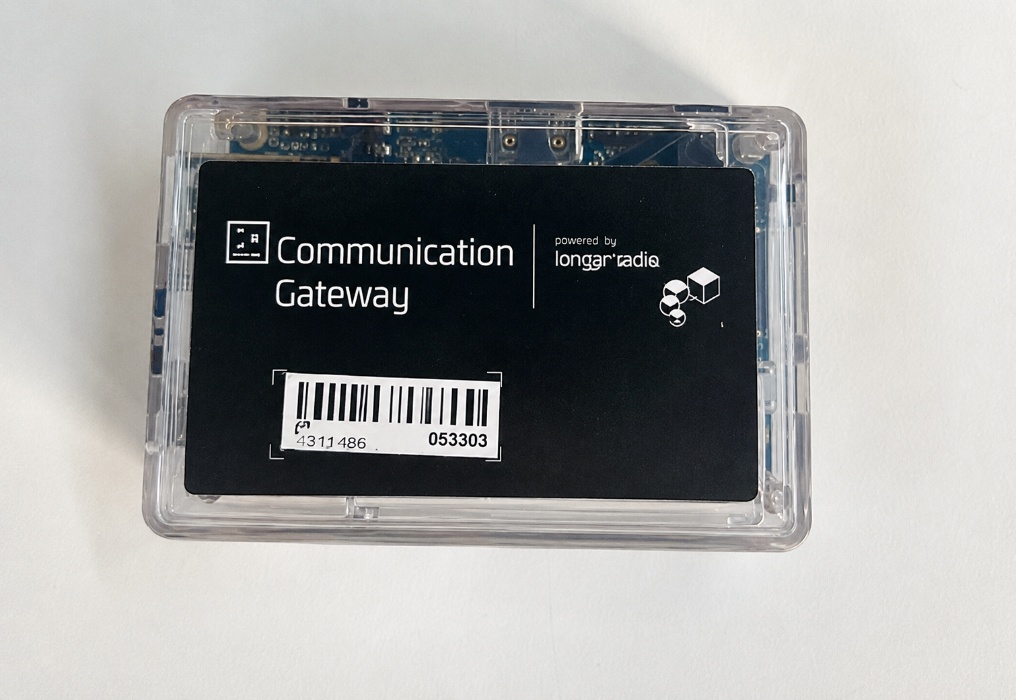
Accelero is a SaaS system, cloud-hosted, that communicates over MQTT. Many access control devices — especially facial readers — operate only on the local network and integrate over HTTP, without talking directly to the cloud.
The Gateway bridges that distance: installed on the same network as the devices, it keeps communication with Accelero and translates the protocols, allowing the access control system to reach and command local equipment from different manufacturers.
Besides facial readers, the Gateway is used as a bridge to other already homologated third-party devices, such as LPRs (license plate recognition), CCTV systems, and monitoring cameras. Each integration is enabled according to the licensing and may have its own configuration parameters.
The equipment has simple network-based configuration, is designed for uninterrupted operation in access control environments, and connects over standard wired RJ45 Ethernet (10/100 Mbps).
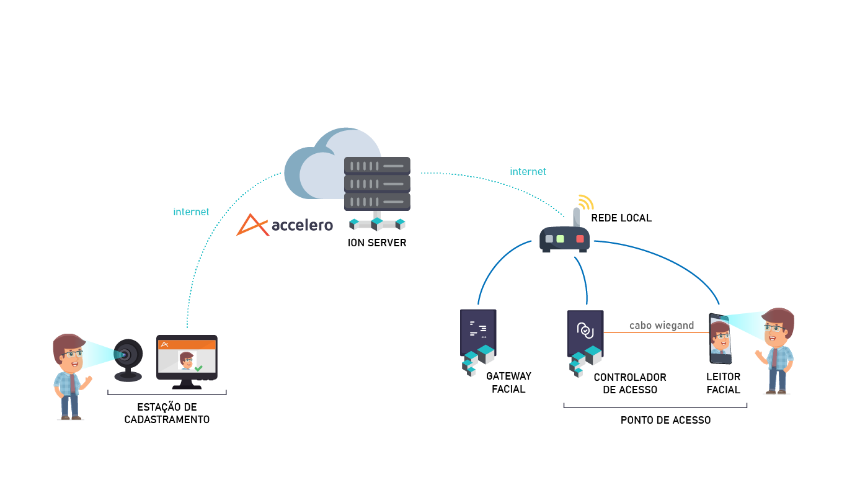
In the diagram above, the ION Server (Accelero) is in the cloud and reaches the customer's local network over the internet. At the access point, the Gateway bridges to the facial reader, while the access controller commands the passage.
Deployment Options
The gateway service can be deployed in two ways, both active and supported:
- Physical Gateway: the device described on this page, installed on the customer's local network. This is the standard model for on-premises installations and for sites without a MikroTik.
- Cloud Gateway: the service runs in the cloud and reaches the site's devices through an encrypted VPN tunnel, with the customer's MikroTik acting as the VPN client. No dedicated computer is required at the site.
In both cases the behavior in Accelero is the same: the gateway appears on the gateways screen with status, version, and keepalive, and the operation modes described below work identically.
Operation Modes
Depending on the manufacturer of the integrated device, the Gateway works in one of two ways:
Enrollment management
The Gateway synchronizes the records (people, photos, and permissions) from Accelero to the devices. The decision to grant or deny access is made by the device itself, based on the records it received.
This is the mode used, for example, with Beward readers.
Online validation
In this mode, the device queries the Gateway in real time on every access attempt, asking whether the person is authorized. The answer is given by applying all Accelero access control rules — including the special controls (antipassback, mantraps, routes, time restrictions, and other system validations).
This way, even on a facial reader, the same access control system rules apply. This mode is supported by devices such as Control iD, Dahua/Intelbras, and some Hikvision models.
This mode is known as Direct Mode. Its main advantage is that it eliminates the need for the Neon Controller: since the decision is made by the software, the reader does not need to be wired to a controller over Wiegand just to enforce the rules — which reduces acquisition and infrastructure costs. On Hikvision readers, Direct Mode depends on the remote check function, available only in the manufacturer's BR firmware.
The availability of each mode depends on the manufacturer and the device model. Check the homologated equipment matrix to confirm the mode of each piece of equipment.
Homologated Integrations
The Gateway serves different categories of third-party devices:
| Category | Example manufacturers / systems | Mode |
|---|---|---|
| Facial readers | Control iD, Dahua/Intelbras, Hikvision | Online validation |
| Facial readers | Beward | Enrollment management |
| CCTV | Digieye | Video integration |
| LPR (license plate recognition) | According to licensing | Third-party integration |
The list of integrations evolves as new modules are homologated. The use of each integration is tied to an Accelero licensing module.
Technical Specifications
| Specification | Value |
|---|---|
| Processor | H3 Quad-core Cortex-A7 (H.265/HEVC 4K) |
| RAM | 1 GB DDR3 |
| Storage | 8 GB eMMC Flash + TF card (max. 32 GB) |
| Video output | HDMI / CVBS |
| USB ports | 3× USB 2.0 HOST · 1× USB 2.0 OTG |
| Network interface | Ethernet RJ45 · 10/100 Mbps |
| Power supply | 5 V DC power adapter |
| Dimensions (PCB) | 93 mm × 60 mm × 26 mm |
| Weight | 100 g |
Key Features
- Integration bridge between the Accelero system and third-party devices
- Protocol translation (MQTT ↔ HTTP) between incompatible systems
- Configuration through a simple, fast, and intuitive interface
- Uninterrupted operation in access control environments
- Wired network, standard RJ45 (10/100 Mbps)
- Powered by a 5 V DC power adapter
Typical Applications
- Integration between Accelero and third-party facial readers
- Communication concentrator in installations with multiple devices
- Bridge between the customer's local network (LAN) and the cloud server
- Integration with LPR, CCTV, and other third-party equipment
- Corporate and industrial environments with high availability requirements
Next Steps
- Cloud Gateway: deploying the gateway service in the cloud, over VPN
- Installation Manual — physical installation and network configuration
- Operation Manual — how it works in Accelero and monitoring
- FAQ and Troubleshooting — common issues and frequently asked questions