Iodine Protocol Converter
The Iodine has been discontinued and is no longer sold for new projects. This documentation remains available to support existing installations. For new projects or replacements, contact the Iongrade sales team.
The Iodine is a protocol converter (translator) for card readers, scanners and other data collection devices. It receives data from a device in a given format and retransmits it in one or more other formats, allowing heterogeneous equipment to be integrated into any management and access control system.
The converter has three input interfaces and three data output interfaces. Each interface operates independently and all of them can operate simultaneously. The available interfaces, both on the input and on the output side, are:
- Wiegand/Abatrack (several configurable formats)
- RS232 serial (UART)
- UDP Socket (local network)
The physical connection is made with cables carrying signals in the Wiegand/Abatrack protocols and/or RS232 serial communication cables. The logical connection is made over the local network through the UDP Socket interface. The hardware is designed to operate safely and reliably in the most diverse environmental conditions, with electronic circuits protected against electrical discharges.
The Iodine has a wireless Access Point interface and an embedded HTTP server, activated when the equipment enters configuration mode. All configuration — and the firmware update — is done through a browser connected to the converter's server.
Overview
The Iodine data converter is a multiple protocol translator: it can receive data on up to three different input channels and transmit the received data on up to three different output channels. Each input and output channel is configured separately and all of them can operate at the same time.
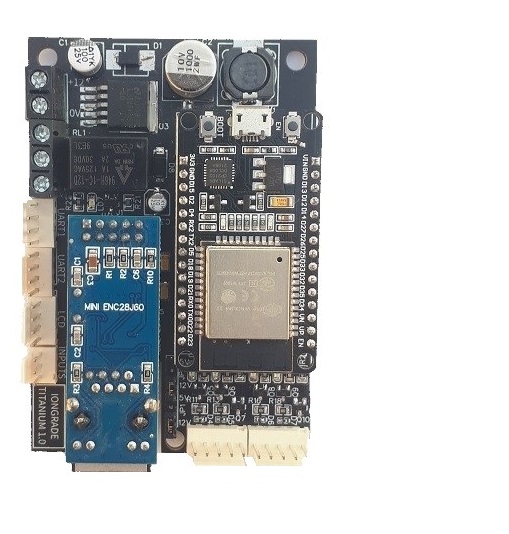
For example, the converter can be configured to receive data from a reader in the Wiegand 26 format and transmit the data in the Abatrack format. At the same time, it can send the same information through its output UART and also forward it to another device through the UDP Socket channel. Similarly, the Iodine can also receive data through the UDP Socket channel and retransmit it through the Wiegand/Abatrack, UART and UDP Socket output channels.
The Wiegand/Abatrack input and output channels can operate in several formats (Wiegand 26, 32, 34, etc.). The protocols used on the UART channels are also configurable, and the converter is prepared to handle custom encrypted codes. On the UDP Socket channels you can configure IP addresses and port numbers.
Use Cases
The Iodine is used whenever a device's protocol must be adapted to that of the receiving system. Typical examples:
- Abatrack → Wiegand: convert the data from an Abatrack reader to the Wiegand format, allowing the reader to be used with a controller that expects Wiegand.
- QR Code → Abatrack: convert the data from a QR Code scanner to the Abatrack format, integrating QR Code reading into the access system.
- Remote reader → Aurum over the network: connect a remote card reader to an Aurum controller over the local network, using the UDP Socket channel (Aurum packet) — eliminating the physical cabling up to the controller.
QR-SERIES Variant (QR Code reader)
The Iodine QR-SERIES variant includes a QR Code reader already integrated into the Iodine converter, forming a barcode reader with Wiegand/Abatrack standard output. It is the combination of the converter with an Sh-400 scanner (third-party), delivered as a single reader.
Differentiators of the QR-SERIES variant:
- 1D and 2D reading: decodes linear (1D) and two-dimensional (2D) barcodes, including PDF417, Data Matrix and QR Code.
- Reading printed or on-screen documents: reads codes both in printed form and displayed on mobile phone screens.
- Wiegand/Abatrack output: the physical connection of the reading is made with a cable carrying signals in the Wiegand/Abatrack protocols, in several configurable formats.
- Logical connection through MQTT or Web Service: in addition to the physical output, the reading can be delivered logically through the MQTT protocol or through a Web Service server.
The configuration of the integrated Sh-400 scanner is covered in the operation manual of the QR-SERIES variant.

Technical Specifications
Iodine Converter
| Specification | Value |
|---|---|
| Type | Protocol converter (translator) for readers/scanners |
| Version | v2.2 (firmware 2.0.7) |
| Power supply | 12 VDC ±5% — 160 mA (nominal catalog value; ~120 mA without peripherals) |
| Consumption | 300 mW (max.) |
| Input interfaces | 3 — Wiegand/Abatrack, RS232 serial (UART), UDP Socket |
| Output interfaces | 3 — Wiegand/Abatrack, RS232 serial (UART), UDP Socket |
| Wiegand/Abatrack electrical level | Open collector |
| Wiegand/Abatrack protocols | Abatrack; Wiegand 26; Wiegand 26 bits Citrox KB; Wiegand 32 Mifare; Wiegand 32 Mifare HID RK40; Wiegand 34 Mifare; Wiegand 34 HID N1002; Wiegand 34 HID STD H10306; Wiegand 34 HIK DS-K1100; Wiegand 66 bits LN; Wiegand 34 bits TAG Antenna Hex |
| UART electrical level | RS232 |
| Serial protocol | Data<CR> |
| Baud rates | 1200, 2400, 4800, 9600, 19200, 38400 and 115200 |
| UDP Socket interface | Configurable input and output ports; encrypted Aurum packet protocol |
| Configuration | Embedded HTTP server, through a browser (WiFi Access Point) |
| Humidity | 5% to 95% non-condensing |
QR-SERIES Variant
| Specification | Value |
|---|---|
| Power supply | 12 VDC — 160 mA |
| Output interface | Wiegand/Abatrack (open collector) |
| Recognized 2D standards | PDF417, Data Matrix, QR Code |
| Recognized 1D standards | EAN-13, EAN-8, UPC-A, UPC-E, ISSN, ISBN, Codabar, Code 128, Code 93, ITF-6, ITF-14, Interleaved 2 of 5, Industrial 2 of 5, Standard 2 of 5, Matrix 2 of 5, GS1 Databar (RSS-Expand, RSS-Limited, RSS-14), Code 39, Code 11, MSI-Plessey, Plessey |
| Recognition mode | Image |
| Resolution | 20 mil QR |
| Illumination | White LEDs |
| Positioning | Red LEDs |
| Ambient light | 0 ~ 100.000 LUX |
| Logical connection | MQTT or Web Service |
| Humidity | 5% to 95% non-condensing |
| Consumption | 2 W (max.) |
Next Steps
- Installation Manual — power supply, Wiegand/Abatrack connections and jumpers, UART pinout, buttons, LEDs and configuration mode