Palladium Noise Monitor
Palladium has been discontinued and is no longer sold for new projects. This documentation remains available to support existing installations. For new projects or replacement, contact the Iongrade sales team.
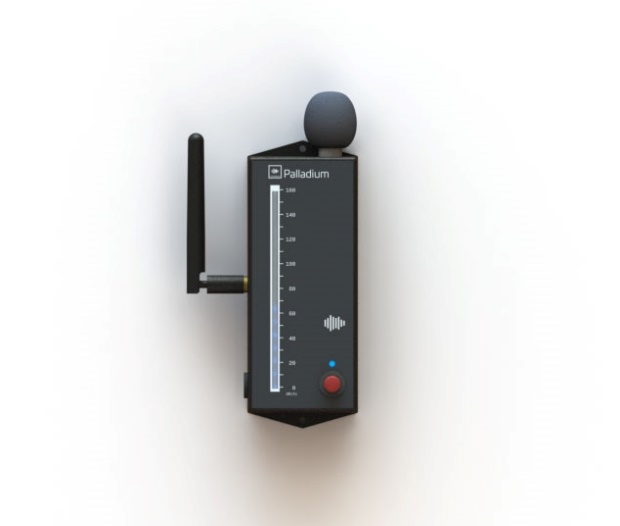
Palladium is a noise monitor (sound level meter) designed to measure the sound pressure level in environments — that is, the intensity of sound in a given place. The sound pressure level is the quantity that represents the auditory sensation of volume, and Palladium is calibrated to indicate it in decibels, measuring levels from 40 to 140 dB(A).
In addition to continuously measuring ambient sound, Palladium can generate alarms when a given level is exceeded, with limits configurable per time range for each day of the week. All configuration and querying is done over WiFi, through a browser, with no need to install any application.
How It Works
Palladium starts operating and recording measurements as soon as it is plugged into the power outlet. No additional equipment is required; to access the data, simply communicate with it over WiFi using a computer, laptop or smartphone.
Measurement and Memory
The device continuously monitors the ambient sound level and stores the information in its internal memory, capable of storing the values measured every minute for up to 45 days. For each minute the following are recorded:
- Instantaneous dB — instantaneous value at the moment of recording
- Average dB — average of the measurements in the minute
- Maximum dB — highest value measured in the minute
- Minimum dB — lowest value measured in the minute
- Temperature — temperature in the environment of the device
This data can be queried and presented as charts for the last 45 days.
Alarms per Time Range
Palladium can be configured to generate alarms when the noise exceeds a limit. For each day of the week you can define up to 4 time ranges, each with its own maximum acceptable noise level. In an alarm situation the device can sound the horn until the alarm is acknowledged, and the front bargraph changes color according to the measured level relative to the configured limit:
| Bargraph color | Meaning |
|---|---|
| Blue | Noise within normal conditions |
| Orange | Noise close to the maximum limit (80%) |
| Red | Noise above the established limit |
The alarm acknowledgment system ensures user interaction: when you press the front button, the horn is turned off and the device records the alarm acknowledgment.
Operating Modes
From the standpoint of communication with the device, Palladium offers the following operating modes:
| Mode | Description |
|---|---|
| Stand-alone (Basic Mode / Access Point) | Operates autonomously with its internal memory for 45 days. Palladium creates its own WiFi access point, which you connect to in order to configure and view the data through a browser. |
| Local Network (Station Mode) | Palladium connects to an existing WiFi network. Users with access to that network and to the device password can access the data and features through the browser, without depending on the cloud. The network data is provided to the device through Basic Mode (Access Point). |
| Palladium Cloud (Cloud Mode) | Connects to the internet over native WiFi and allows full monitoring and configuration over the internet, from anywhere. It is the mode with the largest number of features. |
| Integrated (with third-party software) | Has an open protocol for integrations, allowing it to report its measurements to market systems. |
Iongrade offers, at no additional cost, Palladium Cloud — an internet system that lets you access your Palladium from phones and computers. Among other features, it allows you to define email addresses that receive alert messages whenever the noise exceeds the established limits. Creating an account is free at palladium.iongrade.com.br.
Palladium communicates natively through the open OpenPalladium protocol, based on IoT concepts (MQTT), and can be integrated with any market software. The parameters of this integration have separate documentation.
Applications
Palladium is ideal for noise monitoring in a variety of environments:
- Residential condominiums — especially party rooms, barbecue areas, game rooms and similar spaces, helping to control acoustic comfort and coexistence.
- Help-desk and telemarketing rooms — monitoring the noise level for greater control of environmental health.
- Acoustic presence monitor — in situations where the use of conventional presence sensors is not advisable or feasible.
Reference Noise Levels
Some references help interpret the measured sound intensity levels.
Acoustic comfort (ABNT NBR 10.152)
According to Standard 10.152 of the Brazilian Association of Technical Standards (ABNT), the acceptable noise limit is different for each environment. The lower value corresponds to the comfort level; the higher one, to the acceptable level (both in decibels):
| Environment | Recommended range |
|---|---|
| Hospital ward | 35 dB to 45 dB |
| Classroom | 40 dB to 50 dB |
| Hotel room | 35 dB to 45 dB |
| Residential bedroom | 35 dB to 45 dB |
| Office with computers | 45 dB to 65 dB |
| Enclosed halls for shows and sports | 45 dB to 60 dB |
Average noise levels (WHO)
According to the World Health Organization (WHO), the recommended noise level for hearing is up to 50 dB. The table below shows examples of average noise levels in decibels:
| Level | Example |
|---|---|
| 15 dB | Whispering |
| 30 dB | Quiet garden |
| 60 dB | Office noise |
| 75 dB | Blender |
| 85 dB | Street with heavy traffic |
| 90 dB | Small truck accelerating |
| 100 dB | Jackhammer |
| 110 dB | Rock concert |
| 120 dB | Jet aircraft |
| 140 dB | Limit of hearing |
Reliability
Palladium has a calibration certificate that guarantees the reliability of its readings.
Technical Specifications
| Specification | Value |
|---|---|
| Type | Noise monitor / sound level meter |
| Version | v4.1 (Jan/2022) |
| Measurement range | 40 to 140 dB(A) |
| Power supply | 5 VDC / 250 mA (dual-voltage 110/220 VAC power supply) |
| Communication | WiFi |
| Internal memory | Up to 45 days of per-minute measurements (instantaneous, maximum, minimum, average and temperature) |
| Alarms | Up to 4 time ranges per day of the week, with optional horn and color bargraph |
| Connectivity | Open OpenPalladium protocol, based on IoT concepts — integrable with any market software |
| Clock/calendar | Internal clock with battery, keeps date/time even during a power failure; optional synchronization via an external NTP server |
| Firmware | Local or remote update over the network |
| Calibration | Calibration certificate |
Next Steps
- Installation Manual — power supply, mounting and positioning, front panel (bargraph, LED and button) and first access