Radium BLE Gateway
The RADIUM is Iongrade's BLE → MQTT gateway: it continuously scans the environment, captures the signals from Bluetooth Low Energy (BLE) beacons, filters what matters and publishes everything, in real time, to the IonGuard platform's MQTT broker.
Beyond relaying signals, the gateway has local intelligence: it detects panic and tamper events, drives sirens and signaling devices through its own outputs, and keeps operating — storing events for later delivery — when the network goes down.
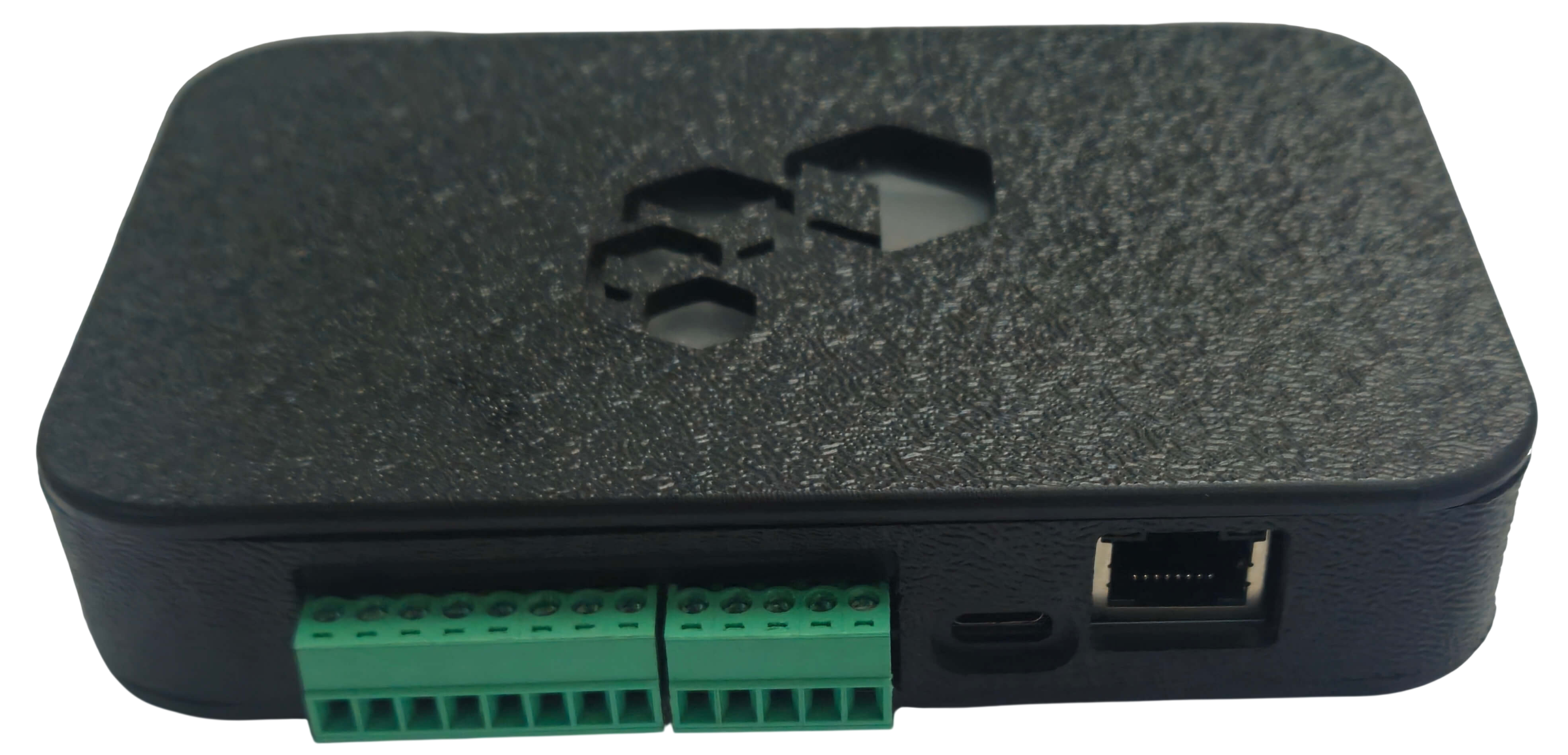
Overview
The RADIUM is built on an ESP32-S3 with Bluetooth 5.0 and support for LE Coded PHY (long-range scanning), scanning LE 1M and Coded PHY in parallel.
Key features:
- Two network media — WiFi 2.4 GHz or Ethernet 10/100-Base-T (RJ45), with automatic failover between them.
- High-precision internal clock (RTC) with NTP synchronization — every event carries a reliable timestamp.
- Embedded web server — all configuration is done through a browser, with no dedicated software.
- 4 inputs and 4 outputs for call buttons, tamper sensors, sirens and signaling devices, with a local alarm engine.
- USB-C or PoE power, with a 1000 mAh internal battery, fuel gauge and power-saving profile.
- Network security — TLS/mTLS on MQTT and 802.1X authentication on WiFi and Ethernet.
For security reasons, the network and broker configuration is done only through the portal served by the board itself — it is never changed remotely over MQTT. This prevents a remote command from locking the gateway out of the network.
How It Works: From Beacon to MQTT
The information flow has three links:
| Link | Role |
|---|---|
| Beacon | BLE device that transmits signals periodically (about 1 per second, configurable). It can be a panic button, an asset tag or a person tag. |
| RADIUM gateway | Fixed BLE receiver installed in a zone. It captures the signals of every beacon in range, applies the configured filters, converts each signal into a standardized message and publishes it over MQTT. |
| IonGuard platform | Receives the signals, identifies each beacon by its MAC, estimates the location zone from the antenna with the strongest RSSI and detects events (panic, low battery, device offline). |
In ION Guard, the RADIUM is registered as an Antenna of the Synapsys (Indoor Location) module and assigned to a zone — the platform considers the zone of the antenna that heard the beacon with the strongest RSSI as its location.
The RADIUM is Iongrade's proprietary hardware for this role. ION Guard also accepts third-party BLE gateways — currently the Minew MG4C —, which act as antennas in the same way. Both can coexist in the same installation.
On every scan cycle the gateway assembles a batch with all captured signals and publishes it to the signals topic. The batch starts with a gateway health entry and continues with one entry per beacon signal, each carrying the MAC (the beacon's unique identifier), the signal strength (RSSI), the signal type and the capture timestamp.
The beacon does not know where it is. It is the platform that estimates the zone by comparing the RSSI with which each gateway heard that beacon — which is why antenna placement defines the resolution of indoor location.
Local Intelligence
The RADIUM does not depend on the cloud to react. Even without internet, it:
- detects panic — from a beacon (BLE button) or from a physical input, always with top priority;
- triggers alarms — sirens, signaling devices and other loads on outputs S1–S4, with configurable delay, pulse and latch;
- stores events — signals and panic events go to memory and are re-sent, with their original timestamp, as soon as the connection returns;
- signals its state through the RGB LED, with a blink code per problem type.
A beacon PANIC never shows on the LED, for safety reasons. Panic signals are also immune to every publishing filter — they are never discarded by the minimum RSSI, by a disabled category or by duplicate removal.
Portal Access Accounts
The gateway portal works with a cumulative permission ladder: each account does everything the lower levels do, and gains pages of its own.
| Account | User | What it is for |
|---|---|---|
| Normal (common) | radium | Day-to-day operation — network, MQTT, inputs, outputs, scanning, filters, LED, alarms, information and diagnostics. |
| Integrator | radium_integrador | Field commissioning — adds the Power profile and the beacon registration, and changes the common user's password. |
| Administrative | — | Iongrade's internal accounts (production line and fleet administration), with their own restricted-circulation manual. |
Permission checking is done on the server, inside the gateway itself, on every request: the menus merely hide the icons the account cannot use, but typing a page address by hand does not bypass the control.
Technical Specifications
| Item | Specification |
|---|---|
| Processor and memory | ESP32-S3, 16 MB of permanent memory (flash) and 8 MB of temporary memory (PSRAM) |
| Bluetooth | BLE 5.0, with LE 1M and LE Coded PHY (long range) |
| Network | WiFi (2.4 GHz) and Ethernet RJ45, with automatic failover |
| Network security | TLS/mTLS on MQTT; 802.1X (WiFi: PEAP/TTLS · Ethernet: EAP-MD5/PEAP) |
| Inputs | 4 digital inputs for dry contact (IN1–IN4) |
| Outputs | 4 electronic outputs (S1–S4), up to 24 V / 1 A each — mind the polarity |
| Power supply | USB-C (5 V / 1 A min.) and PoE (IEEE 802.3at Class 2) |
| Battery | Internal 1000 mAh with fuel gauge; typical runtime of 6 h (up to ~10 h with power saving) |
| Clock | High-precision internal clock + automatic synchronization (NTP) |
| Status LED | RGB |
| Beacon capacity | 5000 registered beacons |
| Signals per cycle | 512 signals per scan cycle (maximum) |
| Offline reports | Up to 24 thousand signals in temporary memory and up to ~47 thousand in permanent memory; panic events have a dedicated area (1024) |
| Configuration | Web portal (at 192.168.4.1), pt-BR / en-US |
| Updates | OTA (firmware in two A/B banks with rollback; pages updated independently) |
| Operating temperature | -40 °C to +80 °C |
| Typical consumption | 200 mA (average) at 5 V |
Documentation based on the RADIUM v1.0 manual and on firmware 1.0.0.
Next Steps
- Installation Manual — electrical connections, inputs, outputs, magnetic sensor and LED
- Operation Manual — the configuration portal, page by page
- Installation Commissioning — power profile and beacon registration (integrator account)
- ION Guard ▸ Antennas — registering the antenna, its zone and MQTT credentials on the platform
- ION Guard ▸ Beacons — registering the tracked beacons