Titanium Access Controller
The Titanium has been discontinued and is no longer sold for new projects. This documentation remains available to support existing installations. For new projects or replacements, contact the Iongrade sales team.
The Titanium access controller is a rugged device developed specifically for high-performance access control solutions that require flexibility to integrate with a wide range of devices. It features an integrated LCD display, which allows messages to be shown directly on the device.
Overview
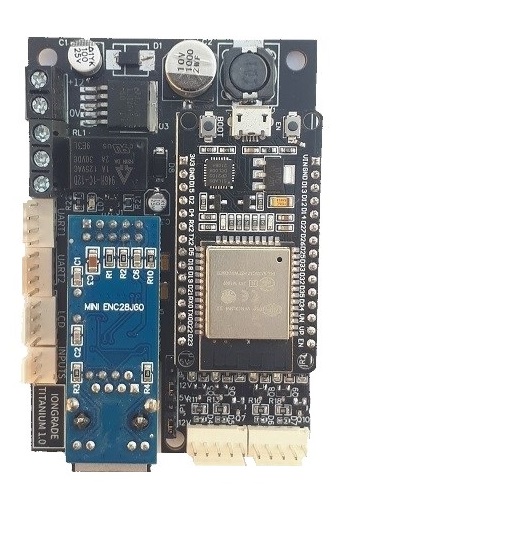
Designed to operate with IoT communication protocols, the Titanium allows easy integration with a wide variety of access control systems.
The hardware was designed to operate safely and reliably in the most diverse environmental conditions. It has electronic circuits specifically designed to protect the components against electrical discharges. The signal inputs are built with optical couplers that fully isolate the sensors from the controller's internal circuits.
It can connect to the communication network using wireless technology (WiFi) or through a UTP Ethernet 10/100-Base-T cable. It has a highly accurate internal clock and can be configured to access an external NTP server. Communication is secure (TLS).
The controller has an internal HTTP server and is configured through a browser. It has interfaces for two card readers, two serial ports, and one connection for an LCD display. It accepts ABATrack/Wiegand readers, QR Code scanners, a Bluetooth module, a printer, and an audio module. It is powered by 12 VDC.
It is prepared to control blocking device types such as doors and barrier gates — the type of blocking device to be controlled is configurable.
The controller also maintains a local contingency list of users, allowing access decisions to be made even when communication with the server fails.
Differentiator: Integrated LCD Display
The Titanium stands out for its LCD display integrated into the controller itself. The display can operate showing locally generated messages (default) or messages sent by the server, with independent configuration for each of its two lines.
This makes it possible to inform the user directly at the access point — for example, ACESSO AUTORIZADO (Access granted) or ACESSO NEGADO (Access denied) — without depending on an external display module.
The physical connection of the LCD display (I2C connector) is detailed in the Installation Manual.
Main Features
- IoT connectivity: WiFi (Wireless) or Ethernet 10/100-Base-T (RJ45)
- Integrated LCD display with two lines, configurable for local or server messages
- Up to two Wiegand/ABATrack readers and up to two serial readers
- Command relay for physical control of electromagnetic locks or door locks
- Local contingency list of users stored in the controller's memory
- Simple configuration through a local web server enabled for this specific purpose
- Integration with several market software packages through the open OpenION protocol (open IoT protocol) or through customizations for specific purposes
- Secure TLS communication and clock synchronization with an NTP server
- Power supply: 12 VDC
Technical Specifications
| Specification | Value |
|---|---|
| Power supply | 12 VDC; 120 mA (base, without readers/modules) — up to 350 mA with peripherals |
| Reader interfaces | 2x inputs for standard ABATrack and Wiegand readers (Wiegand 26, Wiegand 32, Wiegand 34, among others) |
| Serial interfaces | 2x inputs for readers with serial communication (biometric sensors, OCR devices, Bluetooth modules, among others) |
| Virtual inputs | 2x virtual inputs for connection with TCP/IP devices |
| Output relay | 1x relay capable of energizing loads of 1A/120VAC or 2A/30VDC |
| Virtual outputs | Several virtual outputs (event generation) via TCP/IP for integrations over Ethernet networks |
| Display | Integrated two-line LCD display (local or server messages) |
| Communication | WiFi and Ethernet RJ45 10/100-Base-T |
| Firmware | Operates in supervised or contingency mode (local user list). Remote update over the TCP/IP network in push mode (firmware sent to the controller) or pull mode (controller fetches the firmware automatically) |
| Connectivity | Communicates natively through the open OpenION protocol (open IoT protocol); can communicate through custom protocols |
| Clock/calendar | Internal clock to keep date/time even during power failures |
Channel and Port Concept
The Titanium controller operates with the concept of channels and ports.
Channels
The controller has two control channels. A user can be enabled for access on each channel separately.
Each channel is associated with the REX and PAS/DOOR signal inputs. The two card readers are directly associated with channels 1 and 2.
Ports
The Port concept controls the entry of user identifiers. Each port represents a possible identification source on each channel. Port 1 is linked to the two ABATrack/Wiegand card readers; the serial ports (UARTs) are linked to Port 2.
| Port | Channel 1 | Channel 2 |
|---|---|---|
| 1 | Reader 1 | Reader 2 |
| 2 | UART 1 | UART 2 |
| 3 | Web 1 | Web 2 |
| 4 | MQTT 1 | MQTT 2 |
| 5 | QR Code 1 | QR Code 2 |
This way, the control software can enable/disable a user on ports/channels according to the control needs.
Examples:
- A user can be enabled to pass through a channel exclusively using QR Code identification.
- A user can be enabled to pass through a channel using a proximity card or a Bluetooth reader connected to the channel's UART.
Applications
The Titanium controller is fully configurable and allows the control of the following devices:
- Vehicle barrier gate
- Doors
- Data Logger
Next Steps
- Installation Manual — electrical connections and physical installation