ATM - Access with random password
The ATM plugin lets you generate, on demand, a random, temporary numeric access code for a visitor. The code works like a short-lived visitor card: the person uses it to release passage and, when it expires, the card is automatically removed from the system.
It is designed for self-service scenarios — ATM-type terminals and equipment — where you want to grant a person one-off access without registering a permanent physical card.
This feature is delivered as a plugin (accelero_plugin_atm) and must be installed and enabled by the IONGRADE technical team. Contact support to check compatibility with your ACCELERO version.
Current plugin version: 0.0.1 — compatible with ACCELERO 2.16.9 or higher.
What the plugin does
| Feature | What happens in ACCELERO |
|---|---|
| Access code generation | An authorized operator selects a visitor and the system generates a random 6-digit numeric code |
| Temporary card | The code is stored as a visitor card linked to the person, valid only for the configured time |
| Temporary category link | The person is linked to the configured category, starting immediately and ending when the code expires |
| Automatic expiration | When the duration is reached, the card (and the access) stops being valid and is deleted by a background routine |
| Modal with countdown | The code is shown in a window with a timer and a circular progress bar, indicating the remaining time |
Releases a visitor immediately and securely, without issuing a physical card — the code expires on its own and leaves no permanent credentials in the system.
Configuration
Navigation path: Settings > Plugins - ATM
The ATM Configuration screen has a single tab, General, with the Integration data section.

| Field | Description |
|---|---|
| Category | The ACCELERO category assigned to the visitor at the moment the code is generated. Defines the access permissions the code grants |
| Access code duration (in seconds) | The code's validity period, in seconds. After this interval the card expires and is removed. Minimum value: 1 |
The selected category must exist in ACCELERO. If the configured category is not found at generation time, the system returns an error and the code is not generated.
If no time is configured, the system assumes 60 seconds. Adjust the value to the actual time the visitor takes between receiving the code and passing through.
Access code generation
Navigation path: Side menu > ATM - Create
The Register New ATM Event screen is where the operator identifies the visitor and generates the code.

The Document and Name fields appear as the visitor is searched for or entered.
Visitor section
| Field | Description |
|---|---|
| Search by document or name | Autocomplete field that searches already registered visitors. Also allows entering a new visitor |
| Document | Visitor's document (up to 50 characters). Filled in automatically when an existing visitor is selected |
| Name | Visitor's name (between 3 and 50 characters) |
When you enter the document of an already registered visitor, the data is filled in automatically. For a document not yet registered, enter the document and name — a new person is created at the time of generation.
Button
| Button | Function |
|---|---|
| Generate access code | Creates the temporary card, links the configured category and shows the code in the modal |
"Access Code Generated" modal
After generation, the Access Code Generated modal opens, with the instruction "Send this code to the visitor:" and the following elements:
| Element | Description |
|---|---|
| Code | 6-digit number shown prominently |
| Time remaining | Countdown (mm:ss) until expiration |
| Circular progress bar | Ring that empties as time passes, changing color (green → yellow → red) |
| Close | Closes the modal |
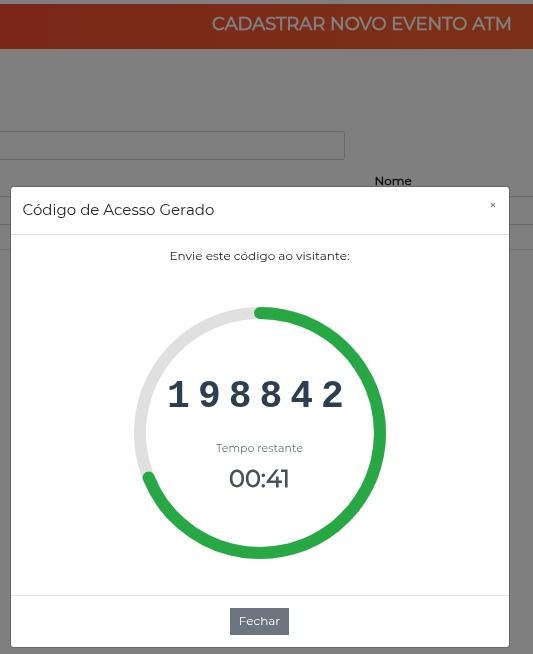
When the time reaches zero, the modal closes automatically and the system informs that "The code has expired!".
Both the ATM - Create menu item and the code generation require the Generate ATM access code permission (atmManage). Operators without this permission do not see the menu nor can they generate codes.
How the code works internally
Understanding the code's life cycle helps you operate the feature safely.
When the code is generated
- The system locates the visitor by the entered document; if it does not exist, it creates a new person with the document and name.
- Previous ATM cards for the same person are removed, ensuring only one code is active at a time.
- A visitor card is created with a random 6-digit number (
000000to999999), enabled and marked with theatmtype. - The person receives the configured category, starting at the moment of generation and ending at the instant of expiration.
- The code is shown in the modal to be passed on to the visitor.
Expiration and cleanup
- The card has an expiration instant calculated from the configured duration.
- A background routine (
AtmExpiredCardCleaner) periodically checks expired ATM cards and deletes them automatically, ending the access.
Generating a new code for the same person replaces any previous ATM code they had. The old code stops working immediately.
Use cases
Release a one-off visitor at a self-service terminal
- Go to the ATM - Create menu.
- Search for the visitor by document or name; if new, enter Document and Name.
- Click Generate access code.
- Pass the 6-digit code shown in the modal to the visitor before the time expires.
Reissue an expired code
- Go to ATM - Create again and select the same visitor.
- Click Generate access code — a new code is generated and the previous one is discarded.
Best practices
- Adjust the duration to the real flow: times that are too short create rework; long times reduce the security of the temporary access.
- Use a dedicated category for the ATM audience, with exactly the access permissions required for the terminal — avoid broad categories.
- Confirm the configured category before operating: if it is removed or renamed incorrectly, code generation fails.
- Pass the code on quickly, since it expires at the configured time and the card is deleted automatically.
Troubleshooting
The "ATM - Create" menu does not appear
Possible causes:
- The operator does not have the Generate ATM access code permission (
atmManage). - The plugin is not enabled.
Solution:
- Check whether the operator's profile has the Generate ATM access code permission.
- Confirm with IONGRADE support whether the plugin is installed and enabled.
Error generating the code (category not found)
Possible causes:
- The category selected in
Settings > Plugins - ATMno longer exists.
Solution:
- Go to
Settings > Plugins - ATM. - Select a valid Category again and save.
The visitor cannot pass through with the code
Possible causes:
- The duration has already expired and the card was removed.
- The configured category does not grant access to the control point used.
Solution:
- Generate a new code and pass it on immediately.
- Check whether the configured category grants access permission to the equipment in question.
Integration with other modules
People
The code creates or reuses a People record — new visitors are created automatically from the document and name provided.
Categories
Release depends on the configured category, which defines the access permissions granted by the temporary code.
Plugins
Learn more about the extension system in Plugins.
Next Steps
- People — Understand the visitor registration used by the ATM code
- Categories — Configure the category that grants temporary access
- Events — See the standard visitor registration flow
- Plugins — Learn more about the ACCELERO plugin system