Work Shift Control
Work Shift Control ensures a minimum rest interval between work shifts. When a person leaves the premises, the system records the time of the last exit; when they try to return, access is only granted after the configured rest time has elapsed. This way, access control itself prevents the person from restarting their shift before completing the minimum interval.
Work Shift Control is a licensed feature (journeycontrol). The configuration sections and the validation in access control are only available when the module is enabled in the license. See Licensing.
What it is for
In many operations it is necessary to ensure a minimum rest period between the end of one shift and the start of the next — for example, to comply with the inter-shift interval required by labor law. Without an automatic control, this depends on manual checking of the schedule and time clock.
With Work Shift Control, the rule is applied at the door: if the person tries to return before completing the rest, access is denied automatically, without operator intervention.
How it works
The control has two moments:
- On exit — when the person moves from an internal area to an external area (leaves the premises), the system records the date and time as their last exit.
- On return — when the person tries to access an internal area, the system calculates whether the rest time has already passed since the last exit. If it has not yet passed, access is denied; if it has, access is authorized by this rule.
The rest time is defined in minutes per category. Since a person can have several categories, the system always uses the most restrictive category — the one with the highest number of rest minutes.
If the person does not belong to any category with Work Shift Control enabled, the rule is transparent and does not interfere with access.
Activation
Step 1: Enable work shift control validation
Go to Advanced > Systems, locate Customization - Customizable access rules and edit. Select Work shift control validation and save.
Without the Work shift control validation rule turned on, the per-category configuration is not applied in access control.
Step 2: Configure rest per category
Navigation path: Settings > Categories > [edit category] > Work shift control section
In the category editing, the Work shift control section offers:
| Field | Description |
|---|---|
| Work shift control | Switch that enables the control for the people in this category |
| Minutes | Minimum rest time, in minutes, required between the last exit and the next return |
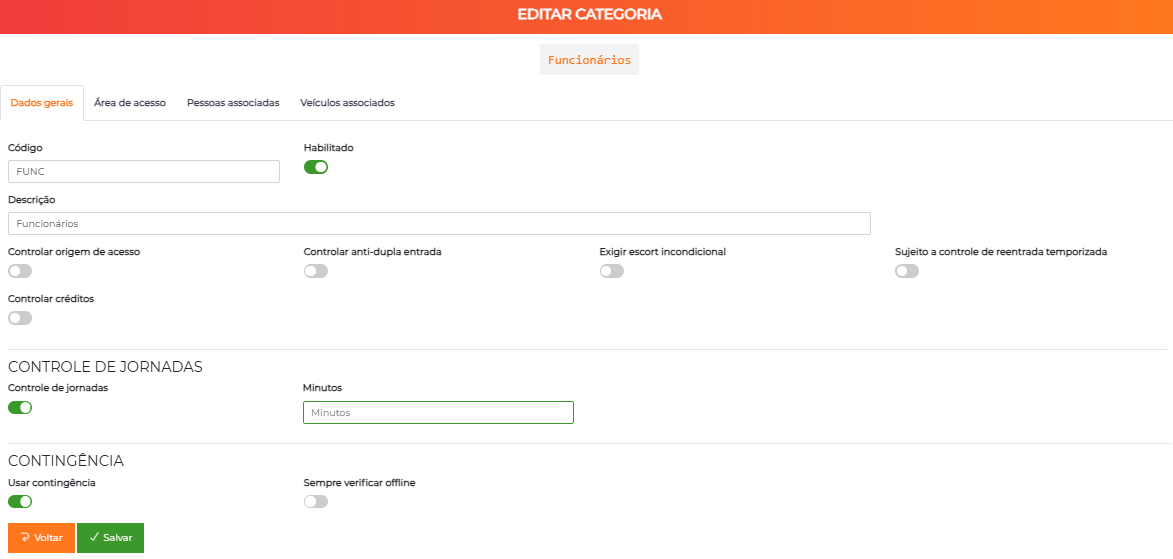
Step 3 (optional): Adjust the person's last exit
Navigation path: People > All > [edit person] > Work shift control section
In the person editing, the Work shift control section shows the Last exit field with the recorded date and time. This field is editable: use it to manually correct the reference time when necessary (for example, after an exit not recorded by access control).
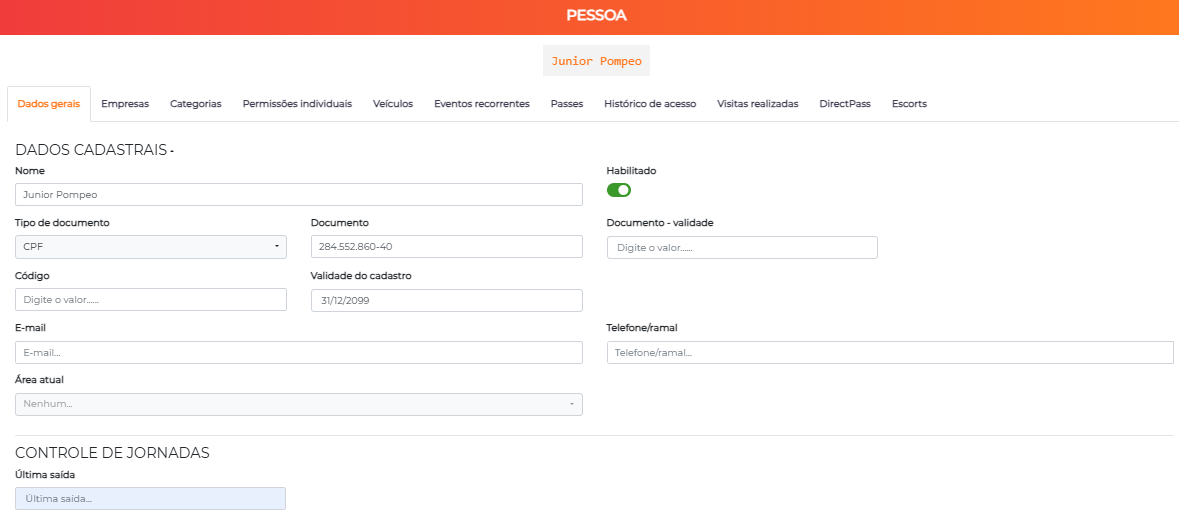
How access control decides
At each access attempt to an internal area, with the rule enabled:
- No categories with control — if the person has no category with Work Shift Control enabled, access is authorized by this rule.
- Rest calculation — the system takes the person's most restrictive category (highest Minutes value) and adds those minutes to the last exit, obtaining the minimum return time.
- Still resting — if the current moment is before that minimum time, access is denied by the work shift control rule.
- Rest completed — if the current moment has already passed the minimum time (or there is no recorded last exit), access is authorized.
The rest count starts from the last exit — the passage from an internal area to an external area. Passages between internal areas do not restart the count.
Flow and usage suggestions
Inter-shift interval in an industry
Create (or use) a category for the production operators, enable Work shift control and set Minutes matching the minimum interval between shifts (for example, the inter-shift rest from labor law). At the end of the shift, the operator leaves (last exit recorded); if they try to return before completing the interval, access is blocked automatically.
Person with multiple categories
An employee belongs to two categories with Work Shift Control: one requires 660 minutes and the other 720. The system applies the most restrictive one (720 minutes) — the return is only released after that period from the last exit.
Correct an unrecorded exit
If an exit was not captured by access control and the person is being blocked improperly, edit the person and adjust the Last exit field to the correct time; the rest calculation then considers the new value.
Next Steps
- Categories — enable the control and set the rest minutes
- People — check and adjust the last exit
- Areas — understand the area types (internal/external) used on exit and return
- Access Policy — see how the access rules combine