Escort
Escort requires two identifications to release a single access: that of the person accessing and that of an authorizer (the escort). Access is only released when the authorizer identifies right after the initial user, ensuring that no one enters a critical location alone.
This is an additional module (escorts) and must be acquired with the sales department. See Licensing.
What it is for
Escort adds a layer of security at points where entry cannot depend on a single person. Instead of relying only on the user's identification, the system conditions the opening on the presence and validation of a second authorized individual.
Difference from Dual Custody
Escort is similar to Dual Custody, but with a fundamental distinction:
- Dual Custody: validation is a remote action — a system operator evaluates the request and decides the release from a distance.
- Escort: validation requires physical presence — the authorizer must be at the location and identify at the access point itself, right after the user.
How it works
The escort comes into play when two conditions combine at the moment of access:
- The person accessing requires an escort; and
- The channel they pass through is configured to control escort.
When this happens, access is not released immediately: the system signals that an escort is required. A valid authorizer must then identify in sequence, at the same access point. Once the double identification is validated, passage is released and the event is recorded as an escorted access (in the logs, with the "Escorted by" indication).
The authorizer must be another person — the system does not accept someone being their own escort.
Who requires an escort
The escort requirement can be defined in two ways:
- Per person — by enabling Require escort in the person's record.
- Per category — by enabling Require unconditional escort in the category. In this case, all the people linked to that category start requiring an escort, without needing to mark them one by one.
Who can be an escort
An authorizer is considered valid if they meet any of the criteria:
- Belong to one of the categories authorized to be an escort on the channel (defined in the channel configuration); or
- Be registered as an individual escort of that specific person (see Individual escorts).
Use cases
- Secure rooms and environments: a vault room, data center or security cabinet is only opened when the user identifies themselves and, next, an authorizer present also identifies themselves.
- Vehicle driver validation: when arriving with a vehicle identified by LPR or antenna, you can validate whether the person driving is authorized to drive that vehicle (see Vehicle escort).
Activation
Step 1: Check the category's areas
Go to Settings > Categories, edit the category that will have an escort and confirm, in the Access areas tab, that the desired areas are included. Save.
Step 2: Enable escort on the channel
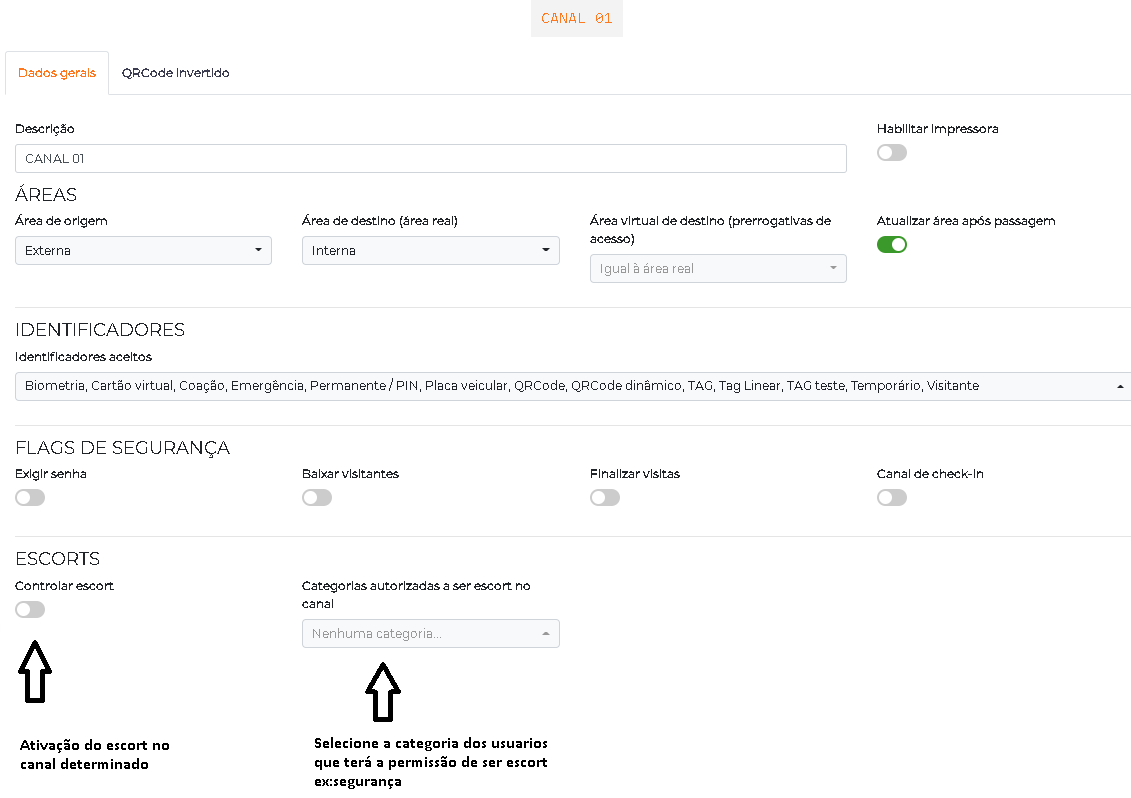
Go to Settings > Controllers, edit the controller corresponding to the area and go to the Channels tab. Edit the desired channel and, in the Escorts section:
- Enable Control escort;
- In Categories authorized to be an escort on the channel, select which categories can accompany;
- Optionally, enable Perform passage of escorted + escort so that both the escorted and the escort are recorded in the passage.
Step 3: Define the users
Define who requires an escort and who can be an escort:
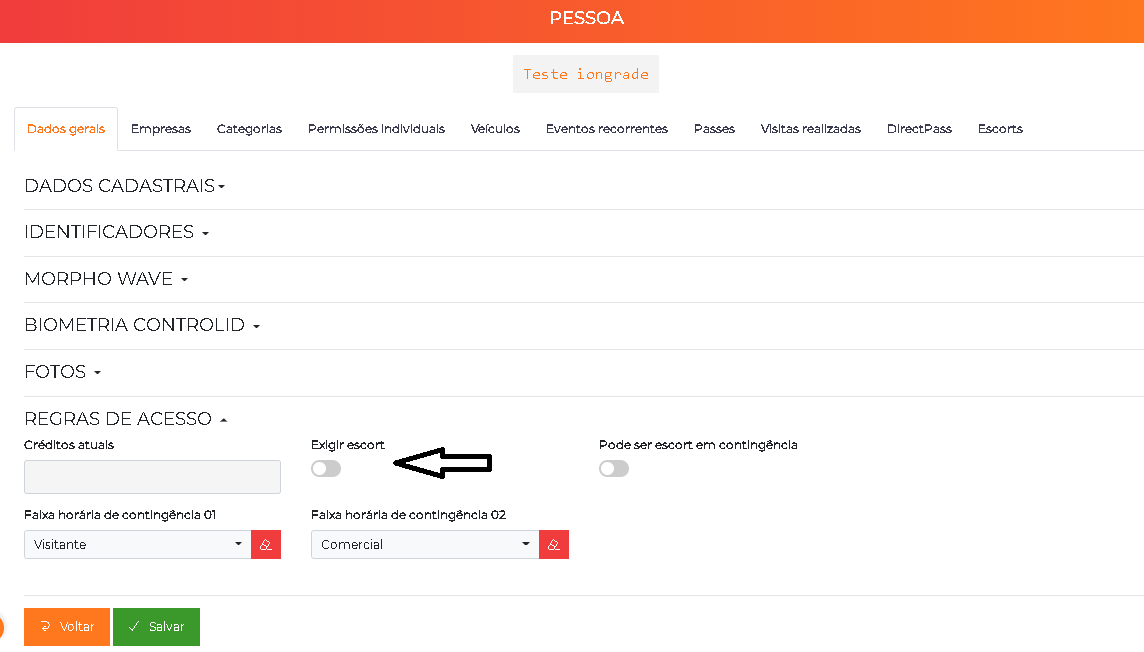
- For the user who requires an escort, go to People, edit the person and, in the Access rules section, enable Require escort. (Alternatively, use Require unconditional escort in the category, to apply the requirement to all its members.)
- For the user who will accompany, assign them one of the categories authorized to be an escort on the channel — or register them as an individual escort of the person.
Once the settings are complete, the Escort module starts operating on the defined channels and users.
Individual escorts
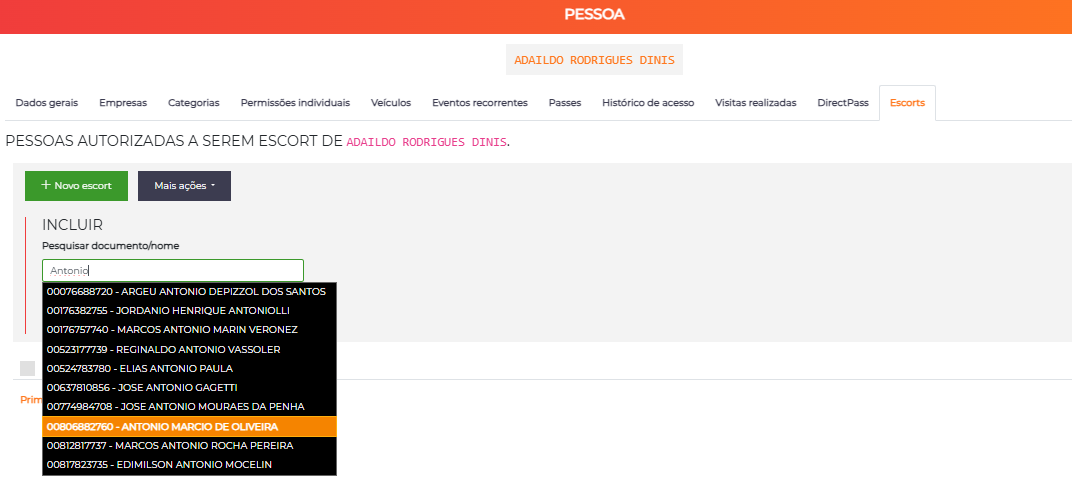
In addition to authorization by category, you can indicate specific people who can be an escort of a user — useful when the escort does not fit into any authorized category.
In the person editing, open the Escorts tab (People authorized to be an escort of). Use New escort to add people to the list and remove them when necessary. These individual escorts apply only to that person, adding to the categories authorized on the channel.
Vehicle escort
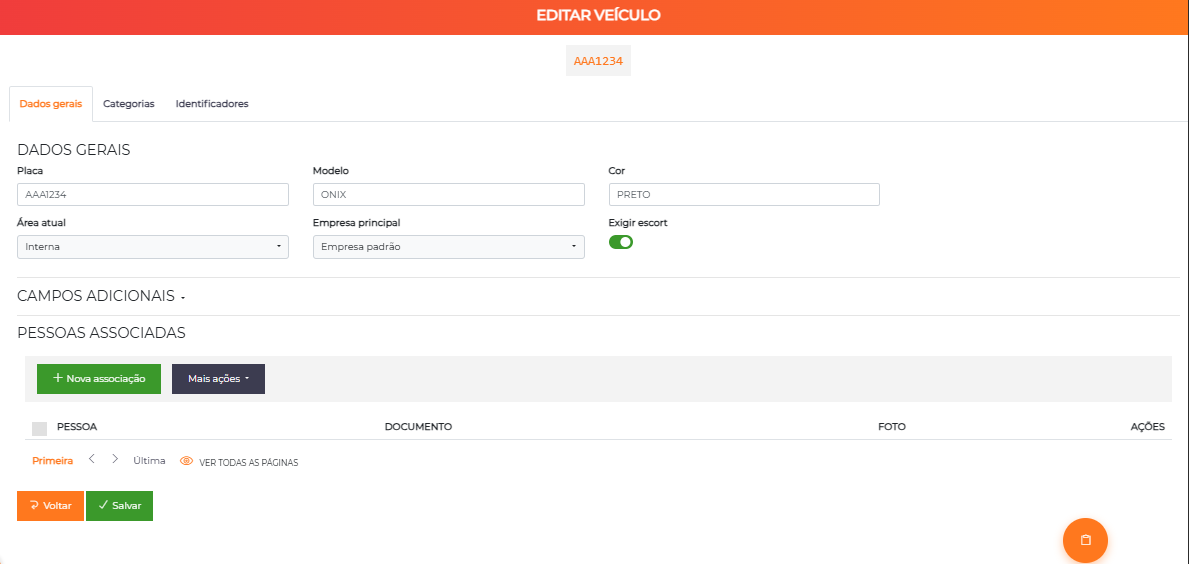
When access is made by a vehicle (identified by LPR or antenna), the escort validates whether the driver is authorized to drive that vehicle.
The logic is the same as the person escort: the vehicle must require an escort and the channel must control escort. The driver is accepted as the vehicle's escort if they:
- Belong to one of the categories authorized to be an escort on the channel; or
- Belong to one of the vehicle's own categories; or
- Be linked to that vehicle (registered as driver/owner).
Thus, the system combines the two accesses (vehicle + driver) and only releases when both are validated.
Operation in contingency
The escort also works with the controller offline (contingency mode), as long as it is configured:
- In the reader/controller, the Require escort in contingency option keeps the escort requirement even without communication with the server.
- In the person's record, the Can be an escort in contingency option enables the user to act as an authorizer in this scenario.
Batch operations
To apply the requirement to several users at once, use Batch operations to require or not require an escort for a set of selected people, avoiding individual editing.
Flow and usage suggestions
Vehicle + driver (LPR + facial)
Classic scenario of a vehicle gatehouse with two devices connected to the same controller (e.g. Neon):
- The vehicle arrives and the LPR reads the license plate — identifying an authorized vehicle that requires an escort.
- Access is conditioned on the driver's identification: the person identifies at the facial device right after.
- The system validates whether that driver is authorized for that vehicle — by category authorized on the channel, by the vehicle's own category or by the person's link with the vehicle.
- If valid, access is released; otherwise, it is denied.
This way, it is ensured that only those authorized to drive the vehicle can drive it, automatically combining the two accesses (vehicle + driver), without a remote operator.
In-person escort in a critical environment
In a vault room, the employee identifies themselves and access waits for an escort. A colleague from an authorized category (or an individual escort registered for that employee) identifies in sequence, at the same point, and the door is released — ensuring that no one enters alone.
When to use Escort (and not Dual Custody)
Use Escort when the second validation should be done by someone present at the access point — including the validation of a vehicle driver. If the validation should come from a remote operator (security center, remote gatehouse), the recommended feature is Dual Custody.