Concentrators
ACCELERO supports the use of access concentrators as a system architecture resource.
Concept
Access concentrators are devices that work as an intermediate layer of communication between ACCELERO and the controllers.
Architecture
ACCELERO (Server)
    ↓
Concentrator (intermediate layer)
    ↓
Access controllers
All communication happens through the concentrators, effectively creating a three-layer architecture.
How It Works
Data Replication
Concentrators hold a copy of the ACCELERO database:
- Updated in real time
- Uses master/slave replication
- ACCELERO server = Master
- Concentrator = Slave
Communication Flow
- ACCELERO updates the master database
- Replication sends changes to the concentrator
- Concentrator updates the local database
- Controllers communicate with the concentrator (not with ACCELERO)
When to Use
Concentrators are recommended for:
1. Very High Traffic Systems
Scenario:
- Thousands of accesses per minute
- Multiple simultaneous controllers
- Distributed load required
Benefit:
- The concentrator processes requests locally
- Reduces the load on the central ACCELERO server
- Better overall performance
2. Limited Connectivity
Scenario:
- Server and controllers on different networks
- Unstable link between locations
- Occasional connectivity
Benefit:
- The concentrator keeps operating even if it temporarily loses connection with the server
- Synchronizes when connectivity returns
- Greater resilience
3. Geographic Distribution
Scenario:
- Company with multiple branches
- Controllers in different locations
- Each location has its own concentrator
Benefit:
- Local communication between concentrator and controllers
- Lower latency
- Better reliability
Configuration
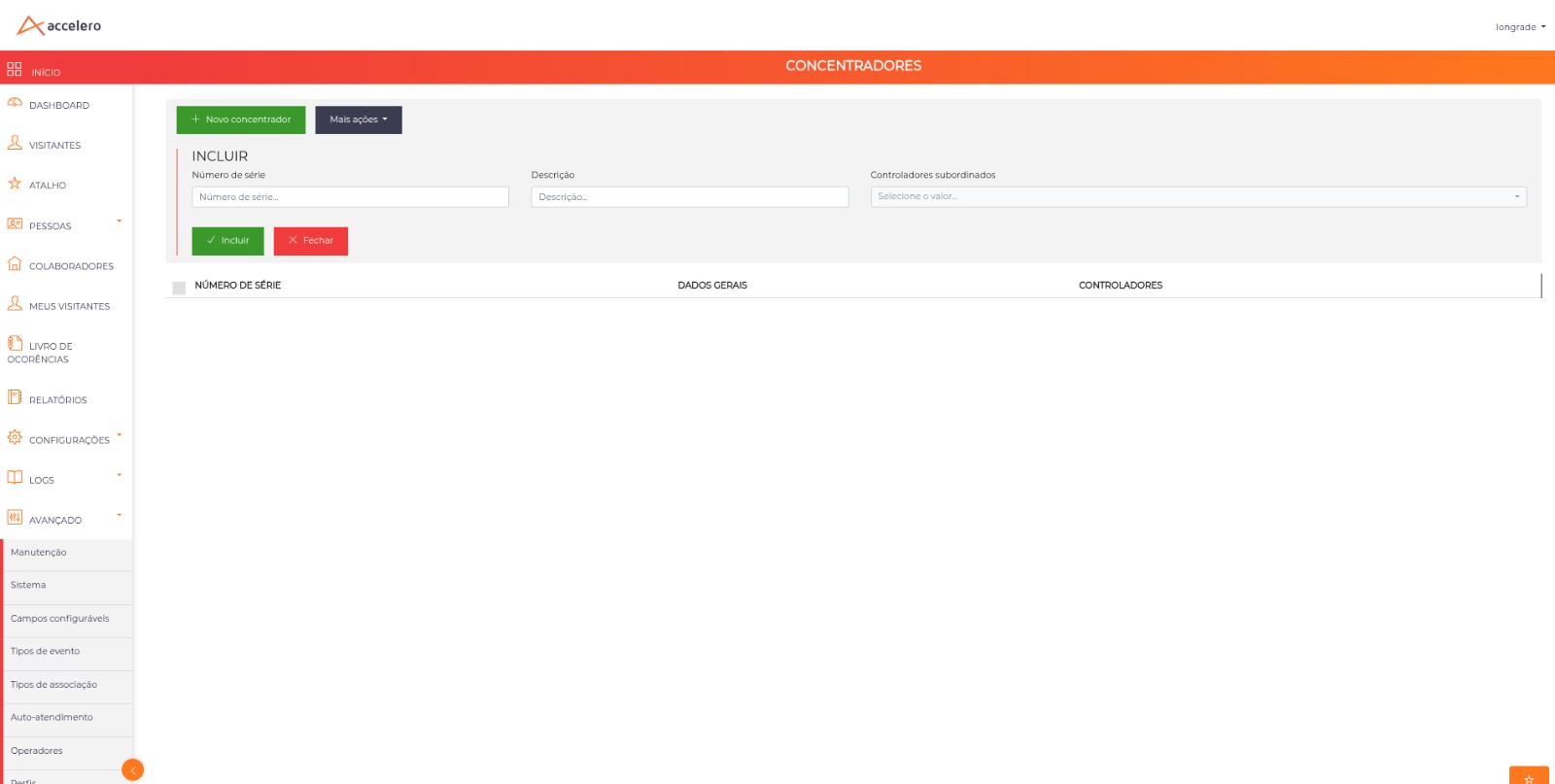
Path: Advanced > System > Advanced - Access concentrators
Add a New Concentrator
- Click on "New concentrator"
- Configure the required fields
- Save the configuration
- Restart the physical device
- Run the initial synchronization
Configuration Fields
| Field | Description | Required |
|---|---|---|
| Serial number | Physical serial number of the device | ✓ Yes |
| Description | Identifying name of the concentrator | ✓ Yes |
| Subordinate controllers | Which controllers are managed | ✓ Yes |
Serial Number
Physical identifier written to the device by the manufacturer.
Where to find it:
- Label on the device
- Concentrator documentation
- Provided by IONGRADE
The serial number must be exact. An error prevents the concentrator from connecting to the server.
Description
Friendly name for identification on the screens.
Examples:
- "São Paulo Branch Concentrator"
- "Building A Concentrator"
- "Main Gate Hub"
Subordinate Controllers
Select which controllers will be managed by this concentrator.
Rules:
- A controller can belong to only one concentrator
- It either belongs to a concentrator or is managed directly by ACCELERO
- It cannot be in two concentrators simultaneously
Hybrid Architecture
A hybrid architecture is possible:
- Some controllers managed by concentrators
- Other controllers managed directly by the ACCELERO server
Example:
ACCELERO
├─ Branch A Concentrator
│   ├─ Controller 1
│   ├─ Controller 2
│   └─ Controller 3
├─ Branch B Concentrator
│   ├─ Controller 4
│   └─ Controller 5
└─ Controller 6 (direct)
└─ Controller 7 (direct)
Multiple Concentrators
You can add several concentrators in the same system.
Typical scenario:
- Each branch has its own concentrator
- Each building has a local concentrator
- Each floor has a dedicated concentrator
Benefits:
- Better load distribution
- Redundancy
- Fault isolation
Synchronization
Initial Synchronization
After adding a new concentrator:
- Restart the physical concentrator device
- Wait for the connection with the ACCELERO server
- Run the synchronization manually
How to synchronize:
- Go to
Advanced > System > Advanced - Access concentrators - Select the desired concentrators
- Click on More actions > Synchronize
- Wait for the process to complete
The process can take considerable time depending on the amount of data. Be patient!
Periodic Synchronization
A concentrator that stays disconnected for a long time (about 24 hours) may need a new synchronization.
When to do it:
- After prolonged maintenance
- After massive database changes
- If you detect inconsistencies
How to do it:
- Repeat the manual synchronization procedure
Automatic Synchronization
During normal operation:
- Real-time replication keeps the concentrator updated
- No manual intervention required
- Automatic and transparent
Monitoring
Connection Status
Check the status of the concentrators:
Path: Advanced > System > Advanced - Access concentrators
Displayed information:
- Connection status (online/offline)
- Last synchronization
- Subordinate controllers
- Software version
Logs
Concentrators generate logs:
- Synchronization events
- Communication problems
- Replication errors
See Logs and Monitoring for details.
Best Practices
-
Size appropriately: Check capacity before assigning many controllers
-
Plan for redundancy: Consider a backup concentrator for critical locations
-
Monitor health: Track connection status regularly
-
Synchronize after maintenance: Always after work that disconnected the concentrator
-
Document the topology: Keep a diagram of which concentrator manages which controllers
-
Test failover: Validate what happens if a concentrator goes down
-
Update firmware: Keep concentrators up to date
-
Protect physically: Concentrators are critical equipment
Troubleshooting
Concentrator does not connect
Causes:
- Incorrect serial number
- Network problem
- Firewall blocking
Solution: Check the serial number, connectivity, and firewall ports
Synchronization does not complete
Cause: Too long without connection, database too large
Solution: Run manual synchronization, wait for completion
Controllers do not respond
Cause: Concentrator offline
Solution: Check the concentrator status, restart if necessary
Outdated data
Cause: Replication with problems
Solution: Force a new manual synchronization
Next Steps
- Controllers - Configure subordinate controllers
- On-Premises Server - Configure the ACCELERO server
- Logs and Monitoring - Monitor concentrator operation