Liberado App Integration (Background Checks)
The Liberado App integration connects ACCELERO to the Liberado App background check service, which looks up arrest warrants (BNMP, the Brazilian national prison monitoring database) and court cases for a person based on their CPF. The lookup happens on the person record or visitor screen itself, without opening the service's external portal.
The feature is designed around a distinction that changes the decision at the front desk: "nothing on record" and "I haven't checked yet" are not the same thing. That is why the starting point is not a button, but a state badge that answers, before any click, whether that person has been checked.
This integration ships as a plugin (liberadoapp) and must be installed and enabled by the IONGRADE technical team. Contact support to check compatibility with your ACCELERO version.
Current plugin version: 2.2.0 — compatible with ACCELERO 2.16.9 and 2.17.2.
What the integration does
| Feature | What happens in ACCELERO |
|---|---|
| State badge | Next to the document field, it shows the check status for that CPF before any click: not verified, nothing on record, findings found, incomplete verification, outdated, quota exhausted or error |
| Lookup by CPF | The badge action queries Liberado App and returns the checks that were performed |
| Detail panel | Shows what was found: the BNMP report as text and the court cases as cards, along with who was checked, when, whether it came from cache and how much quota is left |
| Decision record | When there is a finding or the verification is incomplete, the operator records what they decided: release anyway, with a reason, or do not release |
| Name fill-in | The returned name fills the Name field of the record, when it is empty |
| Cache and quota | Reuses recent results and caps the number of lookups per month, keeping service consumption under control |
| Audit trail | Every lookup writes to the access log, with the operator, the masked CPF and whether the data came from cache |
Checking background at the moment of registration or visitor entry, without switching systems — and with the absence of a check made visible, rather than silent.
How the lookup works
The badge only reads what is already stored on the person record: opening a screen or viewing the detail does not spend a request. Only the verify action reaches the service, and even then it passes through the cache and the quota first.
Liberado App works each check asynchronously. On the first lookup of a CPF the service has never seen, a check may not have finished yet. That has its own state (Incomplete verification) and is never presented as "nothing on record".
Where the plugin appears
The badge is inserted automatically on two screens, whenever the operator has the required permission.
| Screen | Where |
|---|---|
| Person record | On the General data tab, next to the Document field |
| New Event / Visitor | In the Visitor section of the quick event form, next to the document search field |

The badge only appears for operators with the Run Liberado App searches permission (liberadoAppManage). Without a valid plugin configuration it is not loaded either.
Configuration
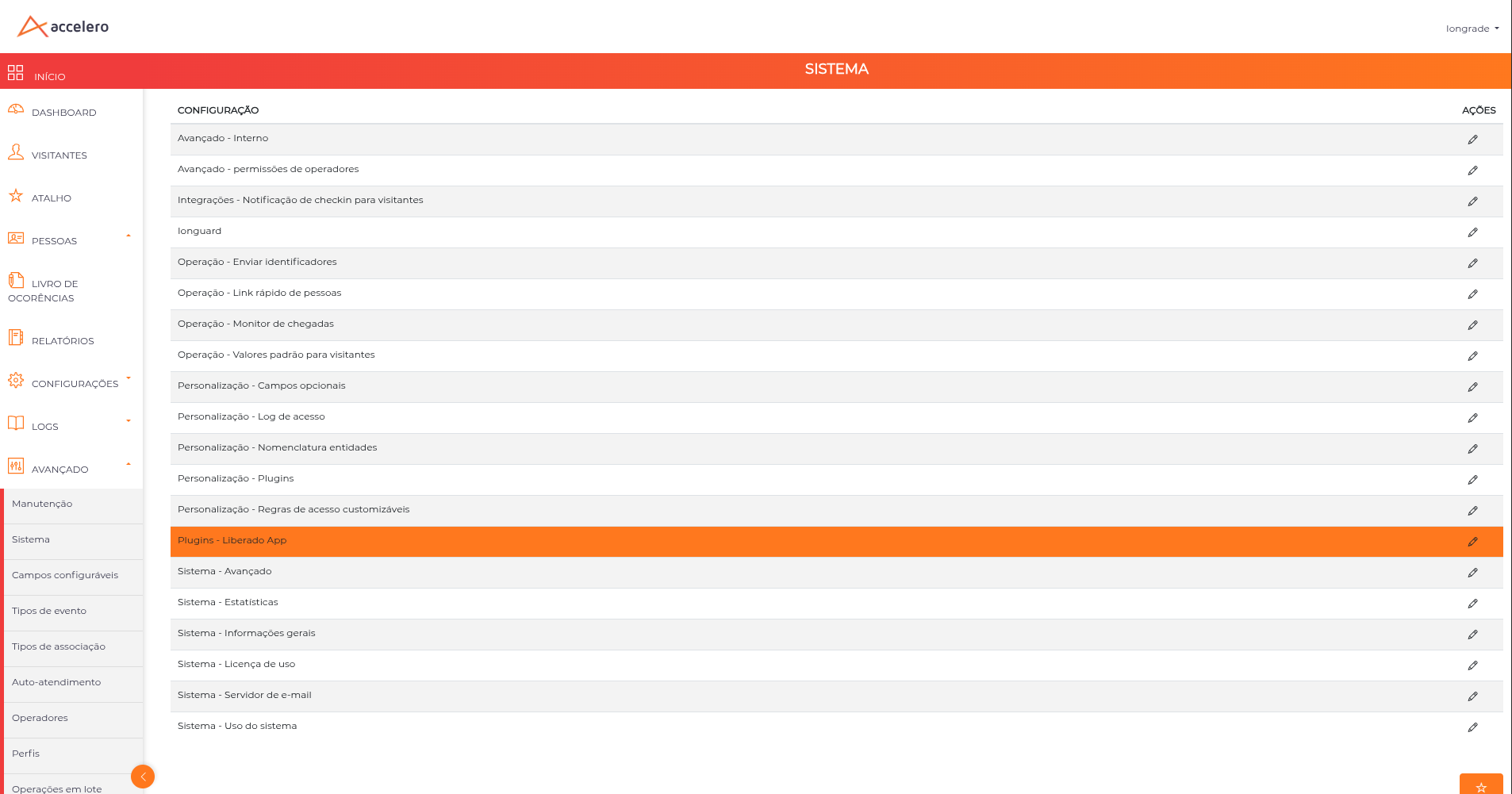
Navigation path: Advanced > System > Plugins - Liberado App
The screen has a single tab (General), with the connection details and the consumption controls.
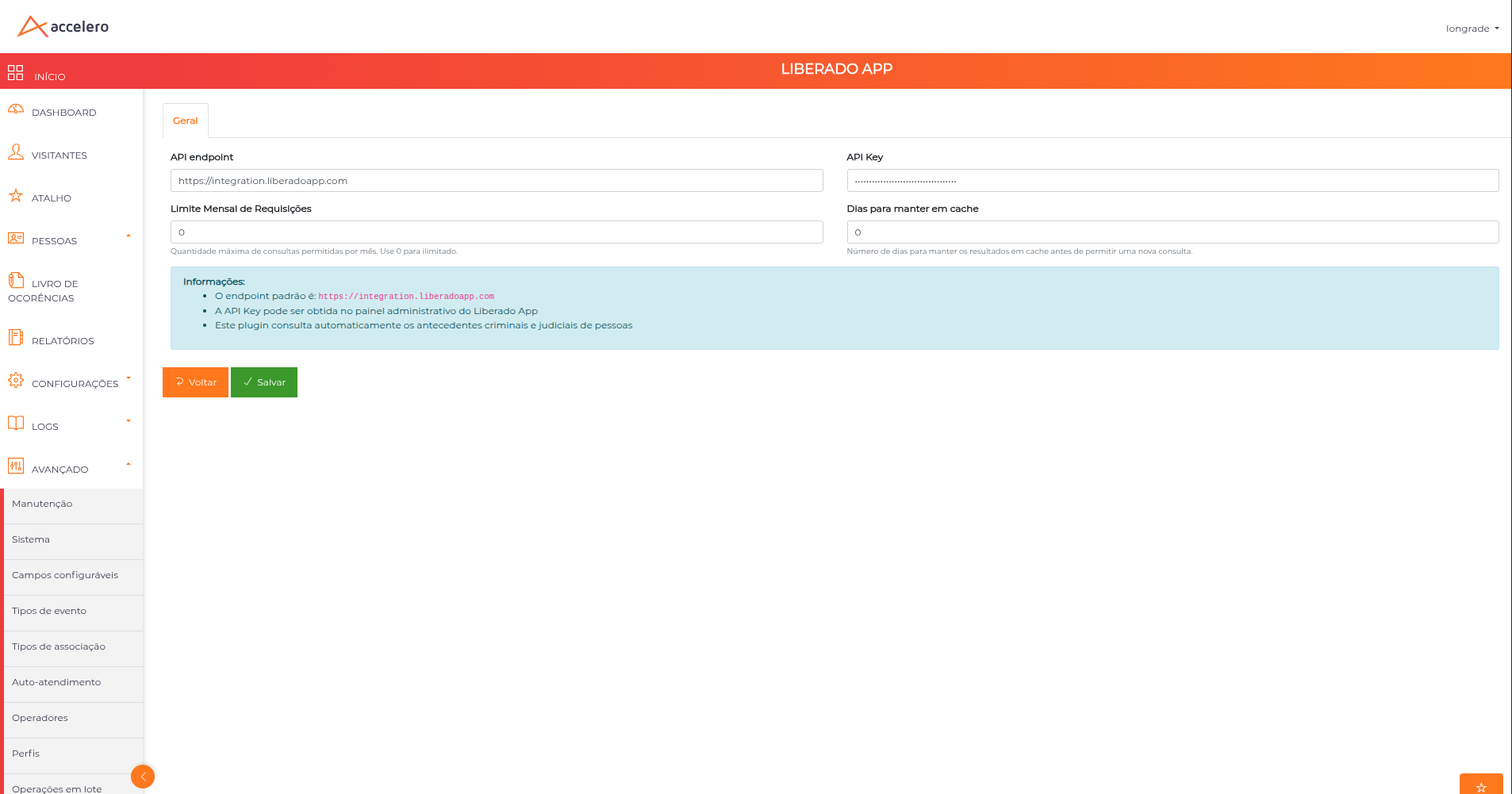
| Field | Description |
|---|---|
| API endpoint | Liberado App service address. Default value: https://integration.liberadoapp.com |
| API Key | Authentication key, obtained in the Liberado App admin panel |
| Monthly Request Limit | Maximum number of lookups allowed per month. Use 0 for unlimited |
| Days to keep in cache | Number of days a complete result is reused before a new lookup is allowed. Use 0 to always query |
Screen buttons
| Button | Function |
|---|---|
| Save | Persists the configuration |
| Back | Returns to the configuration list without saving |
The API Key is provided by the Liberado App service. Without the endpoint and the key configured, the badge is not loaded and the lookup reports that the plugin is not configured.
The badge states
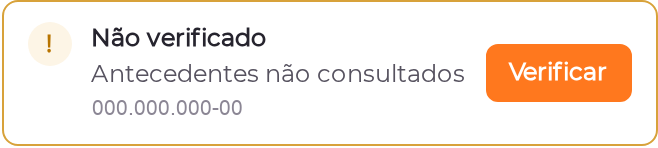
The badge answers, before any click, where the check for that CPF stands.
| State | When it appears | Action offered |
|---|---|---|
| Background check | There is no usable CPF in the form yet | — |
| Not verified | Valid CPF, no lookup on record. Amber outline | Verify |
| Querying Liberado App… | Lookup in progress, with the elapsed time | — |
| Nothing on record | Every check finished with no finding. Shows how many there were and how long ago | Details |
| Findings found | Some check flagged something. Shows the count | View findings |
| Incomplete verification | The service has not finished everything. Hatched background, and it names the missing check | Query again |
| Verified N days ago | The result is past the configured cache window | Re-check |
| Monthly quota exhausted | The limit ran out, with the date it resets | — |
| Unable to query | The lookup failed, with the cause | Try again |
The Incomplete verification state is hatched on purpose: it is neither green nor red, because it means "I don't know yet". It is the normal state of the first lookup of a CPF the service has never seen. The action offered is to query again, and that result is never kept in cache.
The quota exhausted notice only appears in the states where the operator still needs to run a lookup (not verified, incomplete, outdated). For someone who already has the verdict on screen, it would replace useful information with irrelevant information.
Running a lookup
- Enter the CPF in the document field (11 digits).
- Trigger the badge action (Verify, Re-check or Query again).
- Wait. The badge shows the elapsed time and warns when the service is taking longer than usual.
- Read the verdict on the badge and open the panel if you need the detail.
- Finish by saving the record.
The lookup requires a CPF with 11 digits and a valid check digit. Incomplete numbers, numbers with all identical digits or an invalid check digit are rejected before the service is called — previously, a mistyped number turned into a paid lookup and came back empty.
When the response carries the person's name, it fills the Name field only if the field is empty. An already filled record is not overwritten.
The detail panel
The panel opens through the Details or View findings actions and shows the complete result. Opening the panel does not consume a lookup: it reads what is stored. Closing the panel does not erase the verdict either — the badge keeps showing the result.
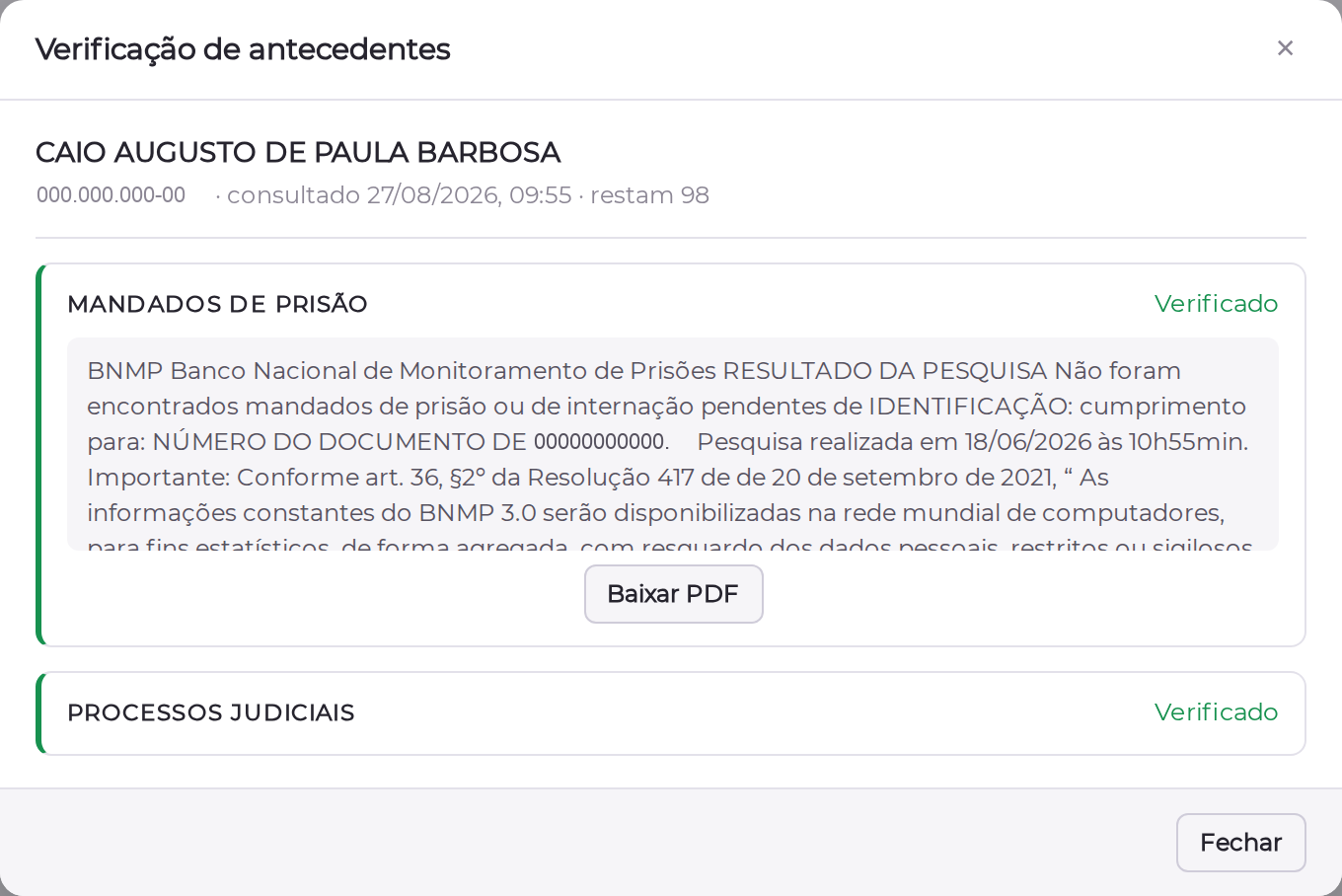
At the top you see the name that was checked, the CPF, when it was looked up, whether the data came from cache and how many lookups remain in the quota. Below that, one card per check.
| Check | What it indicates |
|---|---|
| Arrest warrants | A BNMP query (the Brazilian national prison monitoring database). The content is a text report, and the PDF carries the official search result |
| Court cases | Court cases associated with the CPF, presented as cards |
It is a paragraph made almost entirely of standard legal text, and the piece that decides (whether there is a warrant or not) is already in the check status. Use View the full report when you need the whole text.
Court case card
Each case is presented with the data needed to interpret it without leaving the screen:
| Information | Content |
|---|---|
| Subject | The main subject of the case |
| Status | The case status. An archived case is marked in a calm tone |
| Court | Court, court type and district, with the date of the last movement |
| Number | In CNJ format (NNNNNNN-DD.YYYY.J.TR.OOOO), so it can be checked against the real case |
| The person's role | Appears as [role], plus the polarity: active party, passive party or neutral party |
| Parties | An expandable list of the parties, with the person who was checked highlighted |
An heir in a probate case and a defendant in a criminal case used to arrive with exactly the same red. The card states the role of the person who was checked, which completely changes how the finding reads.
Downloading the document
When the check has an official document, the panel offers Download PDF.
| Situation | What the panel shows |
|---|---|
| Document available and the operator may download | Download PDF button |
| Document available, operator without permission | Notice "Document available — you do not have permission to download it" |
| Expired document | Notice "Document expired — run the lookup again to generate a new one" |
The PDF is generated by the service with an expiration date. Once it passes, the button gives way to the expired document notice, instead of a link that would open an error. Running the lookup again generates a new document.
Decision record
When there is a finding or the verification is incomplete, the panel asks the operator to record what they decided.
| Option | Behavior |
|---|---|
| Release anyway | Requires a mandatory reason |
| Do not release | Reason optional |
| Close without recording | Allowed. That non-decision also goes to the log |
The alert does not block the release: a front desk screen cannot have a locked exit. The friction exists so that recording is the shortest path, but the way out stays open and auditable.
Lookup cache
The result is stored on the person record itself. The Days to keep in cache field defines how many days it is reused.
| Value | Behavior |
|---|---|
| 0 (default) | Cache disabled. Every check goes to Liberado App |
| greater than 0 | Within the window, the stored result is reused without spending a request. After the window, the badge switches to Verified N days ago and offers Re-check |
A result the service has not finished processing does not go into cache, at any age. Previously, with cache on, an incomplete result was frozen for all the configured days — and read as "everything is clean".
A longer cache reduces request consumption but shows an older result. In environments with recurring visitors, a few days of cache saves a lot; for critical checks, prefer always querying.
Monthly request limit
The Monthly Request Limit field sets the ceiling of paid lookups per month. The counter resets on the first day of each month.
| Value | Behavior |
|---|---|
| 0 (default) | Unlimited. Usage is not counted |
| greater than 0 | Each lookup that reaches the service consumes 1 from the limit. Once the ceiling is hit, new lookups are blocked until the start of the next month |
The following do not consume quota: badge reads, detail panel openings, lookups served from cache and lookups that failed. Previously, a timeout or a network error consumed a customer request for a response they never received.
The panel shows how much quota is left, and the badge warns when it is running low.
Permissions
The plugin creates two permissions, granted under Advanced > Profiles.
| Permission | Internal function | What it enables |
|---|---|---|
| Run Liberado App searches | liberadoAppManage | See the badge, run lookups and open the detail panel |
| Download Liberado App documents | liberadoAppDownload | Download the official PDF (BNMP certificate, court report) |
There are front desk operators who need to see the result to decide on entry, but should not take the certificate away. Downloading requires the query permission as well: downloading without seeing the result is not a use case.
Up to version 2.2.0, being able to query was being able to download. On upgrade, every profile that already has liberadoAppManage receives liberadoAppDownload automatically, and the administrator revokes it where they do not want it. That way nobody loses access silently.
Without the download permission, the document URL does not leave the server — hiding the button is not enough, because the address is a pre-signed link. The operator is still told the document exists, so they know who to ask.
Audit trail
Every lookup writes a record to the person's access log, with the LiberadoAPP Search action.
| Information recorded | Detail |
|---|---|
| Operator | Who ran the lookup |
| CPF (masked) | Stored partially (e.g. ***.***123-45) |
| Origin | Whether the result came from a new lookup or from cache |
The decisions recorded by the operator (release anyway, do not release, or close without recording) go to the event log.
If the CPF that was looked up does not exist in ACCELERO yet, the lookup creates the person with name, CPF and document type, and stores the check result on the record.
Use cases
Checking background when registering a person
- Under
People > All > Edit, on the General data tab, fill the Document field with the CPF. - The badge switches to Not verified. Click Verify.
- Read the verdict on the badge and open Details if you need the content.
- If there is a finding, record the decision in the panel.
Checking background at visitor entry
- Under New Event, in the Visitor section, enter the CPF in the search field.
- Trigger the badge and evaluate the result before releasing entry.
- If there is a finding, record Release anyway with the reason, or Do not release.
Keeping service consumption under control
- Under
Advanced > System > Plugins - Liberado App, set the Monthly Request Limit according to your contract. - Adjust Days to keep in cache based on how often people return.
- Track the remaining quota in the detail panel.
Best practices
- Restrict the permissions: grant Run Liberado App searches only to those who need to run lookups, and revoke Download Liberado App documents from anyone who should not take the document away — this is sensitive data.
- Confirm new CPFs: on the first lookup, the check may come back incomplete. The badge says so clearly; query again before drawing a conclusion.
- Use cache for recurring CPFs: in environments with frequent re-entry, a few days of cache reduces cost and speeds up the check.
- Set a monthly limit: it prevents consumption from overrunning your contract with the service.
- Follow the logs: lookups are recorded as LiberadoAPP Search, allowing you to audit who checked whom and when.
Troubleshooting
The badge does not appear
Possible causes:
- The operator does not have the Run Liberado App searches permission.
- The plugin is not configured (endpoint or API Key blank).
- The plugin is not enabled.
Solution:
- Confirm the
liberadoAppManagepermission on the operator's profile. - Review API endpoint and API Key under
Advanced > System > Plugins - Liberado App. - Check with IONGRADE whether the plugin is installed and active.
The lookup returns an error
The plugin translates the failure by cause, instead of showing technical text:
| Message | Cause |
|---|---|
| "The Liberado App service did not respond" | No response from the service, or no connectivity from the ACCELERO server |
| "Liberado App rejected the credentials" | Invalid or revoked API Key |
| "Liberado App did not find this CPF" | The CPF was not found in the service. Check the number entered |
| "The Liberado App service responded with an error" | A failure on the service side |
| "Liberado App is not configured" | Endpoint or API Key blank |
Solution: review the credentials and test connectivity from the ACCELERO server to the configured endpoint.
The badge shows "Incomplete verification"
Cause: the service has not finished one of the checks. This is the normal case for a CPF looked up for the first time.
Solution: use Query again in a few moments. That result is not kept in cache, so the new lookup does reach the service.
"Monthly quota exhausted"
Cause: the number of lookups this month reached the Monthly Request Limit.
Solution: wait for the month to turn over (the badge shows the date the quota resets) or raise the limit in the configuration. Use 0 for unlimited.
The result looks outdated
Cause: the result is past the cache window. The badge shows Verified N days ago.
Solution: click Re-check. To prevent this, reduce the cache days or use 0.
The "Download PDF" button does not appear
| What the panel shows | Cause | Solution |
|---|---|---|
| "Document available — you do not have permission to download it" | The liberadoAppDownload permission is missing | Grant the permission on the profile, under Advanced > Profiles |
| "Document expired" | The document link has expired | Run the lookup again to generate a new document |
| Nothing | The check returned no document | There is no PDF for that check |
"Session expired"
Cause: the ACCELERO session dropped.
Solution: reload the page and log in again.
Integration with other modules
People
The lookup acts on the People record: it uses the CPF entered, stores the result in the person's metadata and fills the Name field when it is empty. If the CPF looked up does not exist as a person yet, the record is created with the returned data.
Events (Visits)
The badge is also added to the quick Events form, allowing you to check the visitor before releasing entry and to record the decision.
Operators and Profiles
Access to the feature is controlled by the Operators permissions assigned under Profiles.
Logs and Monitoring
Every lookup writes a record to the person's access log, identifying the search action and whether the data came from the service or from cache.
Next Steps
- People — Understand the record the lookup acts on
- Profiles — Configure who queries and who may download the document
- Events — See where the badge appears in the visit desk
- Logs and Monitoring — Track the record of the lookups performed
- Plugins — Learn more about the ACCELERO plugin system