Deskbee Integration (BeeBadge)
The Deskbee integration connects ACCELERO to the BeeBadge agent of the Deskbee space and reservation management platform. The agent runs on-premises, on the same network as the ACCELERO server, and consumes a set of REST endpoints exposed by this plugin to synchronize employees and confirmed reservations with physical access control — creating people, opening access windows, and issuing credentials (RFID and QR Code) automatically.
This integration is provided as a plugin (deskbee) and must be installed and enabled by the IONGRADE technical team. Contact support to check compatibility with your ACCELERO version.
Current plugin version: 1.0.4 — compatible with ACCELERO 2.17.0 or higher.
What the integration does
The plugin has no operational screens of its own: it exposes a REST API that Deskbee's BeeBadge agent calls. The flow is always from Deskbee to ACCELERO (Deskbee is the source of reservations and employees), except for the log query, in which Deskbee reads the accesses recorded in ACCELERO.
| Feature | What happens in ACCELERO |
|---|---|
| User synchronization | Creates, updates, or disables the Person corresponding to the Deskbee employee/visitor, including facial photo |
| Access grant (Grant) | Creates/updates an Event with the reservation validity window and links the person; issues credentials when provided |
| Credential issuance | Generates RFID and/or QR Code Cards from the reservation data, with its own validity per reservation |
| Access revocation (Revoke) | Cancels the event link, shortens the access window, and disables the person's Deskbee credentials |
| Access log query | Returns the people's passage events from a given time |
| Health Check | Lets the BeeBadge agent verify whether the integration is available and authenticated |
A space reservation made in Deskbee automatically becomes a physical access grant in ACCELERO — with no manual registration of people, events, or cards.
Configuration
Navigation path: Settings > Integrations - Deskbee
The screen has three tabs: Settings, Credentials, and Advanced.
Settings tab
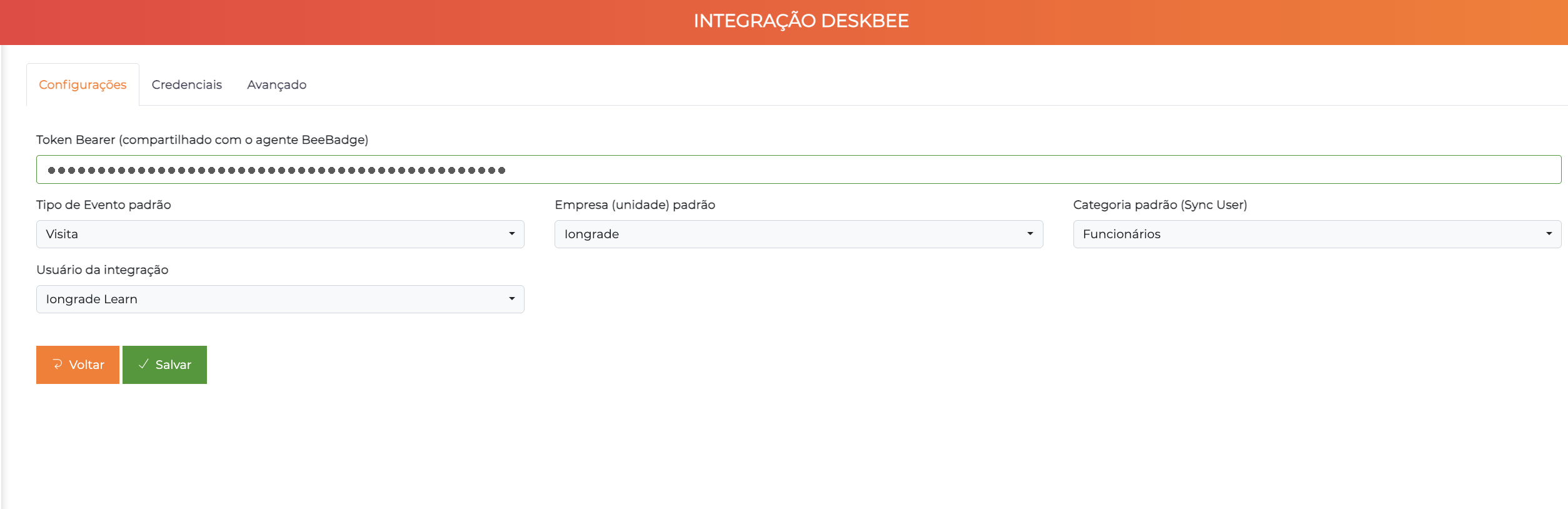
| Field | Description |
|---|---|
| Bearer Token (shared with the BeeBadge agent) | Token used to authenticate all Deskbee calls to the API (Authorization: Bearer <token>). Must be the same value configured in the BeeBadge agent |
| Default Event Type | Event type (EventoTipo) used when creating the access event for each reservation |
| Default Company (unit) | Company/unit where the event is recorded. Also used as the host (visited) of the link and as the person's default company in Sync User |
| Default category (Sync User) | Category (PessoaCategoria) assigned to the person when they are synchronized. Optional field |
| Integration user | ACCELERO user recorded as the executor of the plugin's operations (stored in the events). Optional field |
The Bearer Token is the integration's only authentication mechanism. Keep it secret and use a long, random value. Without the correct token, all calls return an authentication error.
Credentials tab
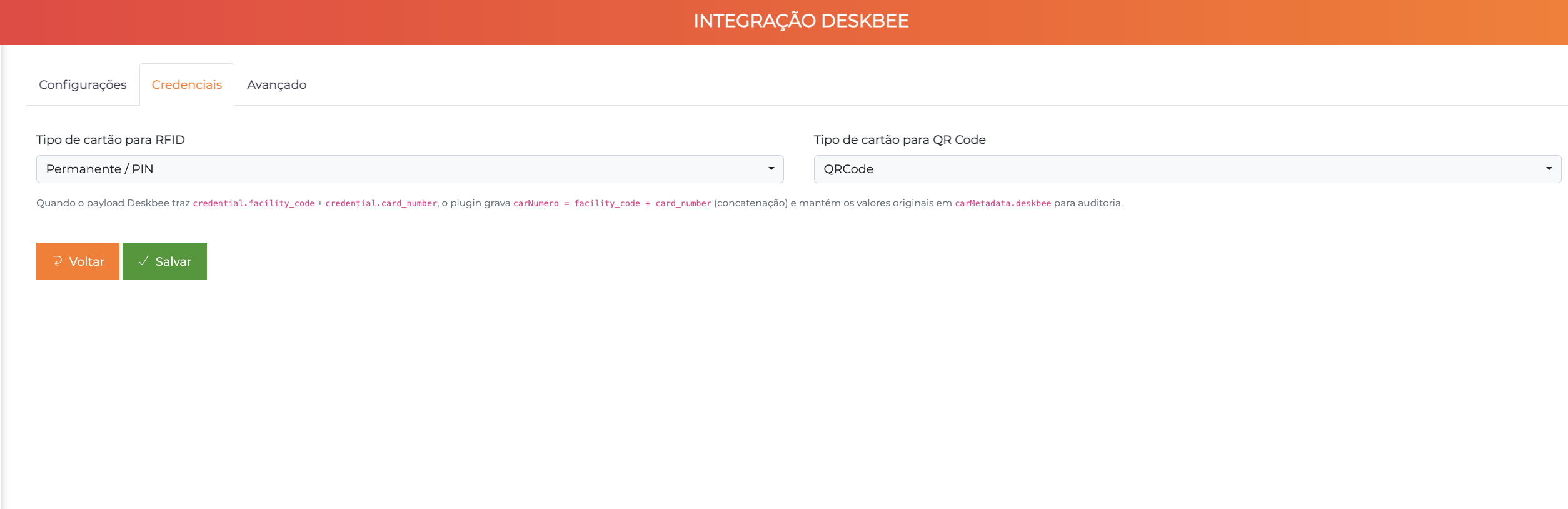
| Field | Description |
|---|---|
| Card type for RFID | Identifier type that represents the physical proximity card in the credentials received from Deskbee |
| Card type for QR Code | Identifier type used for QR Code credentials |
Both fields list the identifier types registered in your installation — each customer creates their own, with whatever names make sense for their operation. Choose here which one the integration should use for each kind of credential. In the example above, the proximity card is mapped to the Permanente / PIN type and the QR Code to the QRCode type.
When the Deskbee payload brings credential.facility_code + credential.card_number, the plugin stores the card number as the concatenation facility_code + card_number and keeps the original values for auditing.
Advanced tab
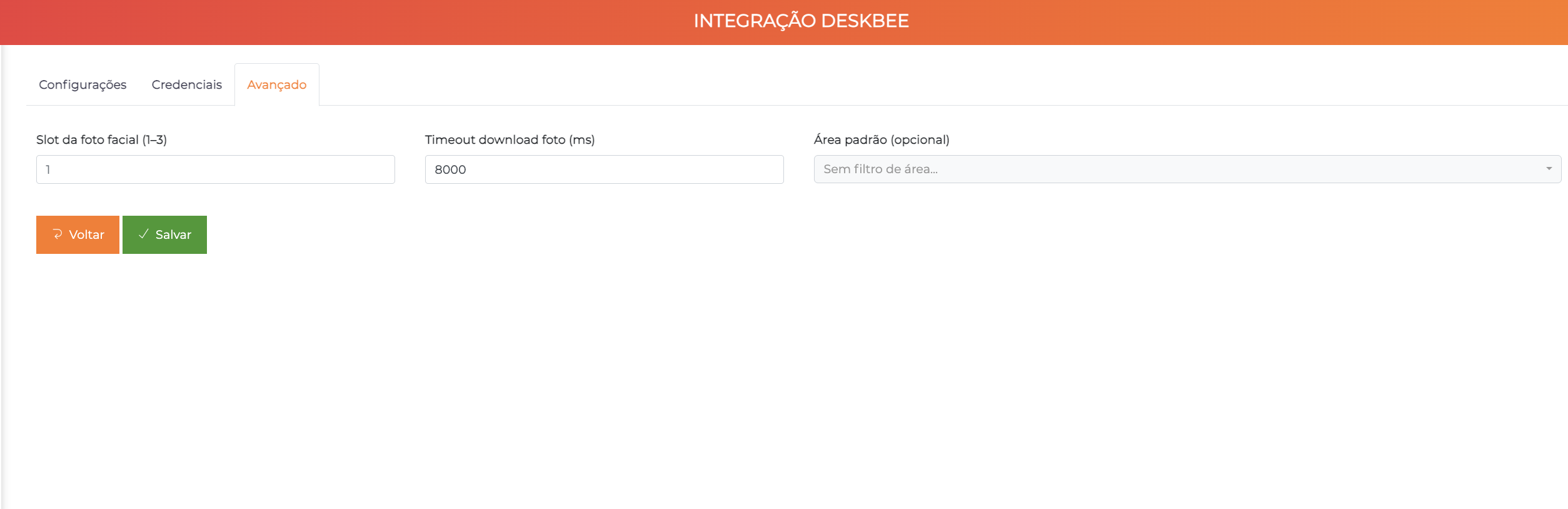
| Field | Description |
|---|---|
| Facial photo slot (1–3) | Person's photo slot where the image received from Deskbee is stored. Default: 1 |
| Photo download timeout (ms) | Maximum time (in milliseconds) to download the photo from the given URL. Default: 8000 |
| Default area (optional) | Area associated with the access. When empty, there is no area filter |
If the photo cannot be downloaded within the timeout, the person is saved anyway (without a photo) and a warning is recorded in the log. The Grant does not return an error because of this.
Screen buttons
| Button | Function |
|---|---|
| Save | Persists the configuration |
| Back | Returns to the settings list |
REST API
All endpoints are called by the BeeBadge agent and require the Authorization: Bearer <token> header with the configured Bearer Token.
| Operation | Method | Route |
|---|---|---|
| Health Check | GET | /api/deskbee/health |
| Access grant (Grant) | POST | /api/deskbee/access/grant |
| Access revocation (Revoke) | POST | /api/deskbee/access/revoke |
| User synchronization (Sync User) | POST | /api/deskbee/users/sync |
| Access logs | GET | /api/deskbee/access/logs?since=<ISO8601> |
Required payload fields
As of version 1.0.4, the enrollment (enrollment) and the Deskbee identifier (identifier) are optional — Deskbee now uses the email as the user's unique identifier. These fields may be omitted or empty ("") without causing a validation error.
| Operation | Required fields | Optional fields |
|---|---|---|
| Grant | name, email, startDate, endDate | enrollment, identifier, photo, credential, qrcode |
| Revoke | name, email | enrollment, identifier |
| Sync User | action, name, email | enrollment, identifier, photo |
When the identifier is not sent, the whole link relies on the email. If two people share the same email in the database, matching becomes ambiguous. Always prefer sending the identifier when it exists.
Status codes
| Code | Meaning |
|---|---|
200 | Success |
400 | Invalid payload (JSON, schema, or dates) |
401 | Missing/invalid token or missing configuration |
404 | Person not found (Revoke only) |
500 | Internal error (recorded in the application log) |
The configuration of the endpoint, the token, and the scheduling of calls are done on the Deskbee BeeBadge agent side. In ACCELERO, you just enable the plugin and fill in the configuration screen. The full contract specification is defined jointly by IONGRADE and Deskbee.
How data is mapped
The plugin translates Deskbee concepts into ACCELERO entities.
| Deskbee concept | Entity in ACCELERO |
|---|---|
| Employee / visitor | Person |
Identifier (identifier, UUID) — optional | Stored in the person's metadata. When it is not sent, the email takes over as the stable key |
Enrollment (enrollment) | Person code (pesCodigo) |
| Confirmed reservation (Grant) | Event + person link, with the reservation validity window |
| Person's default company | Pre-authorized person–company link (created only in Sync User) |
| RFID credential | Card of the type configured for RFID |
| QR Code | Card of the type configured for QR Code |
| Facial photo | Person's photo in the configured slot |
Person matching
When receiving an employee from Deskbee, the plugin looks for an existing person in this order of priority:
- Deskbee identifier (UUID) — stable and preferred key
- Enrollment (
enrollment/pesCodigo) - Email (
pesEmail)
If no criterion matches, a new person is created.
The Deskbee identifier (UUID) does not change even if the person's name, email, or enrollment is altered. Using it as the first criterion avoids duplicates when this data is updated.
Stable linking key
Besides locating the person, the plugin needs a fixed value to find again what it created itself — the event to update on a new Grant, and the links and credentials to cancel on a Revoke. That value is the stable key, stored in the metadata of the person, the event, the link, and each card:
- The Deskbee identifier, when it is sent;
- The normalized email (trimmed and lowercased), when the identifier is not sent.
The stable key is what guarantees the idempotency of the Grant (re-sends update the same event instead of duplicating it) and the operation of the Revoke. The person matching order described above does not change — only the value used internally to link the records.
User synchronization (Sync User)
Keeps the ACCELERO people registry aligned with Deskbee employees. The operation receives an action: created, updated, or removed.
| Action | Effect in ACCELERO |
|---|---|
| Created / Updated | Creates or updates the person (name, email, enrollment, photo), assigns the configured default category, and creates the link with the default company |
| Removed | Disables the person — records and credentials are not deleted, only deactivated |
The synchronized person is an ordinary ACCELERO person — identical to one registered manually, except that the data comes from Deskbee. The name, the enrollment (the Código field) and the email come from the payload:
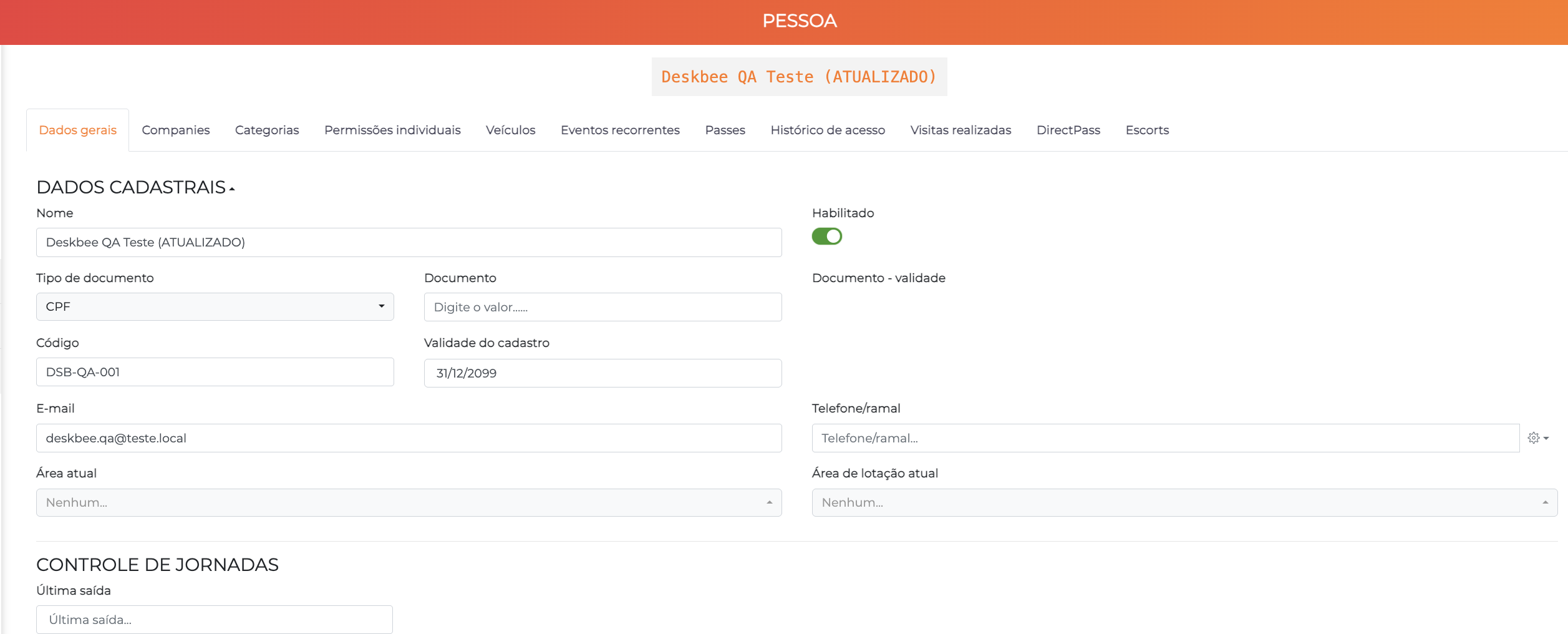
The facial photo received is stored in the slot configured on the Advanced tab (by default, Foto 01):
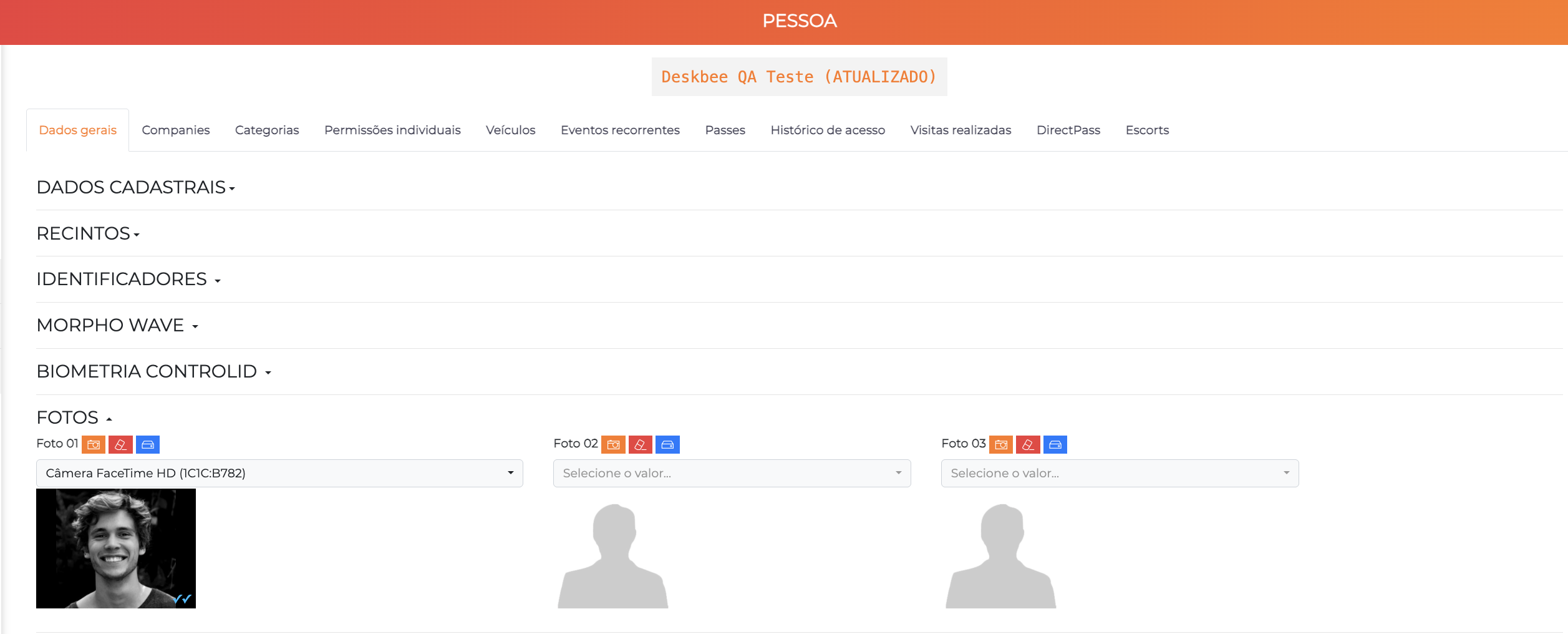
Removal (deleted)
When it receives the removed action, the plugin merely switches off the person's Habilitado (Enabled) field. Nothing is deleted — record, history, and credentials stay in the database, only deactivated:
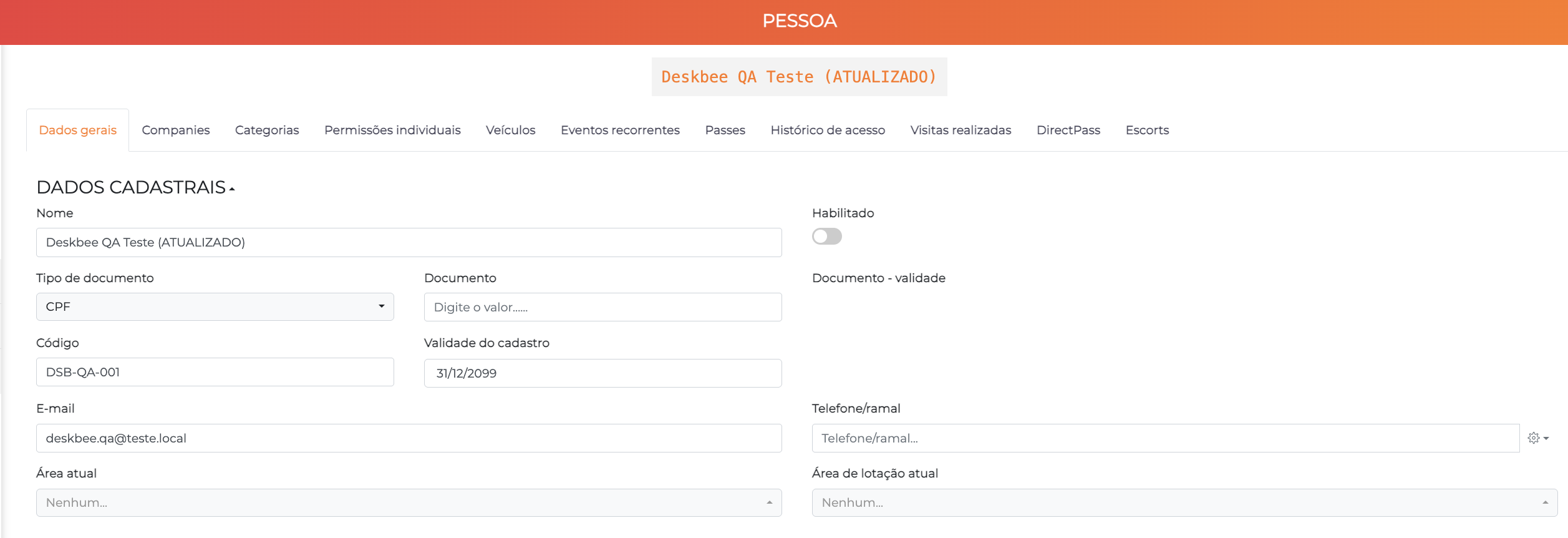
After a removal, resending created or updated for the same person does not re-enable them: the registration data is updated, but the Habilitado field stays off. Reactivation must be done manually on the People screen. Since the record is never deleted, it is always possible.
Access grant (Grant)
Each confirmed reservation in Deskbee triggers a Grant, which creates or updates the person's access Event with the reservation validity window (startDate / endDate).
The same route serves two scenarios, depending on the fields filled in the payload:
| Scenario | Fields sent | What the plugin does |
|---|---|---|
| Employee (host) | Name, email, and validity window (enrollment and identifier when available) | Creates/updates the person and opens the access window. Photo and credentials usually already came earlier via Sync User |
| Visitor (guest) | Same, plus QR Code and/or RFID credential | Same, and additionally creates/updates the cards (RFID and/or QR Code) |
One event per person, multiple credentials
- Single event: each person has a single active event. Repeated Grants of the same reservation update the same event (the operation is idempotent — re-triggers do not create duplicates, they just adjust the window).
- Multiple simultaneous credentials: a person can accumulate several active cards at the same time (e.g., a visitor with two distinct reservations, each with its own QR Code). Resending the same card number updates the existing card; a different number creates a new one, preserving the previous ones. Each card has its own validity, inherited from the reservation that originated it.
How the event appears in ACCELERO
The event generated by the integration is an ordinary event — the same one that would be created manually from the scheduling screen. It can be queried and audited normally under Events, where the reservation appears as follows:
| Event field | What the integration fills in |
|---|---|
| Type | The default Event Type configured in the integration |
| Responsible | The configured integration user |
| Start / End | The reservation window (startDate / endDate) |
| Visitors | The person from the reservation, with authorized status |
| Hosts | The configured default company (unit), as the host of the link |
The credentials issued for the reservation live in the person's record, in the Identifiers section.
Access revocation (Revoke)
When a reservation is canceled in Deskbee, the Revoke:
- Cancels the person's link with the event;
- Shortens the event window to the current moment (ending the access);
- Disables all of the person's Deskbee credentials.
Today, revocation disables all of the person's Deskbee credentials at once — there is no selective revocation per card or per specific reservation. If the person has more than one active reservation, the Revoke ends access as a whole.
Access logs
The logs endpoint lets Deskbee query the passages recorded in ACCELERO from a given time (since, in ISO 8601 format).
Each returned event brings: person's name, internal identifier, enrollment, email, Deskbee identifier, event date/time, event type (access granted or denied), and the name of the device (channel) where it occurred.
The query returns passage events for all people from the given time, with a limit of 500 records per call. The Deskbee identifier is only filled for people synchronized by the integration; for the others, it comes blank.
Use cases
Enable the integration for a unit
- Request that IONGRADE install the
deskbeeplugin. - Generate a long, random Bearer Token and configure it on both sides (ACCELERO and the BeeBadge agent).
- In
Settings > Integrations - Deskbee, on the Settings tab, fill in the token, the Default Event Type, and the Default Company (unit). - If necessary, adjust the card types on the Credentials tab and the photo parameters on the Advanced tab.
- Validate the channel with a Health Check call from the BeeBadge agent.
Grant access for a reservation
- The employee makes a reservation in Deskbee.
- Upon confirmation, the BeeBadge agent calls the Grant.
- ACCELERO creates/updates the person, opens the event with the reservation window, and issues the provided credentials.
- The person now has physical access during the reservation validity.
Cancel a reservation
- The reservation is canceled in Deskbee.
- The BeeBadge agent calls the Revoke.
- ACCELERO ends the event window and disables the person's Deskbee credentials.
Best practices
- Strong, secret token: use a long, random token, unique to this integration, and change it if there is any suspicion of a leak.
- Dedicated company and event type: create an Event Type and use a specific unit for Deskbee accesses, making identification and auditing easier.
- Dedicated integration user: configure a specific ACCELERO user (e.g., "Deskbee Integration") as the executor, instead of a named account.
- Sync before granting: make sure employees are synchronized (Sync User) before reservations, so that photo and registration data are already present at the time of the Grant.
Troubleshooting
All calls return an authentication error (401)
Possible causes:
- The BeeBadge agent's token differs from the one configured in ACCELERO.
- The Bearer Token field is empty or the integration configuration is incomplete.
Solution:
- Confirm that the token is identical on both sides (no extra spaces).
- Check the Settings tab of the
Settings > Integrations - Deskbeescreen.
Duplicate person after synchronization
Possible causes:
- The employee was sent without a Deskbee identifier, and the enrollment or email changed between calls.
Solution:
- Make sure the agent always sends the Deskbee identifier (UUID).
- Standardize enrollment and email in the source registry.
Person created without photo
Possible causes:
- The photo URL was unavailable or the download exceeded the time limit.
Solution:
- Increase the Photo download timeout (ms) on the Advanced tab.
- Check whether the ACCELERO server can reach the photo URL.
- Resend the person's Sync User after fixing access to the image.
Access remains active after canceling a reservation
Possible causes:
- The Revoke was not triggered by the agent, or the person was not found (404).
Solution:
- Confirm that the BeeBadge agent called the Revoke.
- Check whether the identifier/enrollment/email sent correspond to an existing person.
Integration with other modules
People and Categories
The integration creates and updates People and can assign a default category to each one. The registry is kept in sync with Deskbee on each operation.
Cards / Credentials
RFID and QR Code credentials are issued as cards. See Identifiers to understand the card types used by the integration.
Events
Each reservation becomes an Event with the reservation validity window.
Logs and Monitoring
The passages reported by the logs endpoint correspond to the events recorded in Logs and Monitoring.
Next Steps
- People — Understand the registry maintained by the integration
- Identifiers — Learn how the issued cards work
- Events — See how reservations become access events
- Logs and Monitoring — Understand the events queried by Deskbee
- Plugins — Learn more about the ACCELERO plugin system