External Meal Reservations
The Reservas Externas de Refeição (External Meal Reservations) plugin opens the cafeteria only to people who reserved a meal in a third-party app. Every day, at the time you set, it queries the customer's reservation API, finds each person by CPF and assigns a category with an expiry. When the expiry passes, Accelero denies access, and a cleanup routine removes the expired links the plugin itself created.
This page explains what the plugin provides, each screen and field, the meaning of each situation and what happens day to day.
The plugin screen exists only in Portuguese. Labels are shown literally in Portuguese, with an English gloss in parentheses the first time each one appears on this page.
Navigation path: Avançado > Sistema > Reservas Externas de Refeição (Advanced > System > External Meal Reservations)

Do not confuse this with the Reserva de Refeitório (Cafeteria Reservation) plugin, where people reserve through a public Accelero link. Here the reservation is made elsewhere, and Accelero only receives the day's list.
What the plugin provides
| Feature | What it does |
|---|---|
| Daily automatic query | Downloads the day's list at the configured time and retries on its own if the API fails |
| Category with an expiry | Gives the person the chosen category, which expires at the configured time |
| Sending to devices | Takes the person to the facial devices through Accelero's normal flow when they receive the category, and removes them when the category goes away |
| Simulation | Shows who would be granted access, without saving anything |
| Manual run | Runs the query right away, through the same path as the automatic one |
| History | Records each run, with totals and people by situation |
| Daily cleanup | Removes the expired links created by the plugin. A category given by hand is never touched |
| Notices | Notifies an Accelero user when something prevents the day's release |
The plugin does not create people, does not register photos, has no reservation or menu screen and does not choose devices: the category defines where the person can enter.
How it works
Before turning it on
The plugin does not configure these items. Confirm all of them before turning it on:
- The chosen category grants access to the cafeteria area.
- With Atualizar equipamentos (Update devices) on, the category is listed in Categorias que devem possuir reconhecimento facial (Categories that must have facial recognition) of the Control iD integration, and the device's category list contains it or is empty.
- Sempre identificar usuários (Always identify users) is on in the Control iD integration, so Accelero decides the passage.
- The cafeteria controller operates online.
- The Accelero background process is running.
The Accelero option that deletes expired categories can stay as it is. The plugin cleanup does not depend on the link still existing.
The plugin window
Click the item in the Sistema (System) list. The configuration opens in a window over the page, with four tabs:
| Tab | What it is for |
|---|---|
| Conexão (Connection) | API address and token, turning the plugin on and testing the call |
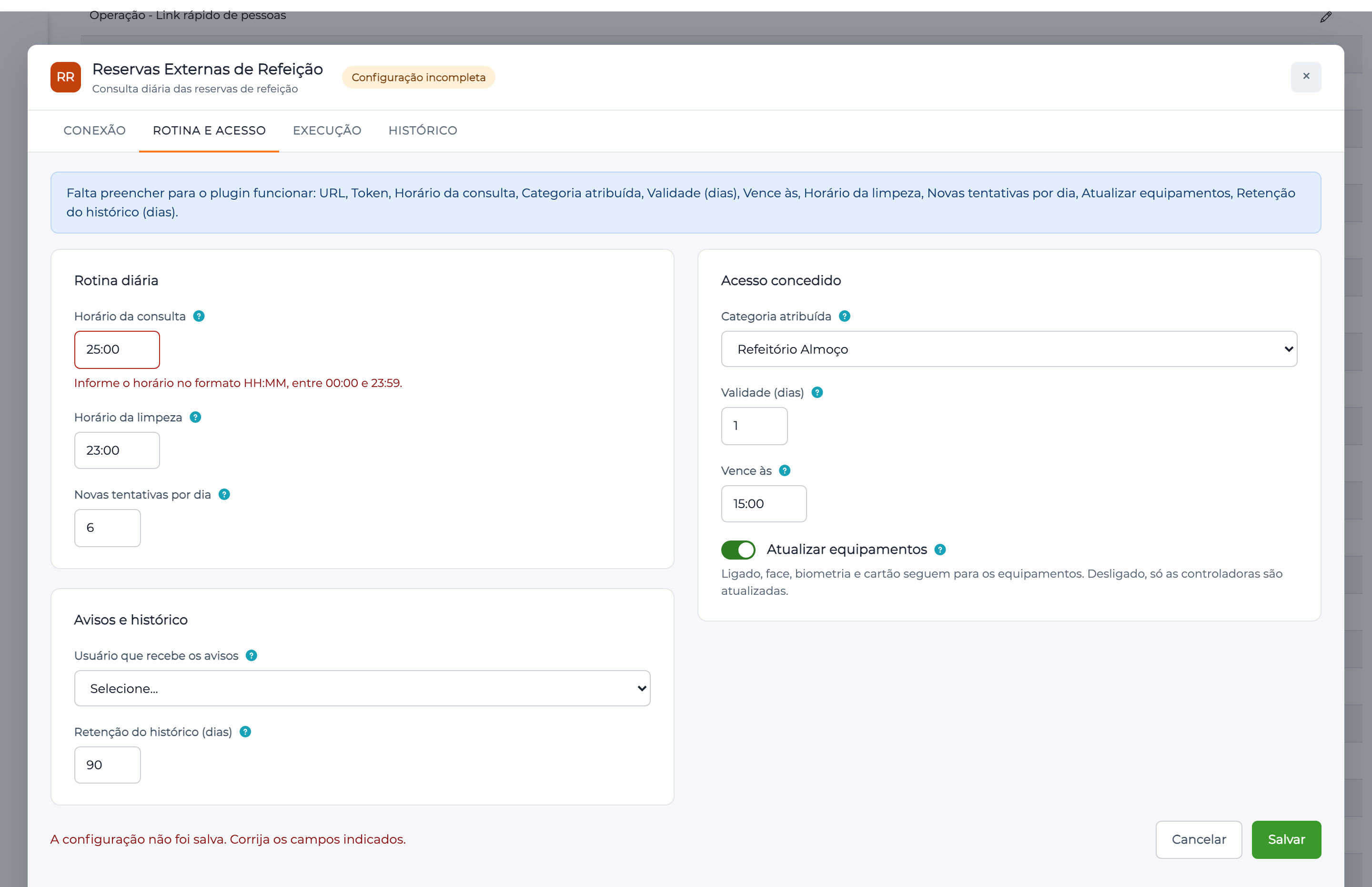
| Rotina e acesso (Routine and access) | Times, category, expiry and notices |
| Execução (Execution) | Process status, simulating and running now |
| Histórico (History) | What happened in each run, person by person |
The badge next to the title shows the plugin state:
| Badge | Meaning |
|---|---|
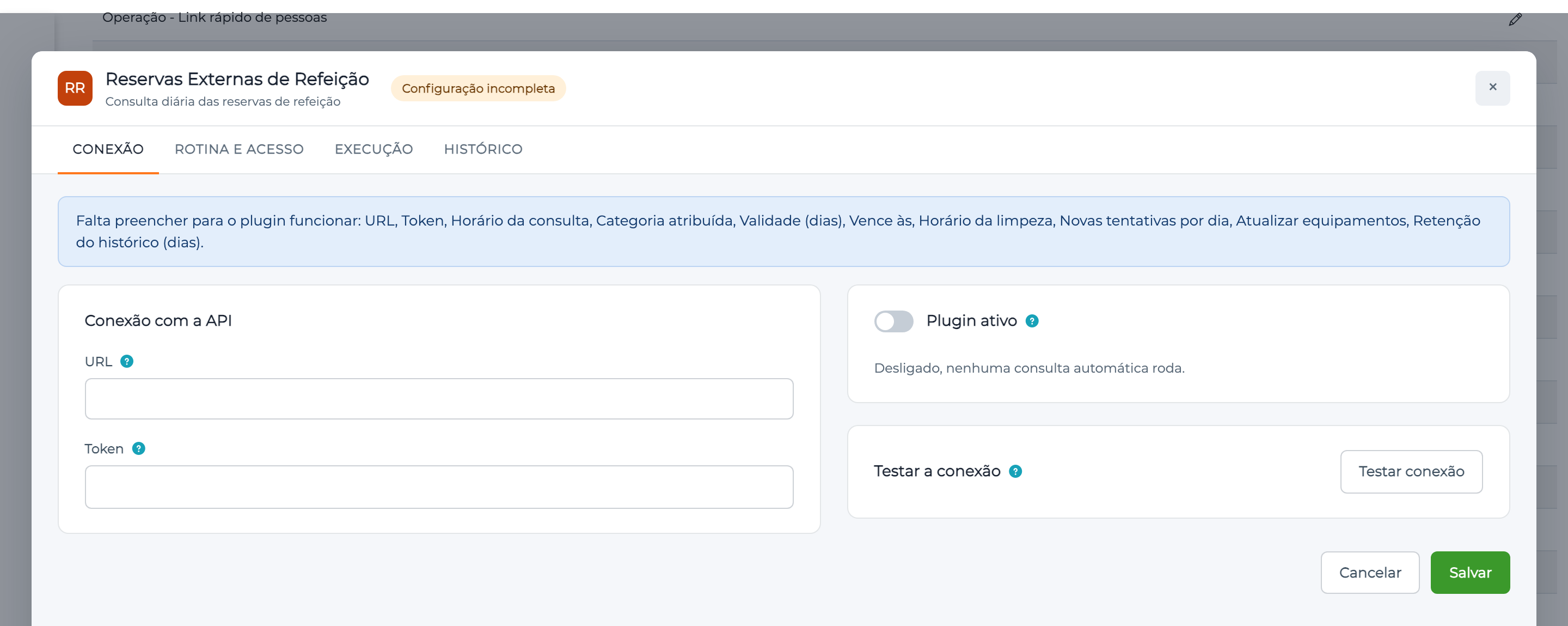
| Configuração incompleta (Incomplete configuration) | A required field is missing. The plugin stays stopped |
| Desligado (Off) | Complete configuration, with Plugin ativo (Active plugin) off. No routine runs on its own |
| Ativo (Active) | Query and cleanup run at the configured times |
While something is missing, the window lists it under Falta preencher para o plugin funcionar (Fill in to make the plugin work):
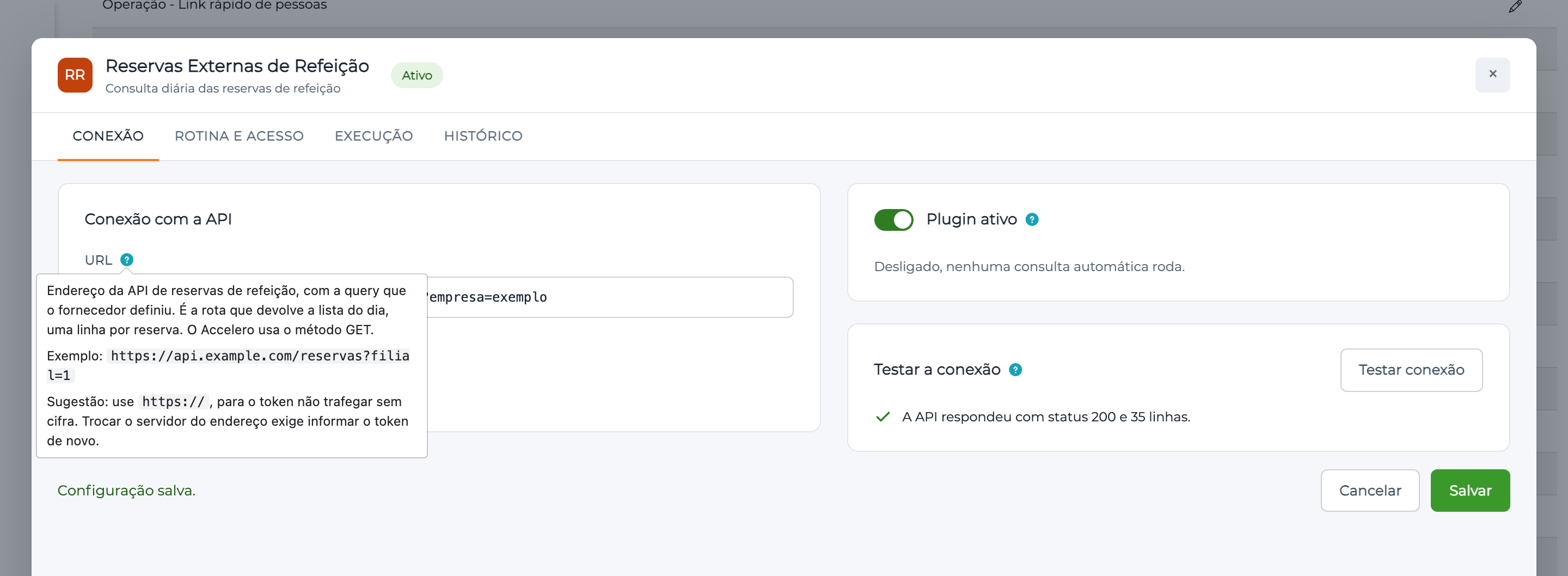
Every field has a question mark. Hover over it to see what the field is for, an example and a suggested value:
Permissions. There are two dedicated permissions, and the tabs depend on them:
| Permission | Grants | Visible tabs |
|---|---|---|
reservaexternaConfig | Configuring | Conexão and Rotina e acesso |
reservaexternaRun | Testing, simulating, running and viewing the history | Execução and Histórico |
Users without the Accelero settings permission do not see the item in the Sistema list.
Conexão tab
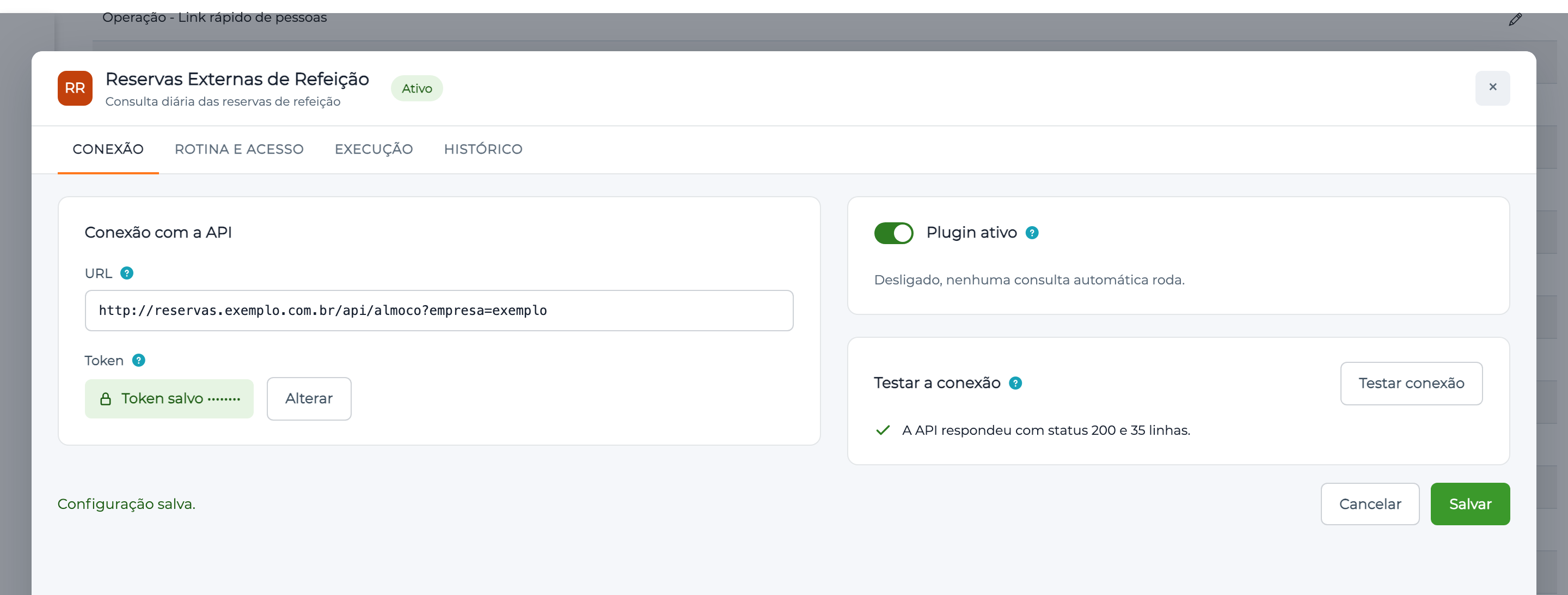
| Field | What it means |
|---|---|
| URL | Full API address, starting with http:// or https://, including the query, if any. Accelero calls it with GET |
| Token | Value sent in the Authorization header, with no prefix. It is stored encrypted and the window shows only a mask, with the Alterar (Change) button. To keep the current token, leave the field alone |
| Plugin ativo | Turns on the automatic routine. Starts off |
Testar conexão (Test connection) makes only the call, with the saved URL and token, and reports the status and the total of lines: it does not assign a category or write to the history. With unsaved changes the button is disabled: save first.
If you change the server (host) of the URL, the save is refused with the message O servidor do endereço mudou. Informe o token novamente. (The address server changed. Enter the token again.) This way the stored token never goes to another server.
If the token cannot be read from the database, the run and the test fail with O token não está disponível. Informe o token novamente. (The token is not available. Enter the token again.) The plugin never queries the API with an empty token.
Expected API response format
The API must answer 200, with UTF-8 text (LF or CRLF line endings, with or without BOM). Each line follows this model:
CPF DD/MM/YYYY HH:MM other fields
Invented example:
12345678909 04/11/2026 12:00 sample meal
| Part | Rule |
|---|---|
| CPF | Exactly 11 digits, no punctuation. The check digit is not verified |
| Date | DD/MM/YYYY, and it must be the day of the query |
| Time | Must start with a real time, from 00:00 to 23:59. The value is not used: the configuration defines the expiry |
| Rest | Discarded. The name and the other fields are never saved |
A CPF repeated in the list counts once. Lines outside this format are ignored and counted in the history:
| Count | Line it applies to |
|---|---|
| Linhas com formato inválido (Lines with an invalid format) | Does not follow the model, for example, no 11-digit CPF |
| Linhas de outra data (Lines from another date) | The date is not the day of the query |
| Linhas sem horário de refeição (Lines with no meal time) | Has text in place of the time |
Rotina e acesso tab
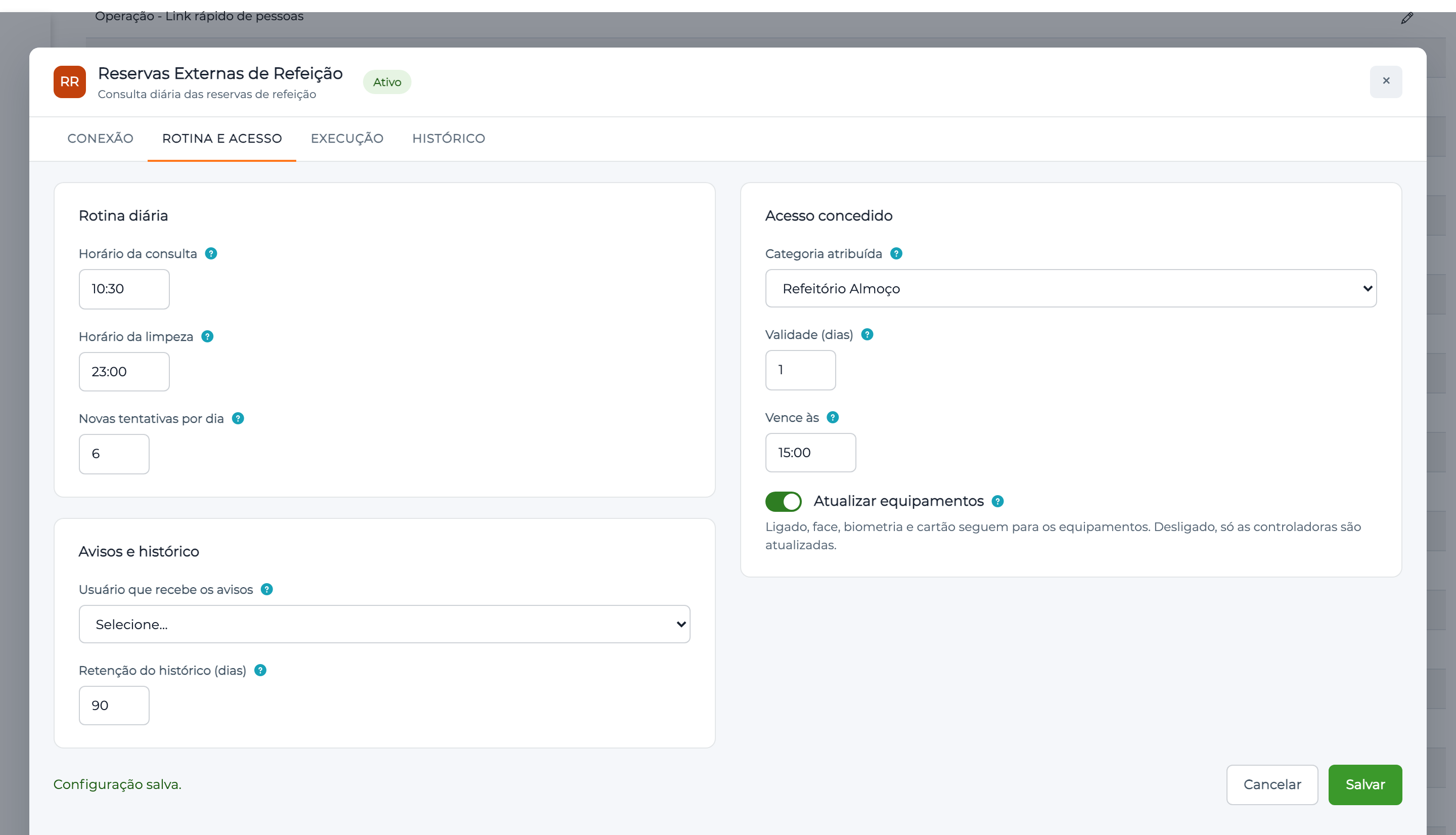
| Field | What it means | Example |
|---|---|---|
| Horário da consulta (Query time) | When the day's query starts. Use a time after the reservation app's cutoff | 10:30 |
| Horário da limpeza (Cleanup time) | When the day's cleanup runs. Use a time after the cafeteria's last shift | 23:00 |
| Novas tentativas por dia (Retries per day) | How many times to repeat after the first query, if it fails, from 0 to 50. Each one waits 10 minutes | 6 |
| Categoria atribuída (Assigned category) | Category given to people who reserved. It must exist, be enabled and not be a blocking or contingency category. Prefer a category used only for the cafeteria | Refeitório Almoço |
| Validade (dias) (Validity in days) | For how many days access lasts, from 1 to 30, counting the day of the query. With 1, it expires the same day | 1 |
| Vence às (Expires at) | Expiry time on the last day. With a validity of 1 day, it must be after the Horário da consulta | 15:00 |
| Atualizar equipamentos | When on, face, biometrics, card, QR Code and elevator follow the category. When off, only the controllers are updated, and the face is managed separately. See Integration specifics | On |
| Usuário que recebe os avisos (User who receives the notices) | Optional. Who receives the notices in Accelero. When empty, no notice is sent, and the result stays only in the history | Cafeteria supervisor |
| Retenção do histórico (dias) (History retention in days) | From 1 to 365. Older runs are deleted by the cleanup | 90 |
Click Salvar (Save). The message Configuração salva. (Configuration saved.) confirms the save, and the window then shows what was stored.
The save is refused as a whole if any field is invalid: the message appears on the field itself, and the window takes you to the tab with the error.
Execução tab
Shows what is happening now and lets you simulate or run the query.
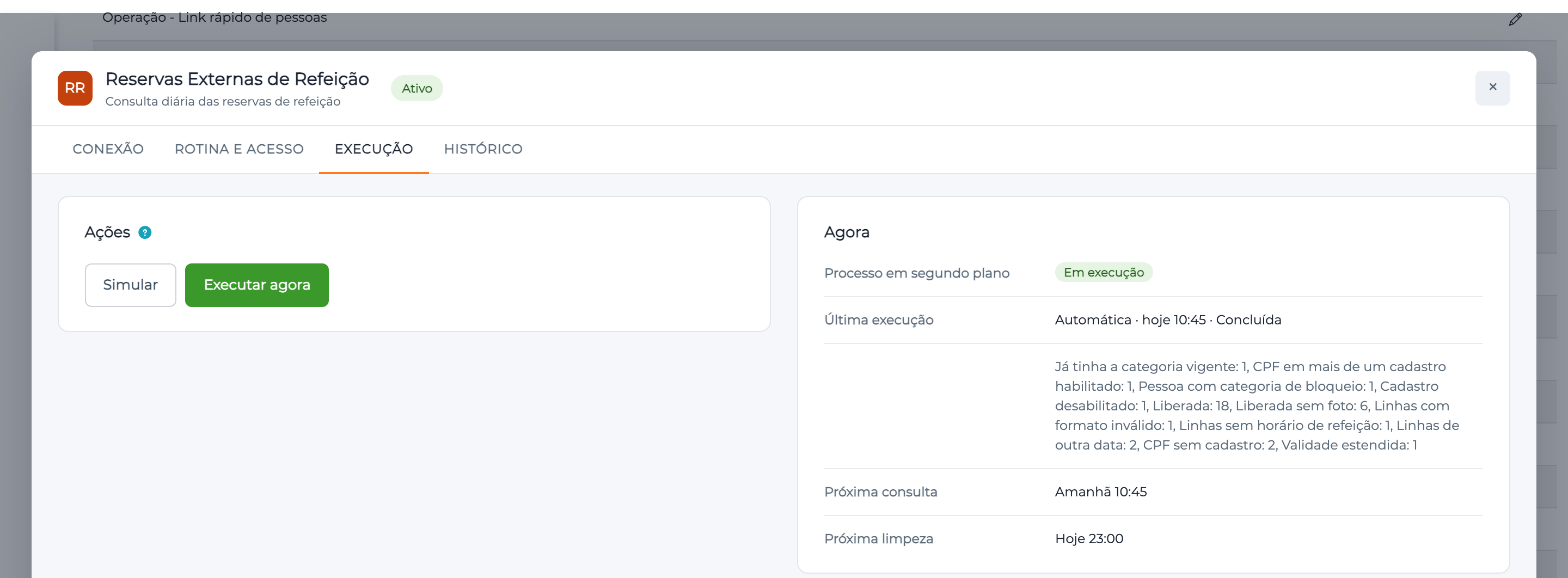
| Information | What it means |
|---|---|
| Processo em segundo plano (Background process) | Em execução (Running): the service that runs the routine is active. Parado (Stopped): nothing automatic or manual is processed until the service comes back |
| Última execução (Last run) | Type, time, result and totals of the most recent run |
| Próxima consulta (Next query) | When the next automatic query runs. Não agendada (Not scheduled) with the plugin off |
| Próxima limpeza (Next cleanup) | When the next cleanup runs. Não agendada with the plugin off |
Simular
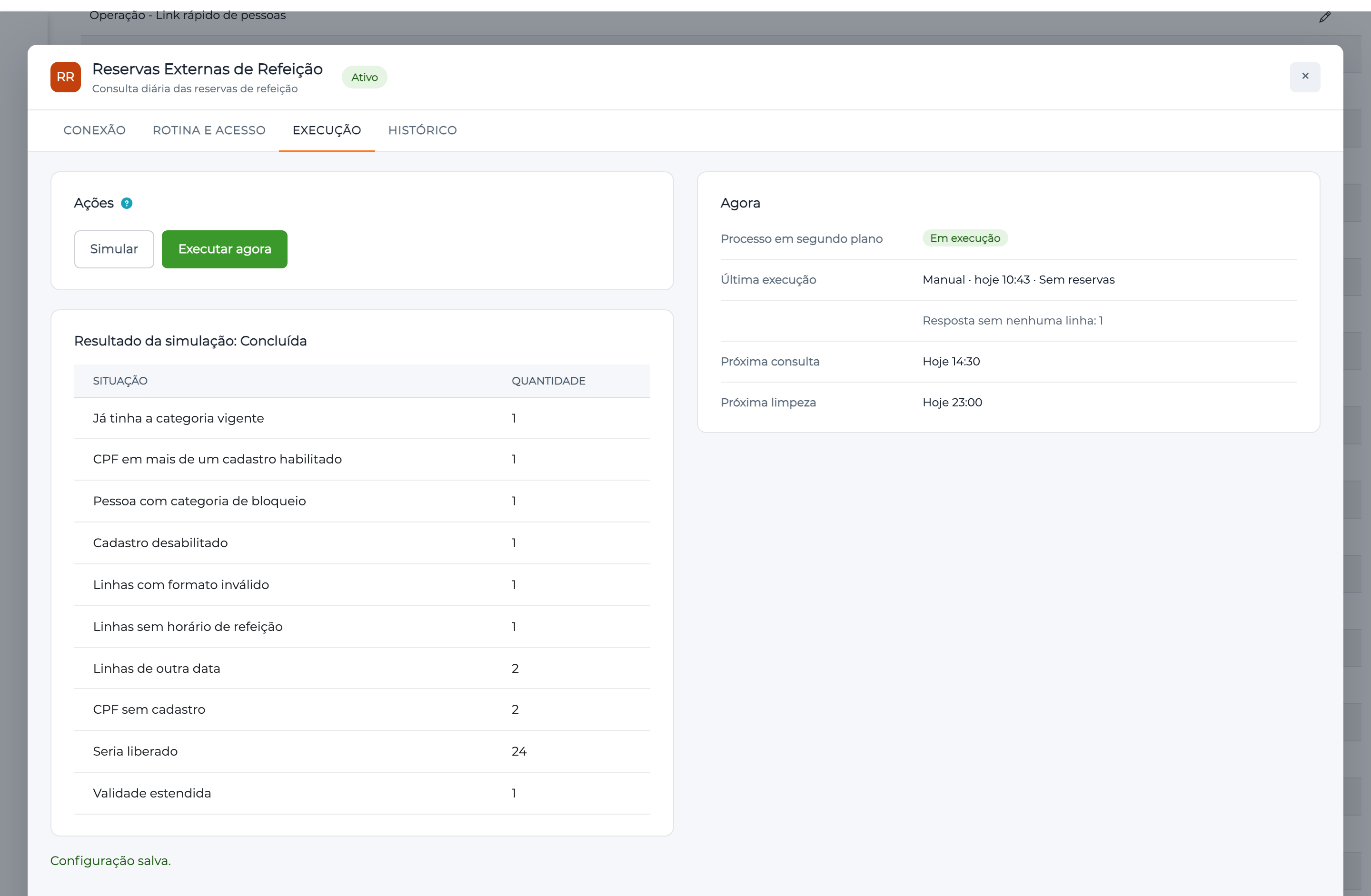
Simular (Simulate) runs the query and shows the result by situation, without saving a link or a history entry and without sending anything to the devices. Seria liberado (Would be granted) is who would receive the category. Use it before the first run to check the list and the records.
Executar agora
Executar agora (Run now) asks for confirmation and records the request. The background process runs it within 30 seconds, through the same path as the automatic query. A click during a run is a new request, which runs when the current one ends.
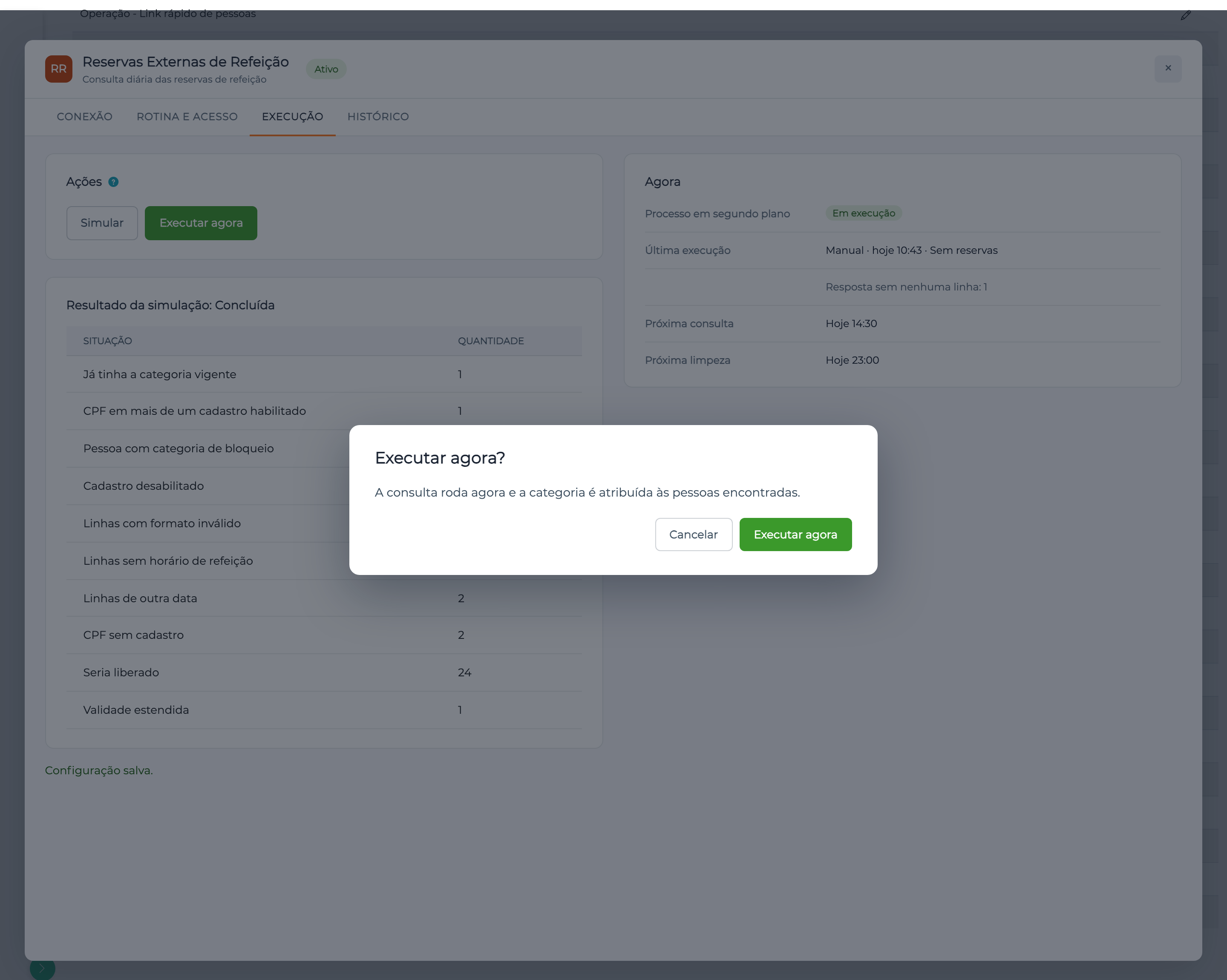
A manual run works with a complete configuration, even with Plugin ativo off, and does not count as an attempt.
The reservation list changes until the app's cutoff. A manual run before the Horário da consulta does not close the day: the automatic query runs normally afterwards, and people already handled are not handled again. A successful manual run after that time does close the day.
Histórico tab
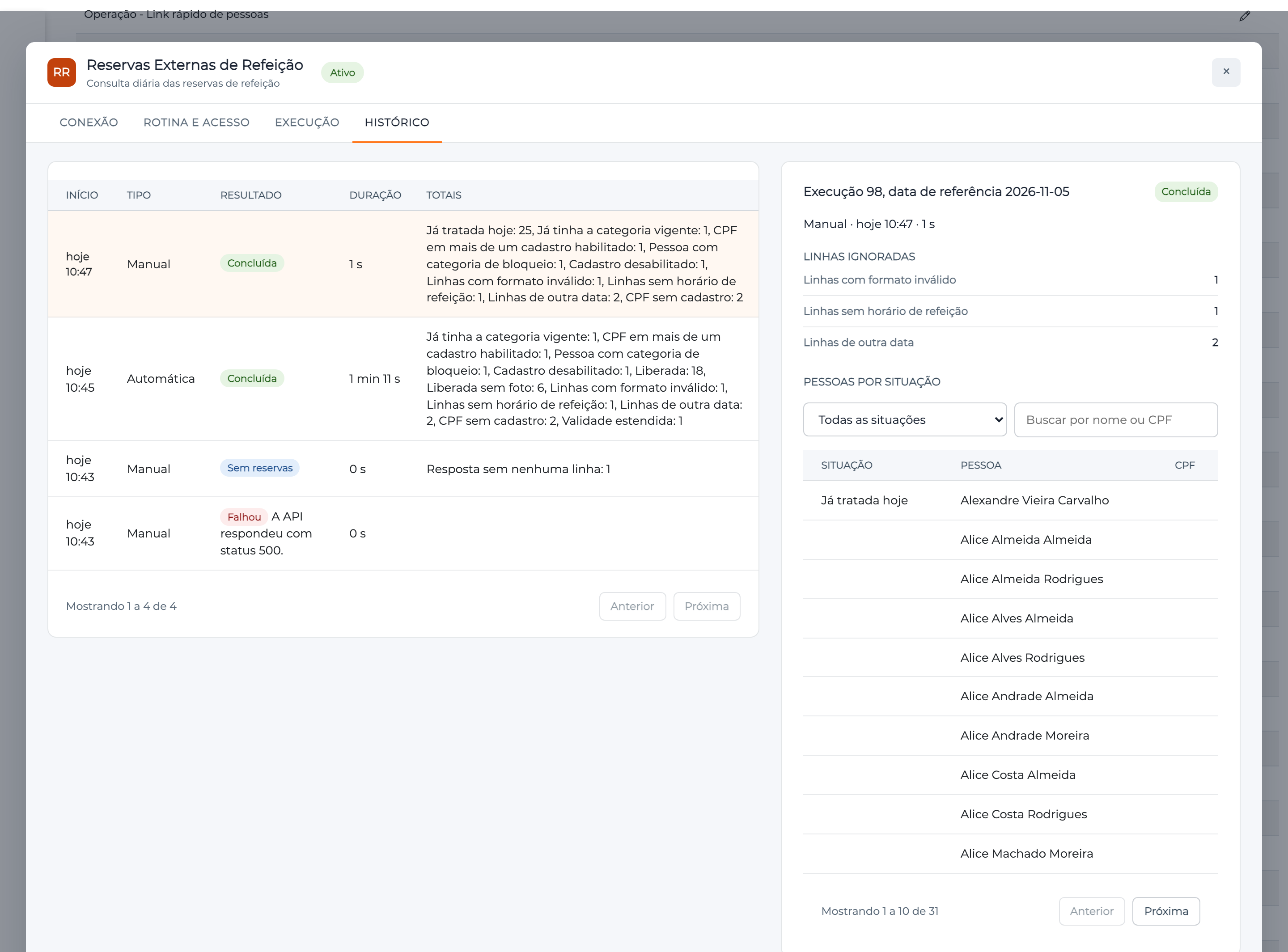
On the left, each run, with Início (Start), Tipo (Type), Resultado (Result), Duração (Duration) and Totais (Totals). Click a row to see, on the right, the Linhas ignoradas (Ignored lines) and Pessoas por situação (People by situation), with pagination.
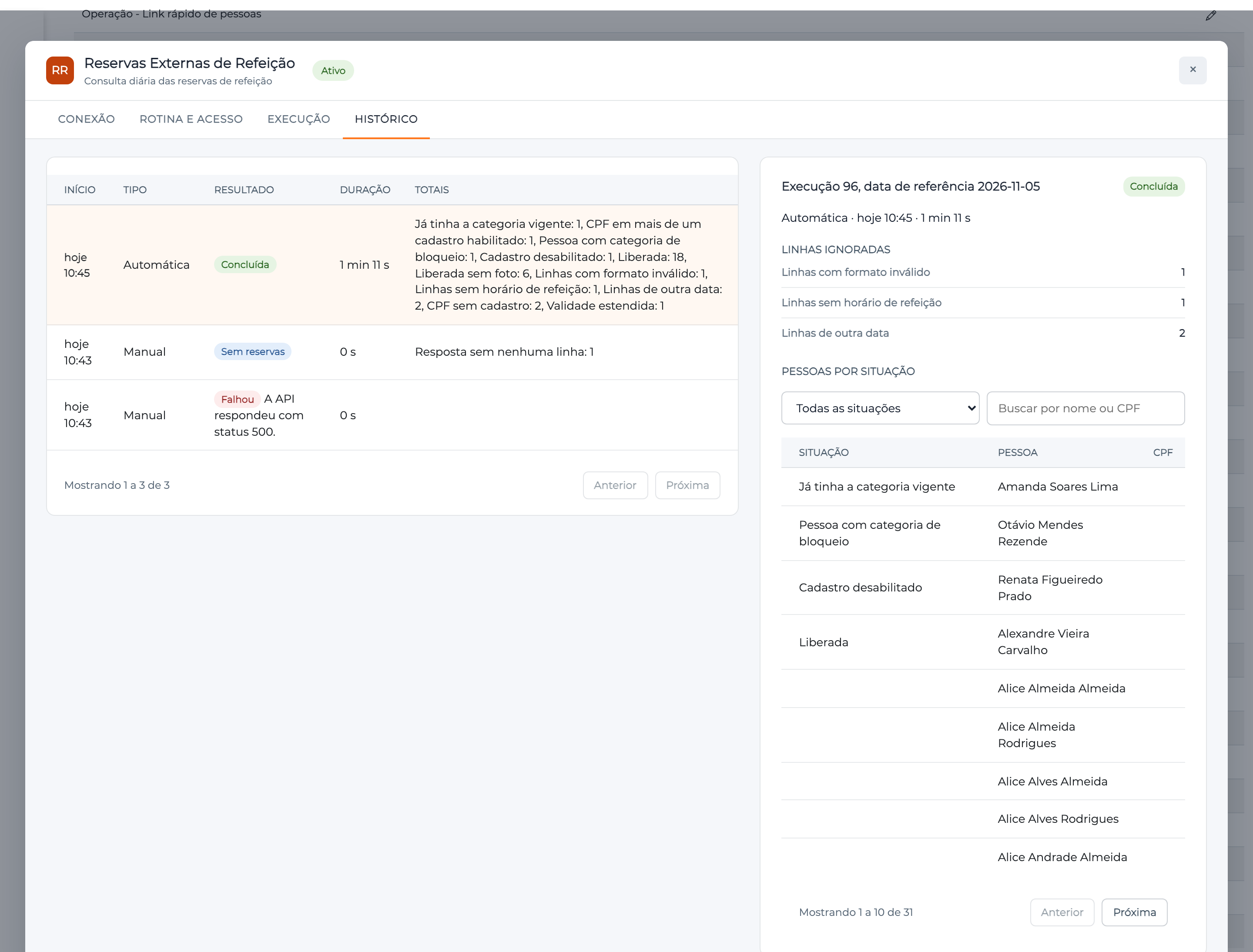
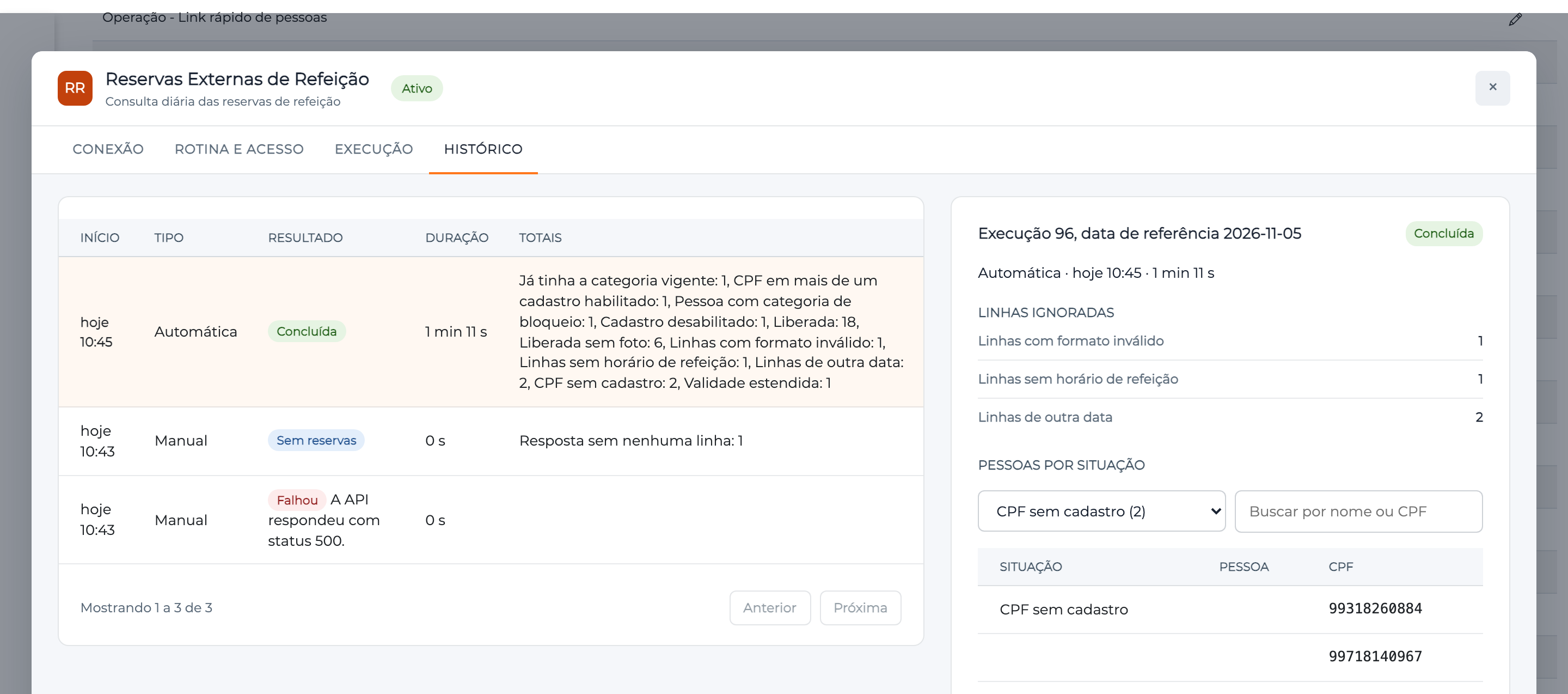
Use the situation filter and the search by name or CPF to find someone. The CPF appears only in CPF sem cadastro and CPF em mais de um cadastro habilitado, so you can fix the record. In the other situations, the registered person appears, or excluída (deleted) if they no longer exist.
Run type
| Type | When it appears |
|---|---|
| Automática (Automatic) | The day's query, at the Horário da consulta |
| Nova tentativa (Retry) | The repetition after an automatic query that failed |
| Manual | Requested through Executar agora |
| Limpeza (Cleanup) | The daily cleanup routine |
Run result
| Result | Meaning | What to do |
|---|---|---|
| Concluída (Completed) | All good, even if someone was left out for a record reason | Check the people by situation |
| Sem reservas (No reservations) | The API answered, but with no valid reservation for the day (empty list, another date or no time). There is no retry. The notice is sent, if there is a notice user | Confirm with the customer whether there are reservations that day |
| Parcial (Partial) | For some people, Accelero refused the save or sending to the devices failed | On the automatic query, the plugin retries on its own and notifies when attempts run out. Check Recusada pelo Accelero and Liberada, com falha no envio aos equipamentos and run again |
| Falhou (Failed) | The run did not finish. If the failure was in the query, nothing changed. If it came later, the links already saved remain, and the Totais show how many | Check the error, fix it and use Executar agora: pending people are resumed |
| Interrompida (Interrupted) | The run stopped midway. The links already saved remain | Run again: pending people are resumed |
| Não executada, acesso já vencido (Not run, access already expired) | Automatic only: the calculated expiry has already passed | Adjust Validade (dias), Vence às or the query time |
Errors shown with Falhou:
| Message | Cause |
|---|---|
| Não foi possível conectar à API. (Could not connect to the API.) | Wrong address, server down or network block |
| A API não respondeu dentro do limite de tempo. (The API did not answer within the time limit.) | No answer in 60 seconds |
| A API respondeu com status {status}. (The API answered with status {status}.) | An answer other than 200, such as 500 on an API failure |
| A resposta da API passou do limite de 5 MB. (The API response exceeded the 5 MB limit.) | Body larger than the limit |
| A resposta da API não tem o formato esperado. (The API response is not in the expected format.) | There is text, but no line follows the format |
Situation of each person
For each CPF in the list, the plugin decides in this order. The first answer that applies is the person's situation:
| Situation | Meaning | Can the person pass? | What to do |
|---|---|---|---|
| Liberada (Granted) | Category assigned and devices updated | Yes | Nothing |
| Liberada sem foto (Granted, no photo) | Category assigned, but the person has no photo in slot 1 | Yes, with another identifier. Not on the facial device | Register the photo. The person only reaches the facial device afterwards |
| Aguardando envio aos equipamentos (Waiting to be sent to devices) | Link saved and sending not finished | Through the controller, yes | Run again: the plugin resumes |
| Liberada, com falha no envio aos equipamentos (Granted, failed sending to devices) | Link saved, sending failed | Through the controller, yes | Check the device connection and run again |
| Validade estendida (Validity extended) | Already had the plugin link, from a previous day, and the validity was extended | Yes | Nothing |
| Já tratada hoje (Already handled today) | Already handled that day, or the operator removed the category | Depends on the current link | Nothing. See Canceling the meal |
| Já tinha a categoria vigente (Already had the current category) | Has the category some other way, valid until the calculated expiry. If the manual link ends earlier, the plugin saves its own link | Yes | Nothing |
| CPF sem cadastro (CPF with no record) | No record with this CPF | No | Register the person and run again |
| CPF em mais de um cadastro habilitado (CPF in more than one enabled record) | Duplicate | No | Disable the repeated record and run again |
| Cadastro desabilitado (Disabled record) | There is only a disabled record | No | Enable the person and run again |
| Pessoa com categoria de bloqueio (Person with a blocking category) | Has a current blocking category | No | Nothing: the block prevails |
| Recusada pelo Accelero (Refused by Accelero) | Accelero refused the save | No | Check the plugin log |
CPF sem cadastro, Cadastro desabilitado and Recusada pelo Accelero are reevaluated on each new run. Fix the record and use Executar agora.
The link on the person's record
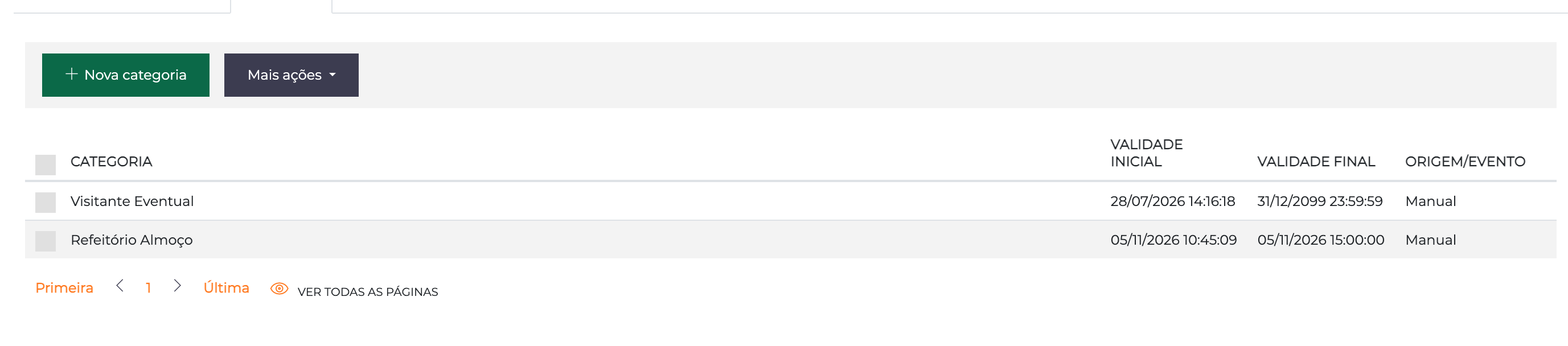
Whoever receives the category then has the link, with a start and an end, in the Categorias (Categories) tab of the person's record, like any other category. The end is the configured expiry. The Origem/Evento (Source/Event) column shows Manual for the plugin's link too, because it does not come from an Event: to see who the plugin served, use the Histórico tab.
What happens during the day
Example with the query at 10:30, expiry at 15:00, validity of 1 day and cleanup at 23:00:
| Time | What happens |
|---|---|
Before 10:30 | Nobody on today's list has access yet. A manual run here grants access to whoever is already on the list, and the automatic query runs anyway |
10:30 | The automatic query downloads the list. People on it receive the category, ending at 15:00 today, and go to the devices |
Until 15:00 | People who were granted access can pass at the cafeteria. Anyone who reserved after the query only gets in with a manual run |
After 15:00 | The link has expired: Accelero denies access, even with the person still on the facial device |
23:00 | The cleanup deletes the plugin's expired links and removes from the devices anyone left without a valid category |
Routine rules
| Case | Behavior |
|---|---|
| The API failed on the query | Counts one attempt and repeats every 10 minutes, up to Novas tentativas por dia. Attempts end at midnight. A Parcial result on the automatic query also counts as a failed attempt. When they run out, the notice is sent |
| Access already expired | If the expiry that would be assigned has already passed, the automatic query does not run, and the history records Não executada, acesso já vencido once a day. Executar agora in this situation is refused right away, with the on-screen message and no history entry |
| Service stopped at the time | The query runs when it comes back, under the same rules |
| Plugin turned on after the time | The first automatic query is the next day's. Use Executar agora to cover the day |
| Plugin off | No automatic query or cleanup runs. The manual run stays available. Expired links stay expired and grant access to nobody |
Cleanup
The cleanup runs once a day, from the Horário da limpeza on, with the plugin active and independently of the query. It appears in the history with the type Limpeza:
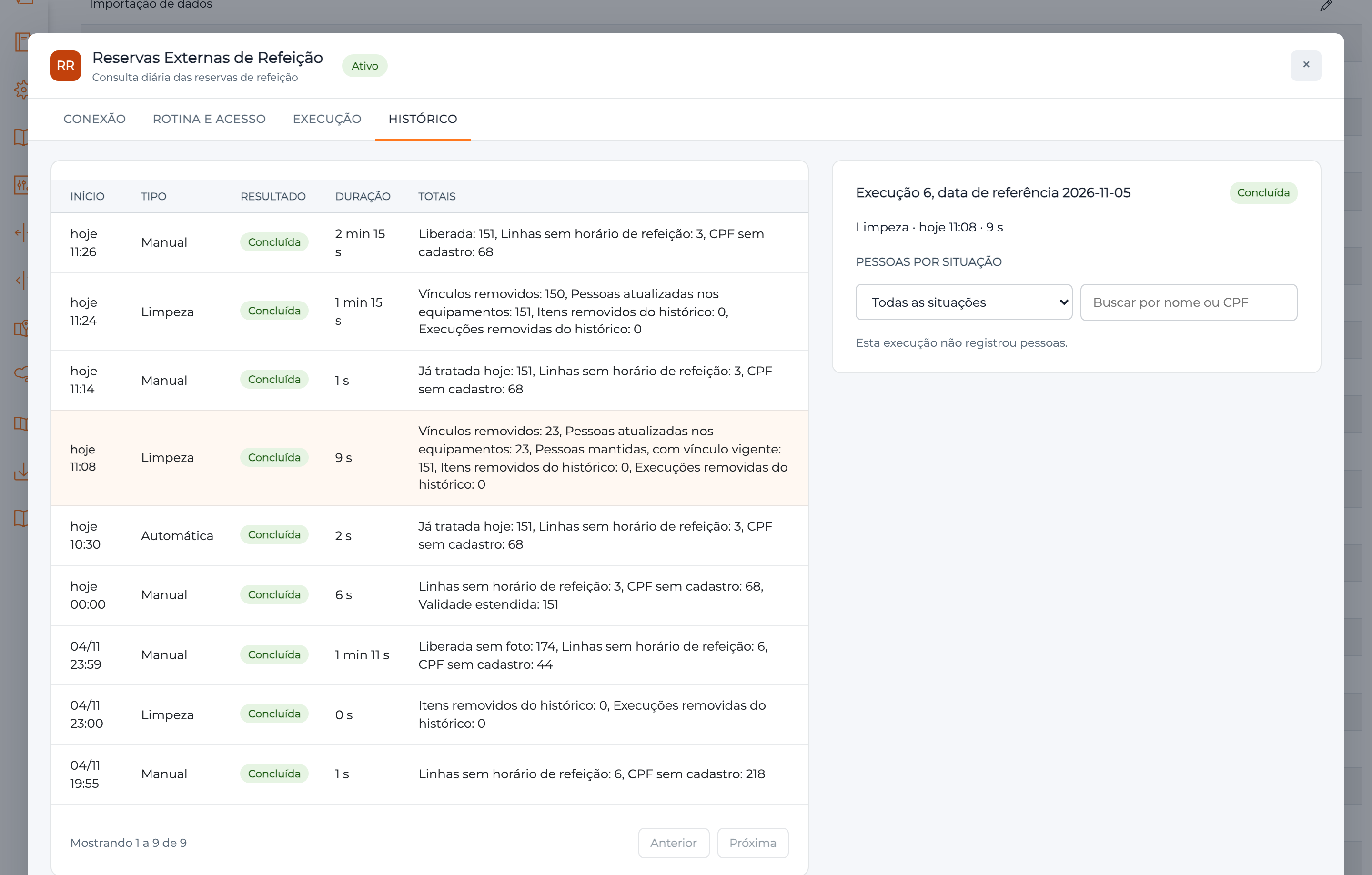
There are three steps:
- Deletes only the links created by the plugin whose validity has passed.
- Updates the devices of the people served: anyone left without a valid category is removed from the facial devices, and anyone with another valid category is sent again.
- Deletes history older than the retention. People not yet cleaned on the devices are never deleted from the history.
| Total | What it counts |
|---|---|
| Vínculos removidos (Links removed) | Expired links deleted |
| Pessoas atualizadas nos equipamentos (People updated on the devices) | People sent to the update flow |
| Pessoas mantidas, com vínculo vigente (People kept, with a current link) | Still have a plugin link, and wait for the next cleanup |
| Pessoas excluídas, só marcadas (Deleted people, only marked) | The record no longer exists |
| Pessoas com falha na limpeza (People with a cleanup failure) | Wait for the next cleanup. The result becomes Parcial |
| Execuções and Itens removidos do histórico (Runs and items removed from the history) | What left through retention |
Notices
With Usuário que recebe os avisos filled in, that user receives a message in Accelero in these cases:
| When | What the notice says |
|---|---|
| The query failed on every attempt | The date, the number of attempts and the last error |
| The query ended Parcial on every attempt | That some people were left without a link or without an update |
| A run was interrupted | That the links already saved were kept |
| The query did not run because the access would already be expired | That the validity or the time must be adjusted |
| The expiry arrived before a retry | That there will be no more attempts today |
| The query worked, with no reservation | That no category was assigned |
Canceling a person's meal
The plugin does not cancel. To cancel, remove the category in the Categorias tab of the person's record. Access is denied immediately, and the plugin does not give the category back on the same day, not even on a manual run: the removal holds for the whole day, and the person appears as Já tratada hoje.
A cancellation made in the reservation app after a run does not take the link away, because the routine does not remove people who left the list.
Changing the Categoria atribuída and running again on the same day gives Já tratada hoje for people already served. Fix it by hand on the person's record or wait for the next day.
Integration specifics
- Daily sending of faces. With Atualizar equipamentos on, the face comes in and goes out every day. With 200 reservations, that is 200 photos and pending items, with at least 200 ms per gateway, plus the device time.
- Atualizar equipamentos off. If daily sending is not acceptable, turn the field off and keep the face fixed through another category. When off, biometrics, card and elevator also stop being updated by the plugin, and only the controllers receive the category.
- Display. With Atualizar equipamentos off, anyone who did not reserve is recognized by the facial device, and the display shows "Acesso autorizado" (Access authorized) before Accelero denies access.
- Contingency. The controller list is filtered by date only when it is generated. That is why the category cannot be a contingency category, and the controller must operate online.
- API dependency. If the API is down at the time, nobody receives the category until a retry works. The history shows this, and the notice arrives if there is a Usuário que recebe os avisos.
- Canceling by hand. Accelero updates only the controller right away, and access is already denied. The face only leaves the facial device at the next cleanup.
- Cleanup before the expiry. If the Horário da limpeza is earlier than Vence às, anyone with a current link is skipped and handled at the next day's cleanup.
- Line with no real time. A line with free text in place of the time is ignored and counted as Linhas sem horário de refeição.
- Plugin turned back on after a restart. If the services restarted with the plugin off, when you turn it back on the Execução tab shows Parado, because the background process is registered only at startup. Restart the services.
- Removing the plugin. Deletes every link it created, including current ones, and the faces stay on the devices until the next synchronization.