Contact us
Overview
Channel for contact about the application (compliments, problems, and suggestions). It is a form sent to the app team — it is not the channel for condominium matters (those go to the building management).
Where it is / How to access
Home → ⋮ menu (kebab) → Contact Us.
Screens and elements
"About this channel" notice
- "Use this space to talk to us about the application (what is working well, problems, and suggestions). For condominium matters, talk to the building management."
Form
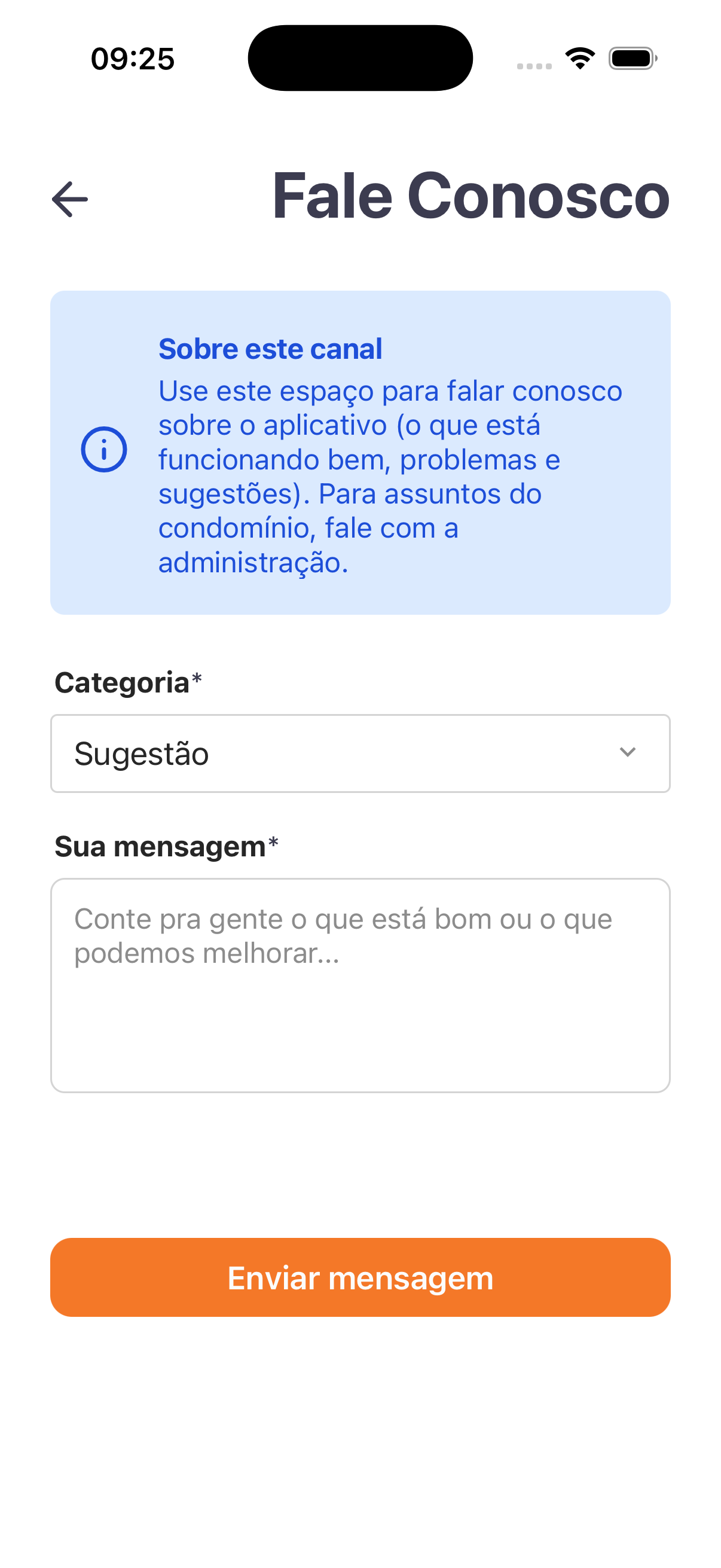
| Field | Type | Required | Description / Rule |
|---|---|---|---|
| Category | Selection | Yes | E.g.: Suggestion. |
| Your message | Long text | Yes | Placeholder: "Tell us what is good or what we can improve...". |
- Action: Send message.
Step by step
- On the home screen, tap ⋮ → Contact Us.
- Choose the Category and write Your message.
- Tap Send message.
Business rules and integrations
- Aimed at feedback about the app; condominium matters should go to the building management.
- Two required fields (Category + message). There is no phone/email/WhatsApp on the screen — it is only the form.
Related
For you
Use it to report problems or suggest improvements to the app. For condominium matters: talk to the building management.