Companies / Condominiums
Overview
Central entity of the product. A company/condominium aggregates people, units, spaces, FAQ, visit types and the integration settings with Access Control. It is on this screen that the keys are born (Token, Private token, Facility ID, Endpoint) later used in the Accelero Integration — General — that is why registering the company is the first step of the Onboarding a new company.
Where it is / How to access
Side menu → PANEL group → Companies/Condominiums.
Screens and elements
List
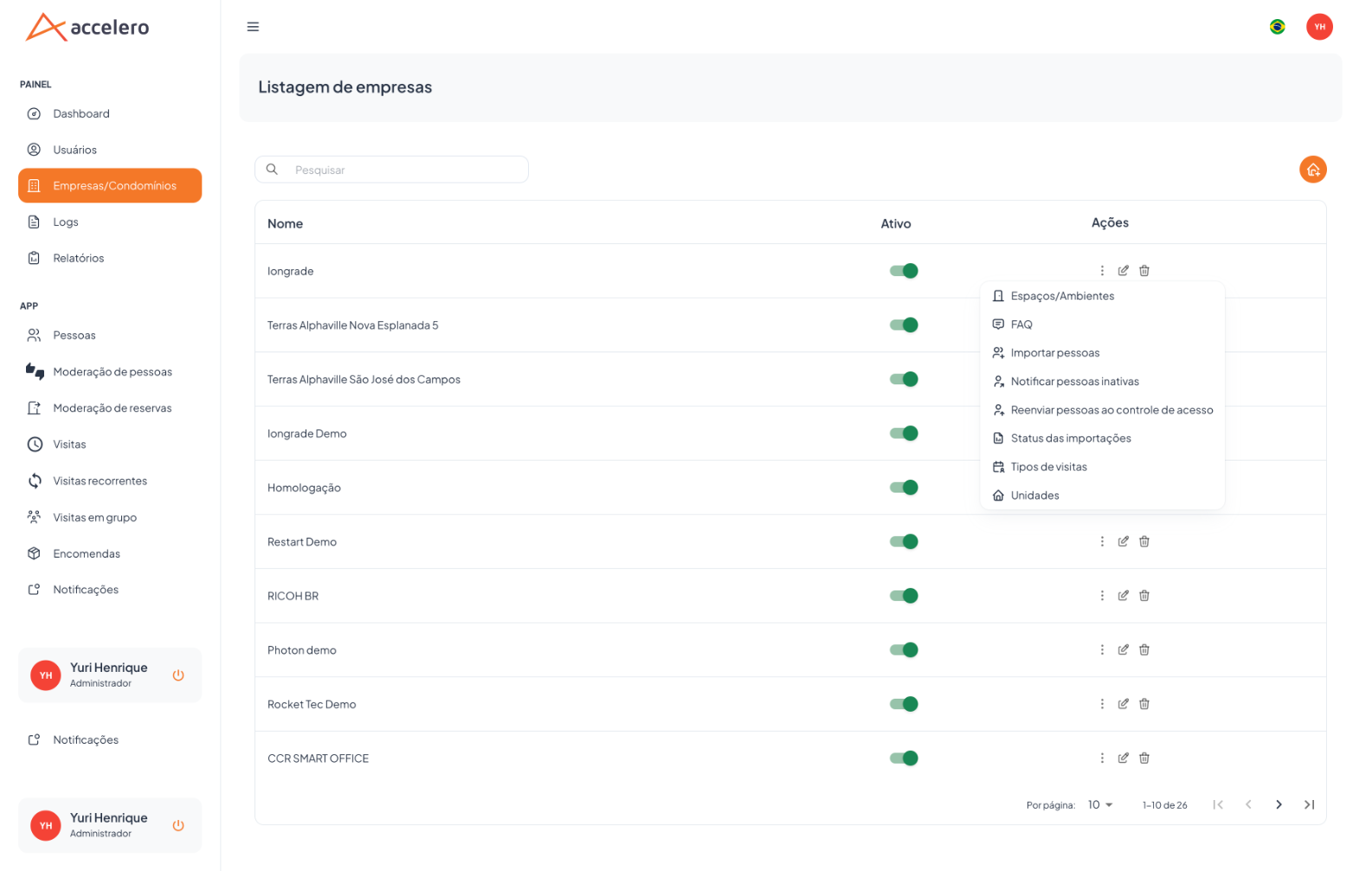
-
Columns: Name, Active (toggle), Actions.
-
Text search; pagination.
-
Row actions: Edit, Delete, and an actions menu (⋮) that opens the child screens:
Menu action Opens Spaces/Amenities Spaces / Amenities FAQ FAQ Import people People import Notify inactive people People import (action) Resend people to access control People import (action) Import status People import Visit types Visit types Units Units
Create / Edit
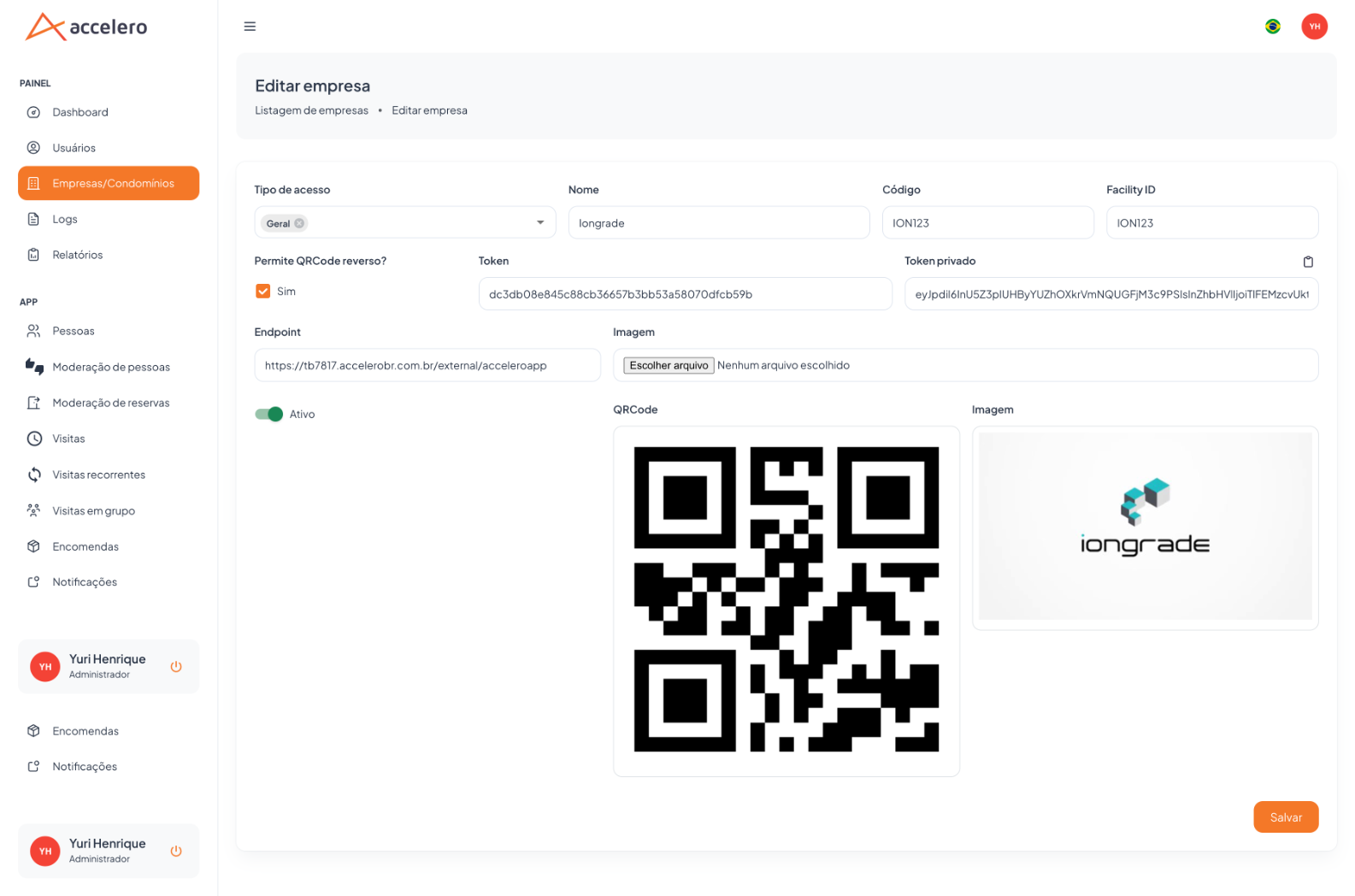
| Field | Type | Required | Description / Rule |
|---|---|---|---|
| Access type | Selection (tags) | Yes | Access mode of the company (e.g., General). |
| Name | Text | Yes | Name of the company/condominium. |
| Code | Text | Yes | Short identifier (e.g., ION123). |
| Facility ID | Text | Yes | Identifier of the facility in Access Control (e.g., ION123). |
| Allow reverse QR code? | Checkbox (Yes) | — | Lets the resident present a QR code to release access. |
| Token | Text | Yes | Public credential used by the integration. |
| Private token | Text (copyable) | Yes | Private credential (JWT) — matches the "Accelero → APP Token" of Integration — General. |
| Endpoint | Text (URL) | Yes | URL of the external access control service (e.g., https://.../external/acceleroapp). |
| Image | Upload | — | Company logo/image. |
| Active | Toggle | — | Turns the company on/off. |
Generated/displayed: a company QR code and the uploaded Image (logo).
Actions: Save.
Step by step
- In Companies/Condominiums, click new (or edit).
- Fill in Name, Code, Facility ID and the Access type.
- Generate/record Token, Private token and Endpoint — these are the keys that go to Access Control.
- Set reverse QR code, Image and Active as needed, and Save.
- Then configure the child actions (Units, Spaces, Visit types…) and take the keys to Integration — General.
Business rules and integrations
- The keys on this screen are the link with Access Control; they must be copied exactly into the Integration — General.
- The actions menu is the entry point to all child screens of the company.
- The Active toggle controls the availability of the company in the system.
Related
- Units, Spaces / Amenities, FAQ, Visit types, People import
- Integration — General — consumes Private token, Facility ID and Endpoint.
- Onboarding a new company — initialization flow.
Token, Private token, Facility ID and Endpoint form the contract with access control; "reverse QR code" changes the direction in which the QR code is read.