Modules
The ION Guard platform is modular — features are distributed across modules that can be installed, enabled, and disabled independently per site.
Available modules
| Module | Description | Scope |
|---|---|---|
| Synapsys | BLE tracking, panic alerts, zone map, analytics | Per site |
| DigiEye | Integration with DigiEye gateways for output triggering | Per site |
| Accelero | Integration with Accelero access control | Per site |
The Cold Room — dwell time and thermal break monitoring in refrigerated environments — is documented as its own section because it has an extensive functional scope, but it is not an independent module: it is delivered as the cold-room sub-feature within the Synapsys module (see Sub-features per site).
Module management
Access: Side menu → Modules (/modules)
Installing and uninstalling modules is exclusive to Platform Admin. Per-site enablement also requires this profile.
Overview
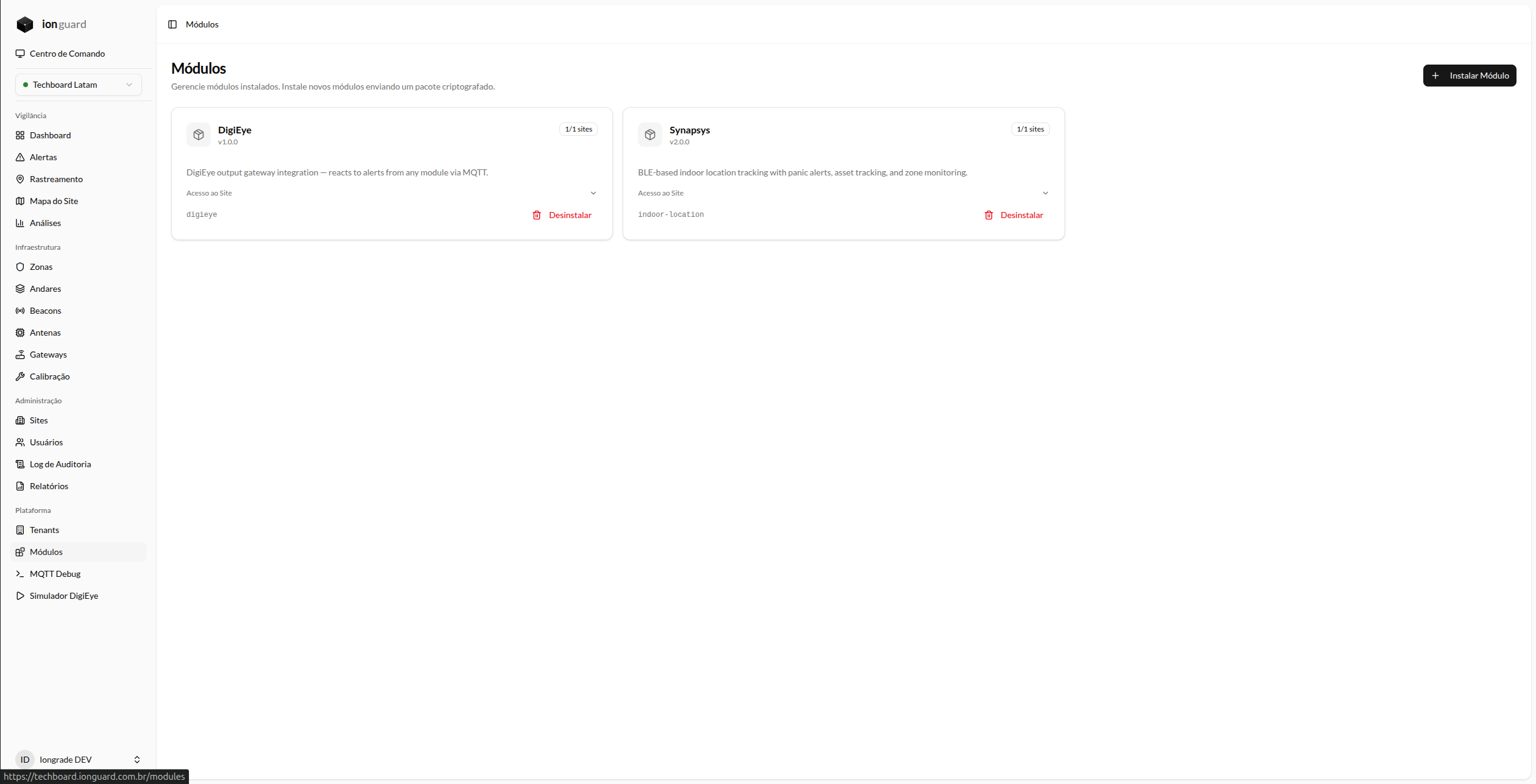
The Modules page displays a grid of cards with all installed modules. Each card shows:
- Module name and identifier
- Installed version
- Description
- Per-site toggle — Enable/disable for each site
Install a module
- Click "Install Module"
- Select the module file (
.enc, maximum 100 MB) - The system validates, decrypts, and installs the module automatically
- After installation, the module appears in the grid
The installation process:
- Validates package integrity
- Runs database migrations
- Publishes frontend assets
- Registers Docker workers (if the module declares processes such as MQTT listeners)
- Restarts PHP-FPM to load the new module
Installation runs database migrations automatically. Make sure you have a recent backup before installing modules in production.
Uninstall a module
- On the module card, click "Uninstall"
- Confirm the action in the dialog
The uninstallation:
- Checks whether there are unresolved alerts from the module (blocks if there are)
- Removes per-site enablement records
- Removes module files
- Clears published assets
- Updates Docker Compose (removes module workers)
- Restarts PHP-FPM
Uninstalling removes the module files. Data in the database (tables created by the module) is kept, but removal migrations are not run automatically.
Enable/disable per site
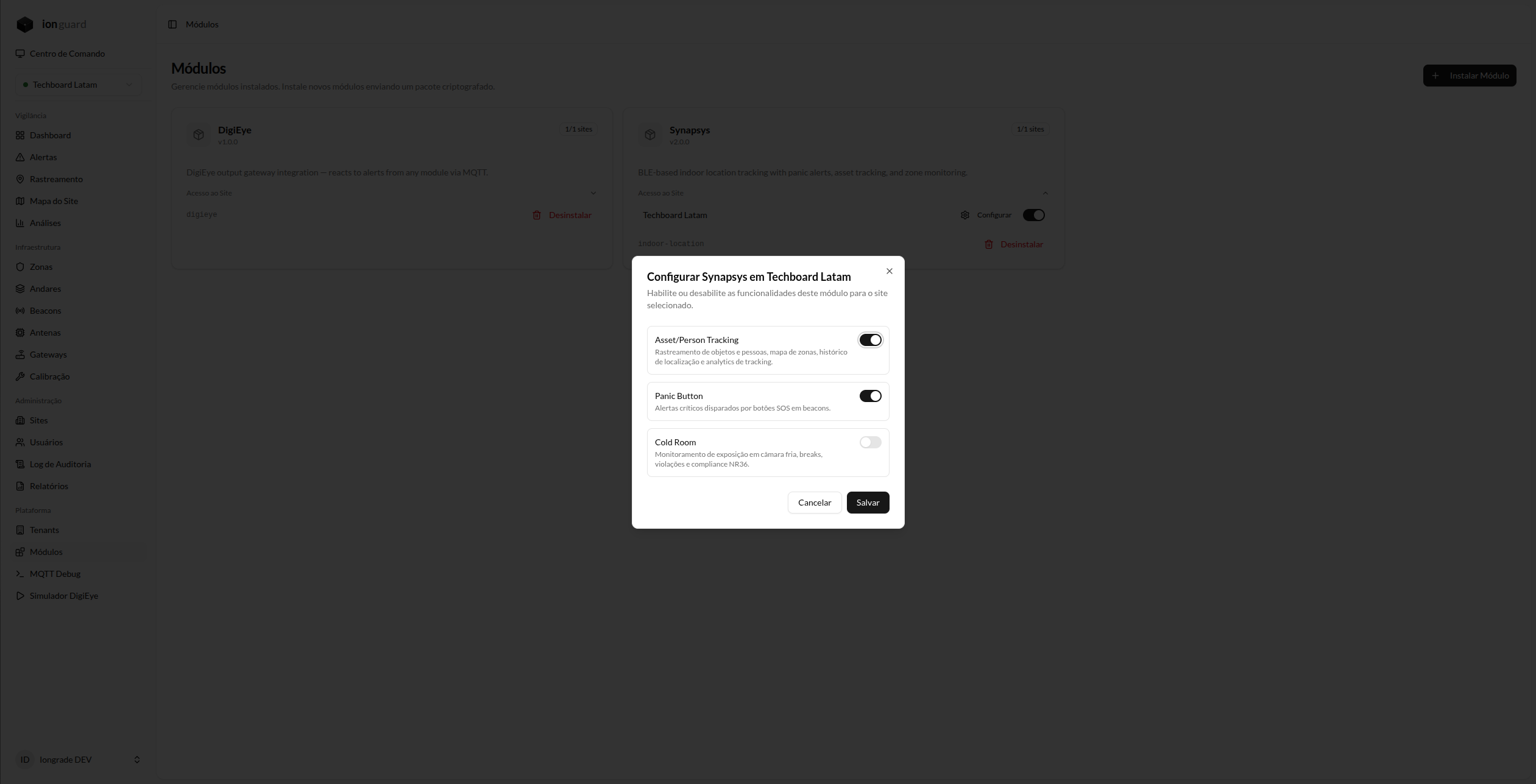
Modules with "Per site" scope need to be enabled individually for each site:
- On the module card, locate the desired site
- Use the toggle to enable or disable
When disabled:
- Module routes return 404 for that site
- Module menus disappear from the sidebar
- Module alerts and jobs are not processed for the site
- Existing data is preserved
Sub-features (features) per site
Beyond the on/off switch of the entire module, some modules expose sub-features that can be enabled or disabled individually per site, without turning off the module. The Platform Admin adjusts these toggles on the module's configuration screen; the preference is persisted in site_modules.settings.features. When a site has never configured a sub-feature, the default declared by the module applies.
The Synapsys module is the main example: it exposes the sub-features panic-button (panic button), asset-tracking (asset tracking), and cold-room (Cold Room). Disabling a sub-feature removes the corresponding menu items and features from that site, keeping the rest of the module active.
Impact on menus
Enabled modules automatically add items to the side menu. For example, enabling Synapsys adds: Beacons, Antennas, Tracking, Site Map, and Analytics.
Disabling removes those items without affecting the data.