Integration with Accelero
Overview
Accelero Visitas connects to Accelero (access control / gatehouse system) to exchange people and visit data between the two sides. The integration is bidirectional and authenticated by tokens: Accelero Visitas calls Accelero (to send visitors/events) and Accelero calls Accelero Visitas (to synchronize people and trigger access events).
That is why the integration has two ends, configured on different screens:
- In Accelero Visitas (panel): in the company registry, General > Integration data tab (see Companies) — Accelero URL, Accelero token and Local token.
- In Accelero (plugin): the "Integração AcceleroVisitas" screen, documented below.
The public visitor flow (SPA accessed through the company slug) is a separate surface — it is documented in the Visitor area.
The screen in Accelero (plugin "Integração AcceleroVisitas")
Inside Accelero, under Advanced, the Integração AcceleroVisitas screen (General tab) concentrates the configuration on the access control side.
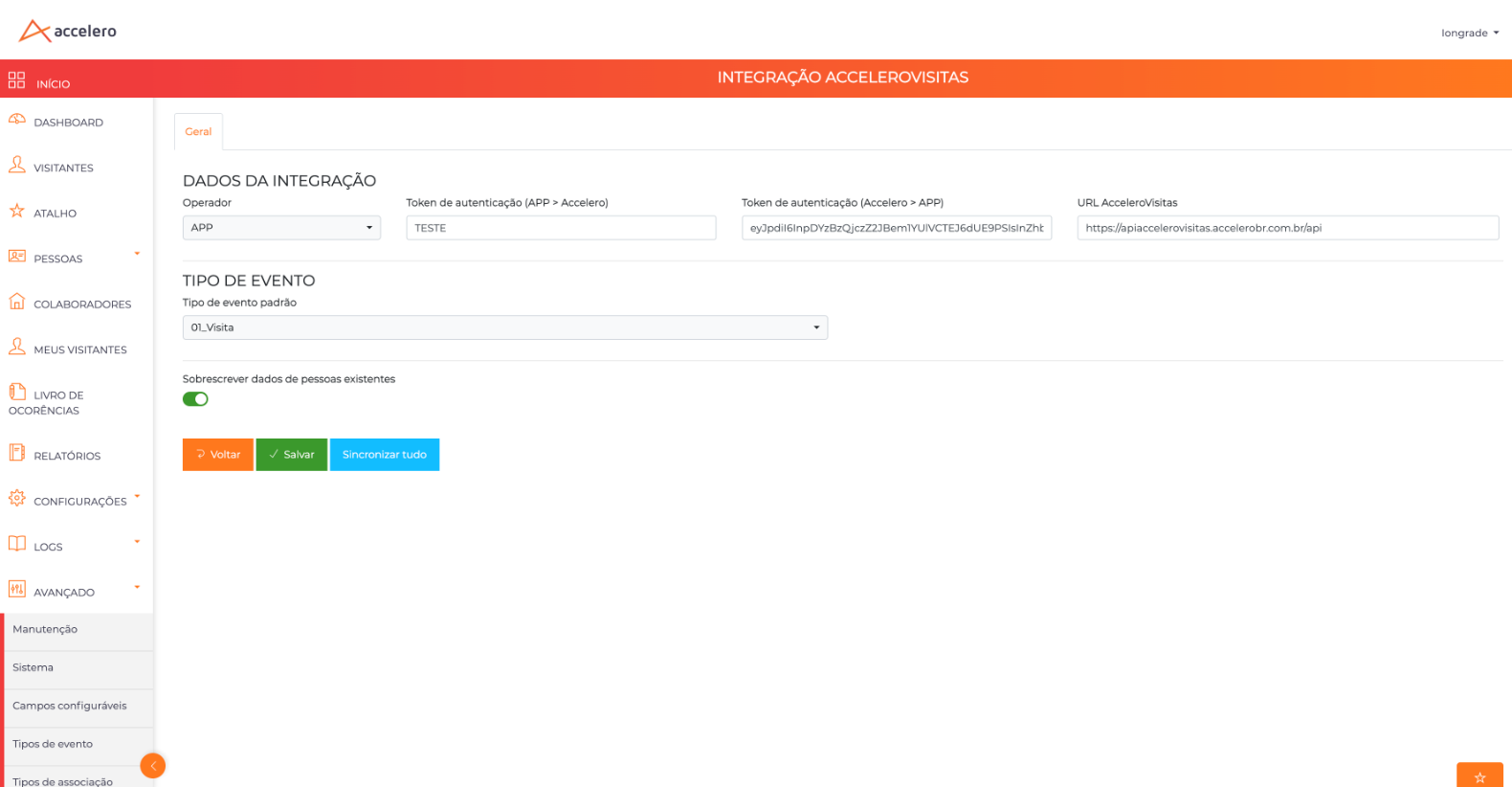
Integration data
- Operator — integration system/operator (e.g., APP).
- Authentication token (APP > Accelero) — token used when Accelero Visitas calls Accelero.
- Authentication token (Accelero > APP) — token used when Accelero calls Accelero Visitas.
- AcceleroVisitas URL — base endpoint of the Accelero Visitas API (e.g.,
https://apiaccelerovisitas.accelerobr.com.br/api).
Event type
- Default event type — event type applied to the synchronized visits (e.g., 01_Visita), chosen among the types registered in Accelero.
Other options
- Overwrite existing people data — on/off switch: when on, the synchronization updates the data of people that already exist in Accelero.
Actions
- Back — exits without saving.
- Save — stores the integration configuration.
- Synchronize all — triggers a full synchronization between the two systems.
The tokens (both directions)
Authentication uses a pair of tokens, one for each direction of the communication:
- APP > Accelero — Accelero Visitas authenticates with Accelero.
- Accelero > APP — Accelero authenticates with Accelero Visitas.
These tokens are the counterpart of the fields on the panel side (Accelero token and Local token, in Companies): what is "local" on one side is the "inbound" token on the other. Both ends must be consistent for the integration to work in both directions.
Synchronization
- In Accelero, Synchronize all forces the full synchronization.
- In Accelero Visitas, structure synchronization is done per company, in Units (Synchronize with Accelero button), which brings units and departments by External ID — see Units.
Prerequisites
- The company must have Accelero URL and Accelero token filled in on the panel before synchronizing (see Companies).
- The tokens for both directions must match between the panel and the Accelero plugin.
- The Default event type must exist in Accelero.
Before triggering any synchronization, confirm that the URL and the tokens for both directions match between the panel and the Accelero plugin. Mismatched tokens are the number one cause of "the integration doesn't work" — and the failure is silent.
The data contract boils down to: AcceleroVisitas URL (base endpoint), the token pair (APP > Accelero and Accelero > APP) and the Default event type. The Overwrite existing people data switch decides whether the synchronization updates people that already exist. Make sure the tokens are consistent with the panel side (Accelero token / Local token) before triggering Synchronize all.